 Meziantou.Framework
Canvas
editWith a rendering backend, the canvas elements have a 2D context, as in a browser. The scripts of the page draw on it, and so can .NET, with the same API:
using var context = new BrowsingContext(new BrowsingContextOptions
{
    RenderingBackend = new ImagingRenderingBackend(),
    ScriptingEnabled = true, // as in a browser, a canvas shows its fallback content when scripting is disabled
});
var document = context.Navigate("https://example.com/", _ => """<canvas id="chart" width="320" height="160"></canvas>""");
context.EventLoop.RunUntilIdle();

// Without a rendering backend, GetContext("2d") returns null, as in a browser without canvas support
var canvas = (HtmlCanvasElement)document.GetElementById("chart")!;
var context2D = (CanvasRenderingContext2D)canvas.GetContext("2d")!;
context2D.FillStyle = "#f8fafc";
context2D.FillRect(0, 0, 320, 160);

double[] values = [40, 90, 65, 120, 80];
for (var i = 0; i < values.Length; i++)
{
    context2D.FillStyle = i == 3 ? "#ea580c" : "#0ea5e9";
    context2D.FillRect(20 + (i * 60), 140 - values[i], 40, values[i]);
}

context2D.StrokeStyle = "#334155";
context2D.LineWidth = 2;
context2D.BeginPath();
context2D.MoveTo(10, 141);
context2D.LineTo(310, 141);
context2D.Stroke();

using var screenshot = canvas.TakeScreenshot();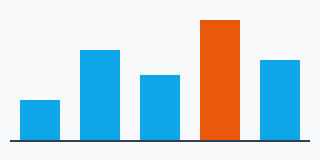
- CanvasRenderingContext2D has all the members of the canvas of the browsers: paths, rectangles, text, images, gradients and patterns, transformations, shadows, filters (the CSS filter functions, and the SVG
filterelements of the page referenced byurl(#id)), compositing, GetImageData and PutImageData. - The bitmap of a canvas has 8 bits per component by default. Request CanvasColorType.Float16 in CanvasRenderingContext2DSettings.ColorType to use half-float pixels. ToDataUrl() and ToBlob() serialize it as PNG, JPEG or WebP.
- A canvas is rendered only when scripting is enabled: as in a browser, a page without scripting shows the fallback content of the
canvaselement. Set ScriptingEnabled (or give a script engine) when you draw from .NET. - OffscreenCanvas works the same way, also in the workers.
- Without a backend,
GetContext("2d")returns null, as in a browser without canvas support.
Wide-gamut colors
Request PredefinedColorSpace.DisplayP3 in CanvasRenderingContext2DSettings.ColorSpace to draw the colors of Display P3, whose gamut is wider than the one of sRGB, as in a browser:
- The CSS colors and the images keep their colors outside of sRGB. The Imaging backend decodes an image whose color profile is wider than sRGB (such as Display P3 or Adobe RGB), a PNG image tagged as Display P3 with a
cICPchunk, and a CMYK JPEG image a second time, without clipping, the first time a Display P3 or a half-float canvas draws it. The pages, which are sRGB, and the 8-bit sRGB canvases clip these colors. - GetImageData and PutImageData convert between the color space of the canvas and the one of the ImageData.
createImageBitmap()keeps the color space of a canvas or of an image data, and the colors of an image outside of sRGB: a bitmap drawn on a Display P3 canvas keeps them.- ToDataUrl() and ToBlob() serialize the pixels of the canvas in its color space: a PNG image is tagged as Display P3 with a
cICPchunk, a JPEG or WebP image with the ICC profile of Display P3.
Half-float pixels
The Imaging backend stores float16 canvases as half-precision floating-point pixels. GetContextAttributes reports that backing format, including after a resize or reset. Request ImageDataPixelFormat.RgbaFloat16 when reading pixels to retain their precision: the default readback is still rgba-unorm8.
PutImageData preserves half-float samples, including negative colors and highlights above one. Color-space conversion is performed before quantization and does not clip half-float colors to the destination gamut. Drawing images, creating image bitmaps, cropping, resizing and transferring an offscreen bitmap also retain floating-point pixels. PNG serialization uses 16-bit integer samples; values outside zero to one are clipped. Decoding these PNG images and creating image bitmaps from them retain their higher precision. Incomplete 16-bit PNG images retain the decoded rows and interlace passes at that precision; pixels not decoded remain transparent. JPEG and WebP use 8-bit samples.
Solid paints preserve floating-point colors. Gradients and intermediate layers, filters and shadows still use the drawing backend's 16-bit normalized colors. Drawing a floating-point image onto an 8-bit canvas clips its color channels to zero to one. The canvas layers (beginLayer()) are not implemented.