 Meziantou.Framework
Getting started
editInstall the package
Add the Meziantou.Framework.WebPlatform package to a project:
dotnet package add Meziantou.Framework.WebPlatformThe examples of this documentation omit the using directives. The parser is in the Meziantou.Framework.WebPlatform namespace, and the DOM types (Document, HtmlAnchorElement, BrowsingContext...) are in Meziantou.Framework.WebPlatform.Dom; see Namespaces for the others.
Parse and query a page
Parse HTML, then query the document as you would in the console of a browser:
var document = HtmlDocumentParser.ParseDocument("""
    <style>.important { color: red; font-weight: bold }</style>
    <ul>
      <li><a href="https://example.com/a" class="important">A</a>
      <li><a href="/b" style="color: blue">B</a>
    </ul>
    """);

// CSS selectors, with typed overloads and LINQ
var links = document.QuerySelectorAll<HtmlAnchorElement>("li > a");
var external = links.Where(a => a.Href.StartsWith("https:", StringComparison.Ordinal)).Select(a => a.TextContent);
var first = document.GetElementsByTagName("li")[0];
Assert.Equal(["A"], external);
Assert.Same(first, links[0].ParentElement);

// XPath
var result = document.Evaluate("//a[@class='important']", document, type: XPathResult.FirstOrderedNodeType);
var important = (Element?)result.SingleNodeValue;
Assert.Equal("A", important?.TextContent);

// Inline style (style attribute)
var color = links[1].Style.GetPropertyValue("color");
Assert.Equal("blue", color);- HtmlDocumentParser.ParseDocument never fails: as in a browser, invalid markup is fixed (here, the missing
</li>and the missing<html>,<head>and<body>elements). - QuerySelectorAll<T> returns the matching elements of type
T, and every DOM collection works with LINQ. - Style is the declaration block of the
styleattribute. The styles of the style sheets are applied by a browsing context, below.
Read the computed styles
The cascade, the inheritance and the media queries need a window and a viewport: a BrowsingContext. Navigate it to the HTML of the page:
var html = """
    <style>.important { color: red; font-weight: bold }</style>
    <p class="important">Hello</p>
    """;

using var context = new BrowsingContext(new BrowsingContextOptions
{
    Viewport = new ViewportOptions { Width = 1280, Height = 720 }, // optional, 800x600 by default
});

var document = context.Navigate("https://example.com/", _ => html);
var style = context.Window.GetComputedStyle(document.QuerySelector(".important")!);
Assert.Equal("rgb(255, 0, 0)", style.Color);
Assert.Equal("700", style.GetPropertyValue("font-weight"));
The callback of Navigate returns the content of the page for its URL: nothing is downloaded. To load pages from the network, see Network requests.
Take a screenshot
Screenshots need a rendering backend. Add the Meziantou.Framework.WebPlatform.Imaging package:
dotnet package add Meziantou.Framework.WebPlatform.ImagingThen give the backend to the browsing context, and take a screenshot of the viewport:
using var context = new BrowsingContext(new BrowsingContextOptions
{
    Viewport = new ViewportOptions { Width = 480, Height = 270 },
    RenderingBackend = new ImagingRenderingBackend(),
});

context.Navigate("https://example.com/", _ => """
    <!DOCTYPE html>
    <style>
      body { margin: 0; height: 100vh; display: grid; place-items: center; background: #e2e8f0; font-family: sans-serif }
      .card { width: 320px; padding: 20px 24px; border-radius: 12px; background: white; box-shadow: 0 4px 16px rgb(0 0 0 / 0.2) }
      h1 { margin: 0 0 8px; font-size: 22px; color: #0f172a }
      p { margin: 0 0 16px; color: #475569; line-height: 1.4 }
      button { font: inherit; padding: 8px 16px; border: 0; border-radius: 6px; background: #2563eb; color: white }
    </style>
    <div class="card">
      <h1>Weekly report</h1>
      <p>12 new orders and 3 returns this week. The details are in the report.</p>
      <button>Open the report</button>
    </div>
    """);
context.EventLoop.RunUntilIdle();

using var screenshot = context.TakeScreenshot(); // the viewport: 480x270 pixels
var png = context.TakeScreenshotAsPng();          // the same pixels, encoded as PNG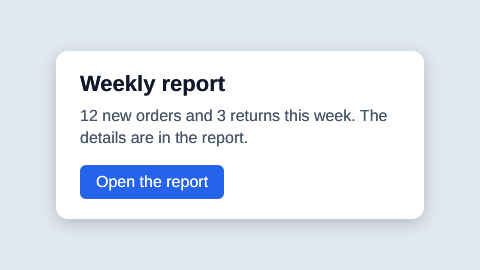
The text is drawn with the fonts bundled with the library (sans-serif is Arimo, metric-compatible with Arial), so the screenshot is the same on every machine. TakeScreenshot returns an Image<Rgba32> of Meziantou.Framework.Imaging, which you can resize or save in any format.
Next steps
- HTML and the DOM: parse, query, change and write documents.
- Loading pages: load pages and their resources, with cookies and an event loop.
- Scripting: run the scripts of the pages.
- Rendering: screenshots, printing and PDF.