 Meziantou.Framework
PDF rendering
editMeziantou.Framework.Pdf.VectorGraphics draws scenes with Meziantou.Framework.Pdf, as vector shapes and text.
dotnet package add Meziantou.Framework.Pdf.VectorGraphicsThe types are in the Meziantou.Framework.Pdf.VectorGraphics namespace.
Draw a scene as PDF
ToPdf draws a scene, a chart or a diagram as a document of one page of its size. The title and the description of the scene become the title and the subject of the document. Lay a scene out with the measurer of CreateMeasurer, so its texts fit the fonts that draw them; a chart or a diagram passed to ToPdf is laid out with it:
var testData = Path.Combine(AppContext.BaseDirectory, "TestData");

// The fonts of the texts: the layout measures the texts with them, and the PDF embeds the subsets it uses
var fonts = SceneFontCollection.Load(Path.Combine(testData, "LiberationSans-Regular.woff2"), Path.Combine(testData, "LiberationSans-Bold.woff2"));

var plot = new Plot { Title = "Sales by region", Width = 400, Height = 300 };
plot.Add(new BarMark<(string Region, double Amount)>([("North", 12), ("South", 7)], x: sale => sale.Region, y: sale => sale.Amount));

var document = plot.ToPdf(new ScenePdfOptions { Fonts = fonts });
var pdf = document.ToByteArray();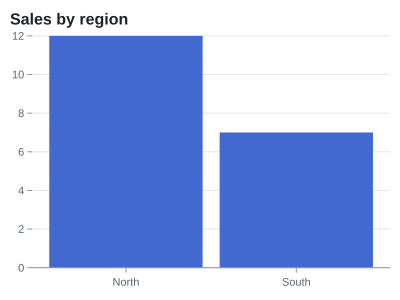
DrawScene draws a scene on a page of an existing document, over its content, with its top-left corner at a position of the page (whose y axis points up), and returns the rectangle it covers.
ScenePdfOptions.Scale is the number of points per unit of the drawing. It is 0.75 by default: a unit is a CSS pixel, so a chart of 640 by 400 pixels is a page of 480 by 300 points, the size a browser gives its SVG.
Accessibility
By default, the drawing is tagged for the assistive technologies, such as screen readers: it is a Figure element of the structure tree of the document, whose alternate description is the title and the description of the scene (Scene.Title, Scene.Description), and its hyperlinks are Link elements of the figure. ToPdf puts the figure in a Document element:
var scene = new Scene(100, 50, "sans-serif") { Title = "Sales by region", Description = "North sold 12 units, South 7." };
scene.Root.Add(new SceneGroup { Hyperlink = "https://example.com/sales" }).Add(new SceneRectangle(10, 10, 40, 20) { Fill = SceneColor.Black });

// The drawing is a figure of the structure tree, described by the title and the description of the scene
var document = scene.ToPdf();
To draw on a page of a tagged document, set StructureParent to the element the figure belongs to, such as a section. On a document that is not tagged, set Tagged to false. Give the scenes a title and a description: a figure without them has no text for the assistive technologies.
Fonts
Each text is drawn with the face of its family of the fonts of the scene (Scene.Fonts), then of ScenePdfOptions.Fonts, and the document embeds the subsets of the faces it uses, so it displays the same everywhere and its text can be extracted. The characters a family does not have are drawn with the other families of the fonts. A face that cannot be embedded (a license that forbids it, CFF2 or bitmap outlines) is replaced by Helvetica.
Without fonts, the texts are drawn with the standard fonts Helvetica, Helvetica-Bold, Helvetica-Oblique and Helvetica-BoldOblique, which are not embedded: their widths are the ones AfmTextMeasurer measures, so the texts fit. These fonts only have the characters of Western European languages: the other characters are drawn as question marks. Use fonts for other scripts.
What is drawn
The shapes, the paths (arcs and quadratic curves are converted to cubic curves), the images, the linear and radial gradients, the patterns (tiling patterns), the markers, the opacity (a group is drawn as a transparency group), the clipping rectangles and paths, the clipping paths of shapes and texts (soft masks, except one shape), the view boxes and the transforms are drawn as in the SVG, with the repeated and reflected gradients, the focal radius of the radial gradients, the gradient transforms, the masks (soft masks), the blend modes, the reused elements, the paint order, the context paints of the markers, the strokes that do not scale, the aspect ratio of the images, and the underlines, strikethroughs and overlines. The texts are filled with any paint and outlined with the stroke rendering mode of PDF; their spans are placed, shifted and turned, and their baselines computed from the metrics of their fonts, as in the images. The texts with a letter or word spacing, a length, a direction from right to left and the texts along a path are drawn glyph by glyph, and keep their characters for the extraction of the text. A JPEG image is embedded as it is; the other formats are decoded and compressed again. PDF has no filters: a scene with a blur, a drop shadow or a color matrix throws NotSupportedException. See the limitations. The hyperlinks of the elements become link annotations of the page; only absolute addresses are linked. The tooltips, the CSS classes and the data attributes are not drawn. A gradient whose stops have different opacities is drawn with their average opacity.