 Meziantou.Framework
Getting started
editInstall the package
Add the Meziantou.Framework.VectorGraphics package to a project:
dotnet package add Meziantou.Framework.VectorGraphicsThe types are in the Meziantou.Framework.VectorGraphics namespace.
Build a scene
A Scene has a size, a font family and a list of elements, drawn in order. SvgSceneRenderer writes it as SVG:
var scene = new Scene(width: 200, height: 80, fontFamily: AfmTextMeasurer.Default.FontFamily) { Title = "A box", Background = SceneColor.White };

// Shapes are filled and stroked; texts are positioned by their baseline
scene.Root.Add(new SceneRectangle(10, 10, 180, 60) { Fill = (SceneColor)"#e0f2fe", Stroke = (SceneColor)"#0369a1", StrokeWidth = 2, CornerRadius = 8 });
scene.Root.Add(new SceneText(100, 45, "Hello", new SceneFont(16, Weight: SceneFont.BoldWeight), (SceneColor)"#0c4a6e") { Anchor = SceneTextAnchor.Middle });

// Paths use the commands of SVG
var arrow = new PathBuilder().MoveTo(20, 60).LineTo(60, 60).LineTo(55, 55).MoveTo(60, 60).LineTo(55, 65).Build();
scene.Root.Add(new ScenePath(arrow) { Stroke = (SceneColor)"#0369a1" });

var svg = SvgSceneRenderer.Render(scene);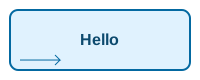
The coordinates are in pixels, with the origin at the top-left corner and the y axis pointing down. A SceneText is one line of text, positioned by its baseline and anchored at its start, its middle or its end; its SceneFont sets the size, the weight and the style. The family is the one of the scene.
Text styles
SceneFont.Weight is a weight from 1 to 1000, as in CSS: NormalWeight (400) and BoldWeight (700) are the usual ones. With the fonts of a scene, the face of the nearest weight draws the text; without them, the weights from 600 are drawn as bold. SceneText.Decorations draws an underline, a strikethrough, an overline or several of them, in the color of the text, at the position and of the thickness the font gives. LetterSpacing adds space after each character, and WordSpacing after each space, as the CSS properties of the same names; a span can set its own:
var scene = new Scene(width: 300, height: 125, fontFamily: "sans-serif");

// A weight from 1 to 1000, as in CSS, and lines drawn with the text
scene.Root.Add(new SceneText(10, 20, "Light", new SceneFont(16, Weight: 300), SceneColor.Black));
scene.Root.Add(new SceneText(10, 45, "Bold and underlined", new SceneFont(16, Weight: SceneFont.BoldWeight), SceneColor.Black) { Decorations = SceneTextDecorations.Underline });
scene.Root.Add(new SceneText(10, 70, "Removed", new SceneFont(16), SceneColor.Black) { Decorations = SceneTextDecorations.Strikethrough });

// Space between the letters and the words, in pixels, and a line over the text
scene.Root.Add(new SceneText(10, 105, "Spaced and overlined", new SceneFont(16), SceneColor.Black) { LetterSpacing = 2, WordSpacing = 6, Decorations = SceneTextDecorations.Overline });

var svg = SvgSceneRenderer.Render(scene);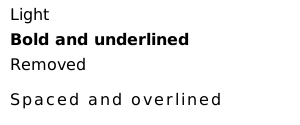
The measurers measure a text with its spacing: Measure(SceneText) gives the width the renderers draw.
Several styles in one text
A text made of SceneTextSpan has parts with their own font, color or lines; what a span does not set is the style of the text. The spans are drawn one after the other on the baseline of the text, unless they are moved (see below), and the anchor applies to the whole text. Measure them with Measure:
var scene = new Scene(width: 300, height: 40, fontFamily: "sans-serif");
var font = new SceneFont(16);

// A text whose parts have their own font, color or lines: what a span does not set is the style of the text
SceneTextSpan[] spans =
[
    new("Total: "),
    new("42") { Font = font with { Weight = SceneFont.BoldWeight }, Color = (SceneColor)"#0369a1" },
    new(" items, "),
    new("3 removed") { Decorations = SceneTextDecorations.Strikethrough },
];
var measurer = AfmTextMeasurer.Default;
scene.Root.Add(new SceneText(10, 25, spans, font, SceneColor.Black) { MeasuredWidth = measurer.Measure(spans, font).Width });

var svg = SvgSceneRenderer.Render(scene);
Text along a path
A text with a Path follows it, as an SVG textPath: each character is turned to the direction of the path at the middle of its advance. The text is anchored at PathStartOffset along the path, and the characters beyond its ends are not drawn:
var scene = new Scene(width: 200, height: 110, fontFamily: "sans-serif");

// The text follows the arc, centered on its middle
var arc = new PathBuilder().MoveTo(20, 105).ArcTo(80, 80, 0, largeArc: false, sweep: true, 180, 105).Build();
scene.Root.Add(new ScenePath(arc) { Stroke = (SceneColor)"#cbd5e1" });
scene.Root.Add(new SceneText(0, 0, "Text along a path", new SceneFont(16), SceneColor.Black)
{
    Path = arc,
    PathStartOffset = arc.GetLength() / 2,
    Anchor = SceneTextAnchor.Middle,
});

var svg = SvgSceneRenderer.Render(scene);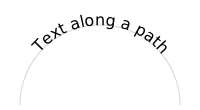
The text stands on the left of the path, in the direction it goes. To draw it on the other side, as the SVG textPath does with side="right", follow the path backwards: PathData.Reverse gives the same path, drawn from its end to its start.
Paints and outlines
A text is painted with its Color, or with a Fill of any paint: a gradient or a pattern, in the coordinates of the text. A Stroke draws the outline of the glyphs, with the width, the dashes, the caps and the joins of a shape; PaintOrder paints it under the fill, as the SVG paint-order property, for a halo that leaves the glyphs whole. A span has its own Fill and Stroke. The lines of a text have the paint of its glyphs, or their own DecorationFill: SVG paints the lines of an element with its own fill, under children of other colors:
var scene = new Scene(width: 300, height: 100, fontFamily: "sans-serif");
var font = new SceneFont(28, Weight: SceneFont.BoldWeight);

// A text filled with a gradient, and an outlined text: a stroke and a transparent fill
var gradient = new LinearGradientPaint(10, 0, 140, 0, [new(0, (SceneColor)"#0369a1"), new(1, (SceneColor)"#be123c")]);
scene.Root.Add(new SceneText(10, 35, "Gradient", font, SceneColor.Black) { Fill = gradient });
scene.Root.Add(new SceneText(160, 35, "Outline", font, SceneColor.Transparent) { Stroke = (SceneColor)"#0369a1", StrokeWidth = 1.5 });

// A thick outline painted under the fill, as a halo
scene.Root.Add(new SceneText(10, 80, "Halo", font, SceneColor.Black) { Stroke = (SceneColor)"#fde047", StrokeWidth = 6, LineJoin = SceneLineJoin.Round, PaintOrder = ScenePaintOrder.StrokeFillMarkers });

// Lines painted with the color of the text under spans of other colors, as SVG paints the lines of a parent element
SceneTextSpan[] spans = [new("Red and "), new("blue") { Color = (SceneColor)"#0000ff" }];
scene.Root.Add(new SceneText(110, 80, spans, new SceneFont(20), (SceneColor)"#ff0000") { Decorations = SceneTextDecorations.Underline, DecorationFill = (SceneColor)"#ff0000" });

var svg = SvgSceneRenderer.Render(scene);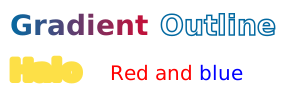
Positions, baselines and length
A span can be placed as an SVG tspan: X and Y move it to a position, and start a new chunk of text, which the anchor of the text applies to; Dx and Dy shift it and the spans that follow it. BaselineShift raises or lowers the span alone, for a superscript or a subscript, and GlyphRotation turns each of its characters.
The Baseline of a text is the line on its y coordinate, as the SVG dominant-baseline property: the alphabetic baseline, the middle of the lowercase letters, the middle or the edges of the em box. TextLength stretches or compresses the text to a length, by its spacing or by scaling its glyphs (LengthAdjust), and Direction writes it from right to left: it starts at its right end, and its spans follow each other to the left:
var scene = new Scene(width: 300, height: 150, fontFamily: "sans-serif");
var font = new SceneFont(16);
var small = font with { Size = 10 };

// A formula with a subscript and a superscript: the shift applies to its span only
scene.Root.Add(new SceneText(10, 30, [new("H"), new("2") { Font = small, BaselineShift = -4 }, new("O and x"), new("2") { Font = small, BaselineShift = 7 }], font, SceneColor.Black));

// Spans at their own positions: each line is a text chunk, centered on its x
scene.Root.Add(new SceneText(220, 30, [new("First line"), new("Second line") { X = 220, Dy = 20 }, new("Third") { X = 220, Dy = 20 }], font, SceneColor.Black) { Anchor = SceneTextAnchor.Middle });

// Turned letters, and a span moved to the right
scene.Root.Add(new SceneText(10, 75, [new("Wavy") { GlyphRotation = 15 }, new("text") { Dx = 8 }], font, SceneColor.Black));

// A text centered vertically on its y, and a text stretched to 120 pixels
scene.Root.Add(new SceneLine(10, 110, 140, 110) { Stroke = (SceneColor)"#cbd5e1" });
scene.Root.Add(new SceneText(10, 110, "Middle", font, SceneColor.Black) { Baseline = SceneTextBaseline.Middle });
scene.Root.Add(new SceneText(10, 140, "Stretched", font, SceneColor.Black) { TextLength = 120, LengthAdjust = SceneTextLengthAdjust.SpacingAndGlyphs });

var svg = SvgSceneRenderer.Render(scene);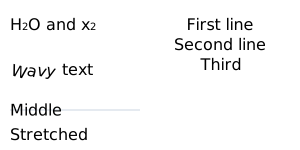
The renderers compute the baselines from the ascent, the descent and the x-height of the font of each span: the middle baseline is half the x-height above the alphabetic baseline, the central one halfway between the ascent and the descent, the hanging one at eight tenths of the ascent and the mathematical one at half of it, as browsers do. Measure(SceneText) gives the length of a fitted text, and the extent of a text whose spans are moved.
Strokes
The outline of a shape (SceneShape) has a StrokeWidth, a LineCap for the ends of open outlines, and a LineJoin for the corners: a miter join is beveled when the corner is so sharp that its point would be longer than MiterLimit times the width (4 by default, as in SVG). StrokeDashArray draws the outline as dashes and gaps, and StrokeDashOffset shifts where the pattern starts.
Paint order, context paints and non-scaling strokes
A shape paints its fill, then its stroke, then its markers; PaintOrder changes that order, as the paint-order of SVG: with the stroke first, the fill covers the inner half of the stroke. NonScalingStroke keeps the width and the dashes of the stroke in the coordinates of the scene, whatever the transforms of the shape and of its groups (vector-effect="non-scaling-stroke"). In the content of a marker, ContextPaint paints with the fill or the stroke of the shape the marker is drawn on (context-fill and context-stroke), so one arrowhead serves lines of every color. FocalRadius starts a radial gradient on a circle around its focal point (fr):
var scene = new Scene(width: 200, height: 100, fontFamily: "sans-serif");

// One arrowhead for lines of every color: it is painted with the stroke of the line it ends
var arrow = new SceneMarker { RefX = 10, RefY = 5 };
arrow.Content.Add(new ScenePath(new PathBuilder().AddPolygon((0, 0), (10, 5), (0, 10)).Build()) { Fill = ContextPaint.Stroke });
scene.Root.Add(new SceneLine(10, 20, 90, 20) { Stroke = (SceneColor)"#0369a1", StrokeWidth = 2, MarkerEnd = arrow });
scene.Root.Add(new SceneLine(10, 50, 90, 50) { Stroke = (SceneColor)"#e11d48", StrokeWidth = 2, MarkerEnd = arrow });

// The stroke under the fill, and a stroke of 1 pixel in a group scaled 20 times
scene.Root.Add(new SceneRectangle(110, 10, 80, 30) { Fill = (SceneColor)"#e0f2fe", Stroke = (SceneColor)"#0369a1", StrokeWidth = 8, PaintOrder = ScenePaintOrder.StrokeFillMarkers });
var zoomed = scene.Root.Add(new SceneGroup { Transform = SceneTransform.Scale(20, 20) });
zoomed.Add(new SceneCircle(7.5, 3.5, 1) { Fill = (SceneColor)"#e0f2fe", Stroke = (SceneColor)"#0369a1", NonScalingStroke = true });

// A radial gradient whose first color fills a circle of 10 pixels around the focal point
scene.Root.Add(new SceneCircle(30, 80, 15) { Fill = new RadialGradientPaint(30, 80, 15, [new(0, (SceneColor)"#e11d48"), new(1, (SceneColor)"#0369a1")]) { FocalRadius = 10 } });

var svg = SvgSceneRenderer.Render(scene);
Paths
A PathBuilder adds the commands of SVG one by one, and common shapes in one call: AddRectangle, AddRoundedRectangle, AddCircle, AddEllipse and AddPolygon. Each shape is a closed contour, so one path can hold several of them. PathData.Translate moves a path, and Append copies the commands of a path into another one:
// A triangle, an ellipse and a rounded rectangle in a single path
var path = new PathBuilder()
    .AddPolygon((0, 0), (10, 0), (5, 8))
    .AddEllipse(centerX: 30, centerY: 5, radiusX: 10, radiusY: 5)
    .AddRoundedRectangle(x: 50, y: 0, width: 20, height: 10, radius: 2)
    .Build();

// Paths can be moved, and combined into a new path
var moved = path.Translate(offsetX: 0, offsetY: 20);
var both = new PathBuilder().Append(path).Append(moved).Build();
Assert.HasCount(2 * path.Commands.Count, both.Commands);
GetLength measures a path, and GetPointAtLength gives the point at a distance along it, with the direction of the path there, to place a label or an arrow on a curve:
var path = new PathBuilder().MoveTo(0, 0).LineTo(30, 40).LineTo(30, 100).Build();

// The length of the path, and a point at a distance along it with the direction of the path there
Assert.Equal(110, path.GetLength(), 1e-9);
var point = path.GetPointAtLength(80);
Assert.Equal(30, point.X, 1e-9);
Assert.Equal(70, point.Y, 1e-9);
Assert.Equal(90, point.Angle, 1e-9); // Down: the y axis points down
Markers
A SceneMarker is a drawing placed on the vertices of a path or a line, such as an arrowhead: MarkerStart on the first vertex, MarkerEnd on the last one, and MarkerMid on the others. Its point (RefX, RefY) is on the vertex, it is turned to the direction of the path, and it is scaled by the width of the stroke unless its Units are the coordinates of the shape:
var scene = new Scene(width: 200, height: 100, fontFamily: "sans-serif");

// An arrowhead whose tip, at (10, 5), is on the vertex: it follows the direction of the path, scaled by the stroke width
var arrow = new SceneMarker { RefX = 10, RefY = 5 };
arrow.Content.Add(new ScenePath(new PathBuilder().AddPolygon((0, 0), (10, 5), (0, 10)).Build()) { Fill = (SceneColor)"#0369a1" });

// A dot on every vertex between the ends, in the coordinates of the path
var dot = new SceneMarker { Units = SceneMarkerUnits.UserSpace };
dot.Content.Add(new SceneCircle(0, 0, 3) { Fill = (SceneColor)"#0369a1" });

var path = new PathBuilder().MoveTo(10, 80).LineTo(60, 20).LineTo(110, 80).LineTo(170, 30).Build();
scene.Root.Add(new ScenePath(path) { Stroke = (SceneColor)"#0369a1", StrokeWidth = 2, MarkerMid = dot, MarkerEnd = arrow });

var svg = SvgSceneRenderer.Render(scene);
Orientation turns the marker at the start of the path back (an arrowhead that points out of both ends), or by a fixed angle. GetVertices gives the vertices and their directions.
Images, clipping and radial gradients
A SceneImage draws a PNG, JPEG, GIF or WebP image, stretched to its rectangle: the SVG embeds its bytes. Its Alignment keeps its proportions instead, as the preserveAspectRatio of SVG: the image fits in the rectangle, aligned as the value says, or covers it and is cut to it with Slice. SceneGroup.ClipPath clips a group to any path, in the coordinates of its parent, and RadialGradientPaint paints a gradient from a focal point to a circle:
var png = Convert.FromBase64String("iVBORw0KGgoAAAANSUhEUgAAAAIAAAACCAIAAAD91JpzAAAAEklEQVR4nGP4zwAE/0Ho////AB/uBftt3M6tAAAAAElFTkSuQmCC");
var scene = new Scene(width: 100, height: 100, fontFamily: "sans-serif");

// A radial gradient, from white at the center to blue on the circle
scene.Root.Add(new SceneRectangle(0, 0, 100, 100) { Fill = new RadialGradientPaint(50, 50, 50, [new(0, SceneColor.White), new(1, (SceneColor)"#0369a1")]) });

// An image, stretched to its rectangle and clipped to a circle
var avatar = scene.Root.Add(new SceneGroup { ClipPath = new PathBuilder().AddCircle(50, 50, 30).Build() });
avatar.Add(new SceneImage(20, 20, 60, 60, png));

var svg = SvgSceneRenderer.Render(scene);
The image and PDF renderers decode the images: an image they cannot decode is not drawn.
Clipping paths
Every element has a ClippingPath, as the clip-path of SVG: a SceneClipPath whose content is shapes and texts. The element is drawn inside the union of their geometry: the interior of each shape by its fill rule, whatever its paints, and the glyphs of each text. The content is in the coordinates of the parent of the element, as a mask, and a clipping path can be cut by another one (SceneClipPath.ClippingPath):
var scene = new Scene(width: 200, height: 100, fontFamily: "sans-serif");

// The union of two circles, in the coordinates of the parent of the clipped element
var circles = new SceneClipPath();
circles.Content.Add(new SceneCircle(40, 50, 30));
circles.Content.Add(new SceneCircle(80, 50, 30));
scene.Root.Add(new SceneRectangle(0, 0, 120, 100) { Fill = (SceneColor)"#0369a1", ClippingPath = circles });

// The glyphs of a text show a gradient
var letters = new SceneClipPath();
letters.Content.Add(new SceneText(130, 70, "Clip", new SceneFont(40, Weight: SceneFont.BoldWeight), SceneColor.Black));
var gradient = new LinearGradientPaint(130, 0, 200, 0, [new(0, (SceneColor)"#0369a1"), new(1, (SceneColor)"#e11d48")]);
scene.Root.Add(new SceneRectangle(120, 0, 80, 100) { Fill = gradient, ClippingPath = letters });

var svg = SvgSceneRenderer.Render(scene);
A gradient (SceneGradientPaint) pads its end colors beyond its ends by default; Spread repeats it or reflects it instead, and Transform rotates, skews or stretches it, as the gradientTransform of SVG.
Patterns
A PatternPaint paints a shape with a tile of drawing repeated side by side, as an SVG pattern: its Content is drawn in the Tile, in the coordinates of the shape, and its Transform rotates or scales the pattern:
var scene = new Scene(width: 200, height: 100, fontFamily: "sans-serif");

// A tile of 10 by 10 pixels with a dot, repeated over the shapes it paints
var dots = new PatternPaint(new SceneBounds(0, 0, 10, 10));
dots.Content.Add(new SceneCircle(5, 5, 2) { Fill = (SceneColor)"#0369a1" });
scene.Root.Add(new SceneRectangle(10, 10, 80, 80) { Fill = dots, Stroke = SceneColor.Black });

// Hatches: a line in a tile, turned by the transform of the pattern
var hatches = new PatternPaint(new SceneBounds(0, 0, 8, 8)) { Transform = SceneTransform.Rotate(45) };
hatches.Content.Add(new SceneLine(0, 4, 8, 4) { Stroke = (SceneColor)"#b91c1c", StrokeWidth = 2 });
scene.Root.Add(new SceneCircle(150, 50, 40) { Fill = hatches, Stroke = SceneColor.Black });

var svg = SvgSceneRenderer.Render(scene);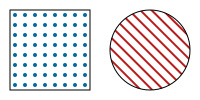
Effects
Every element has a Filter: a SceneBlurFilter, a SceneDropShadowFilter, or a SceneColorMatrixFilter, whose factories are the color functions of CSS (Grayscale, Sepia, Saturate, HueRotate, Invert, Brightness, Contrast). It also has an opacity Mask, whose content shows the element by its luminance or its alpha, and a BlendMode, the blend modes of CSS and PDF. As in SVG, the filter applies first, then the clips, the mask, the opacity and the blend mode. The masks and the filters are in the coordinates of the parent of the element:
var scene = new Scene(width: 200, height: 100, fontFamily: "sans-serif");

// A card with a drop shadow, and a blurred circle
scene.Root.Add(new SceneRectangle(10, 10, 80, 50) { Fill = SceneColor.White, CornerRadius = 4, Filter = new SceneDropShadowFilter(offsetX: 0, offsetY: 2, standardDeviation: 3, (SceneColor)"#00000040") });
scene.Root.Add(new SceneCircle(150, 50, 20) { Fill = (SceneColor)"#0369a1", Filter = new SceneBlurFilter(standardDeviation: 2) });

// Stripes: a gradient of 10 pixels, reflected, and rotated by its transform
var stripes = new LinearGradientPaint(0, 0, 10, 0, [new(0, SceneColor.White), new(1, (SceneColor)"#0369a1")])
{
    Spread = SceneGradientSpread.Reflect,
    Transform = SceneTransform.Rotate(45),
};
scene.Root.Add(new SceneRectangle(10, 70, 180, 20) { Fill = stripes, BlendMode = SceneBlendMode.Multiply });

// A group faded from left to right by a luminance mask
var faded = scene.Root.Add(new SceneGroup { Mask = new SceneMask() });
faded.Mask!.Content.Add(new SceneRectangle(100, 0, 100, 100) { Fill = new LinearGradientPaint(100, 0, 200, 0, [new(0, SceneColor.White), new(1, SceneColor.Black)]) });
faded.Add(new SceneText(150, 95, "Fading", new SceneFont(12), SceneColor.Black) { Anchor = SceneTextAnchor.Middle });

var svg = SvgSceneRenderer.Render(scene);
Filter graphs
A SceneFilterGraph is a filter of SVG made of primitives: blurs, offsets, floods, composites, blends, merges, morphologies, turbulences, displacement maps, convolution matrices, diffuse and specular lightings, component transfers, tiles, images and color matrices. Each primitive reads the drawing of the element, its alpha, or the result of an earlier primitive (SceneFilterInput), by default the result of the primitive before it. As in SVG, the primitives compute in linear light unless their ColorSpace is sRGB. The region of the graph, the subregions of the primitives and the positions of the lights are in the coordinates of the parent of the element; without a Region, the graph draws in the bounds of the element enlarged by how far its primitives move them:
var scene = new Scene(width: 200, height: 100, fontFamily: "sans-serif");

// A glow: the alpha of the shape, thickened, blurred and colored, under the shape
var glow = new SceneFilterGraph(
[
    new SceneMorphologyPrimitive(SceneMorphologyOperator.Dilate, radiusX: 2, radiusY: 2) { Input = SceneFilterInput.SourceAlpha },
    new SceneGaussianBlurPrimitive(standardDeviation: 4),
    new SceneFloodPrimitive((SceneColor)"#38bdf8"),
    new SceneCompositePrimitive(SceneCompositeOperator.In, SceneFilterInput.Result(1)),
    new SceneMergePrimitive(SceneFilterInput.Previous, SceneFilterInput.SourceGraphic),
]);
scene.Root.Add(new SceneRectangle(30, 30, 60, 40) { Fill = (SceneColor)"#0369a1", CornerRadius = 6, Filter = glow });

// A rough edge: the shape moved by noise, in a region of its own
var rough = new SceneFilterGraph(
[
    new SceneTurbulencePrimitive(SceneTurbulenceType.FractalNoise, baseFrequencyX: 0.05, baseFrequencyY: 0.05, octaves: 2, seed: 3),
    new SceneDisplacementMapPrimitive(scale: 10, map: SceneFilterInput.Previous)
    {
        Input = SceneFilterInput.SourceGraphic,
        XChannel = SceneColorChannel.Red,
        YChannel = SceneColorChannel.Green,
    },
])
{
    Region = new SceneBounds(110, 10, 80, 80),
};
scene.Root.Add(new SceneCircle(150, 50, 30) { Fill = (SceneColor)"#b91c1c", Filter = rough });

var svg = SvgSceneRenderer.Render(scene);
An image primitive draws an element, which does not need to be in the scene otherwise: an image without effects whose primitive has the rectangle of the image as its subregion is written in the SVG filter itself, another element in the definitions of the SVG, by its identifier.
PDF has no filters, not even the color matrices: the PDF renderer throws for a scene that has one. See the limitations.
Groups
A SceneGroup applies a clip rectangle or path, and its transform, opacity and effects, to its children. Every element has a Transform and a Hyperlink, which makes it a link in the SVG and in the PDF; the address is written as is, so only set addresses you trust. An element is drawn as if it were the only child of a group with them: its mask and its filter are in the coordinates of its parent.
var scene = new Scene(width: 200, height: 100, fontFamily: "sans-serif");

// Any element has a transform and a hyperlink, without a group around it
scene.Root.Add(new SceneRectangle(0, 0, 40, 20)
{
    Fill = (SceneColor)"#0369a1",
    Transform = SceneTransform.Rotate(30).Then(SceneTransform.Translate(20, 10)),
    Hyperlink = "https://example.com/",
});

// The rotation of a text applies before its transform
scene.Root.Add(new SceneText(0, 0, "Moved", new SceneFont(12), SceneColor.Black) { Rotation = -90, Transform = SceneTransform.Translate(150, 90) });

var svg = SvgSceneRenderer.Render(scene);
Every element has an Id, its id attribute in the SVG, a CssClass, a Tooltip and data-* attributes (SetDataAttribute) for the scripts of a web page.
SceneTransform creates translations, rotations and scales; Then combines two transforms, in the order they apply:
// Scale by 2 around the origin, then move by (10, 20)
var transform = SceneTransform.Scale(2, 2).Then(SceneTransform.Translate(10, 20));
Assert.Equal((16.0, 28.0), transform.Apply(3, 4));
Assert.Equal(new SceneTransform(2, 0, 0, 2, 10, 20), transform);
Identifiers and reuse
The identifiers of the elements must be different: the SVG renderer throws when two elements have the same one, and the identifiers it generates avoid them:
var scene = new Scene(width: 100, height: 50, fontFamily: "sans-serif");

// The identifier of an element is its id attribute: a script or a style sheet finds the element with it
scene.Root.Add(new SceneRectangle(10, 10, 30, 30) { Id = "north", Fill = SceneColor.Black });

var svg = SvgSceneRenderer.Render(scene);
A SceneUse draws an element again, with its own transform and effects. The SVG writes the element once and refers to it with a use element; when the element is not in the scene, the SVG writes it in its definitions. The image and PDF renderers draw it again:
var scene = new Scene(width: 200, height: 60, fontFamily: "sans-serif");

// A star that is not in the scene: the SVG writes it once in its definitions, and each use refers to it
var star = new ScenePath(new PathBuilder().AddPolygon((0, -20), (6, -6), (20, -6), (9, 3), (13, 18), (0, 9), (-13, 18), (-9, 3), (-20, -6), (-6, -6)).Build()) { Fill = (SceneColor)"#eab308" };
for (var i = 0; i < 3; i++)
{
    scene.Root.Add(new SceneUse(star) { Transform = SceneTransform.Translate(30 + (i * 50), 30) });
}

// An element of the scene drawn again, smaller
var circle = scene.Root.Add(new SceneCircle(0, 0, 10) { Id = "dot", Fill = (SceneColor)"#0369a1", Transform = SceneTransform.Translate(180, 15) });
scene.Root.Add(new SceneUse(circle) { Transform = SceneTransform.Scale(0.5, 0.5, 180, 45) });

var svg = SvgSceneRenderer.Render(scene);
View boxes
A group with a ViewBox maps a rectangle of the coordinates of its children to a viewport, which cuts what is outside of it, as a nested SVG svg element. The box keeps its proportions as Alignment and Slice say, as the preserveAspectRatio of SVG:
var scene = new Scene(width: 200, height: 100, fontFamily: "sans-serif");

// A drawing of 100 by 100 units, fitted in a viewport of 200 by 80 pixels: scaled by 0.8 and centered
var chart = scene.Root.Add(new SceneGroup { ViewBox = new SceneViewBox(new SceneBounds(0, 0, 100, 100), new SceneBounds(0, 10, 200, 80)) });
chart.Add(new SceneRectangle(0, 0, 100, 100) { Fill = (SceneColor)"#e0f2fe", Stroke = (SceneColor)"#0369a1" });
chart.Add(new SceneCircle(50, 50, 40) { Fill = (SceneColor)"#0369a1" });

var svg = SvgSceneRenderer.Render(scene);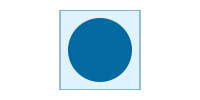
SVG options
SvgRenderOptions sets the number of decimals, whether the xmlns attribute is written (turn it off for SVG inlined in HTML), and the prefix of the identifiers of the gradients, clip paths, patterns and markers: give each drawing of an HTML page its own prefix, so the identifiers do not collide.