 Meziantou.Framework
Fonts of a scene
editA layout measures its texts with a text measurer, and a renderer draws them. When both use the same font, the texts fit their boxes. A SceneFontCollection holds the font files of a scene: the layout measures each text with it, and the scene keeps it in Scene.Fonts, so the SVG and the image renderers draw each text with the font that measured it.
Load the fonts
SceneFontFace.Load reads the faces of a font file (TrueType, OpenType, WOFF, WOFF2 or a collection), and SceneFontCollection.Load reads several files into a collection. The family of the first face is the default family of the collection. Measure with FontFaceTextMeasurer created from the collection, or ImageTextMeasurer for an image:
var testData = Path.Combine(AppContext.BaseDirectory, "TestData");

// The fonts of the texts: the family of the first face is the default one
var fonts = SceneFontCollection.Load(
    Path.Combine(testData, "LiberationSans-Regular.woff2"),
    Path.Combine(testData, "LiberationSans-Bold.woff2"),
    Path.Combine(testData, "LiberationMono-Regular.woff2"));

// The layout measures the texts with the fonts, and the scene keeps them so every renderer draws with them
var measurer = new FontFaceTextMeasurer(fonts);
var scene = new Scene(width: 300, height: 60, fontFamily: measurer.FontFamily) { Fonts = measurer.Fonts };

// Each text has its own family, or the family of the scene
var code = new SceneFont(12, Family: "Liberation Mono");
scene.Root.Add(new SceneText(10, 20, "Title", new SceneFont(16, Weight: SceneFont.BoldWeight), SceneColor.Black));
scene.Root.Add(new SceneText(10, 45, "var x = 1;", code, SceneColor.Black) { MeasuredWidth = measurer.Measure("var x = 1;", code).Width });

// The SVG can embed the fonts, so every viewer draws the texts with them
var svg = SvgSceneRenderer.Render(scene, new SvgRenderOptions { EmbedFonts = true });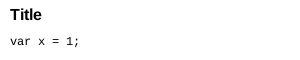
Charts and diagrams set the fonts of their scene from their measurer (ITextMeasurer.Fonts): pass the measurer to CreateScene or set the TextMeasurer of the plot or the diagram.
A family per text
SceneFont.Family sets the family of a text, as a CSS font-family value; null uses the family of the scene (Scene.FontFamily). The first family of the list the collection has draws the text, and the default family when it has none of them: "Fira Code", monospace falls back to the default family when the collection has no Fira Code. The names ignore the case of ASCII letters.
Within the family, the face closest to the style of the text draws it: the same slant first, then the nearest weight (SceneFont.Weight). A collection without a bold face draws the bold texts with its regular face.
WithFontFamily gives a measurer another family for the texts that name none. The family of a chart or diagram theme works this way: the texts are measured and drawn with the family of the theme when the fonts have it.
Characters a family does not have
The other families of the collection draw the characters the family of a text does not have, in the order they were added: each grapheme cluster uses the first face that has all its characters, and the face of the family when none has them. Add a font of each script the texts use: a Latin font first, then the fonts of the other scripts.
SVG
The SVG writes the families of the collection after the family of each text, so a viewer looks for the characters a family does not have in the same fonts. It does not embed the fonts by default: the viewer must have them, for instance through the @font-face rules of the page. Set SvgRenderOptions.EmbedFonts to embed the faces that draw a character of a text, whole, as @font-face rules. Prefer WOFF2 files: they are the smallest. The faces of font collections (.ttc, .otc) are not embedded.
The PDF renderer draws each text with the face of its family, and embeds the subsets of the faces the texts use. See PDF rendering.
Images
The image renderer draws the texts of a scene with its fonts. Without them, it uses the fonts of the options: SceneImageOptions.Fonts, or the font of each style. See image rendering.