 Meziantou.Framework
Rendering
editPdfRenderer draws a page to an image of Meziantou.Framework.Imaging, which can then be saved to PNG, JPEG, WebP and the other formats it writes, resized or drawn on. The types are in the Meziantou.Framework.Pdf.Rendering namespace.
var page = document.Pages[0];

// 144 dpi: two pixels per point
using var image = PdfRenderer.RenderPage(page, new PdfRenderOptions { Dpi = 144 });
using var png = new MemoryStream();
image.Save(png, new Imaging.Formats.PngEncoder());
PdfRenderer.RenderPage(page, options) and the extension method page.Render(options) are the same; an overload takes a CancellationToken, and another draws on an image of the application (see Regions, sizes and targets). The image is the crop box of the page, turned by its Rotation, as viewers show it, in sRGB. It is an Image<Rgba32>: dispose of it.
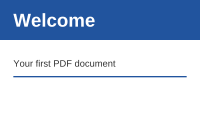
Render thumbnails
Choose the resolution from the size you want:
public static void RenderThumbnails(string pdfPath, string outputDirectory)
{
    var document = PdfDocument.Open(pdfPath);
    for (var i = 0; i < document.Pages.Count; i++)
    {
        // The width of the page as it is shown: a rotation of 90 or 270 degrees exchanges its sides
        var page = document.Pages[i];
        var width = page.Rotation is 90 or 270 ? page.CropBox.Height : page.CropBox.Width;

        // 72 dpi is one pixel per point: the resolution that gives images 200 pixels wide
        var options = new PdfRenderOptions
        {
            Dpi = 72 * 200 / width,
            UseSystemFonts = false, // the same pixels on every machine
        };

        using var image = page.Render(options);
        image.Save(Path.Combine(outputDirectory, $"page-{i + 1}.png"));
    }
}
Render many pages of a document
PdfRenderSession renders the pages of one document with caches they share: the fonts, images, color spaces and functions a page reads are kept for the next pages, so that a logo or a font used on every page is decoded once. PdfRenderer.RenderPage reads them again for each page.
// The pages share the fonts, images and color spaces the session reads
using var session = new PdfRenderSession(document, new PdfRenderOptions { Dpi = 144 });
foreach (var page in document.Pages)
{
    using var image = session.RenderPage(page);
    Assert.Equal(400, image.Width);
}
The work of each page is counted alone against MaxOperations. The caches are emptied between two pages when they hold more than about 256 MB, and when the session is disposed of: dispose of it once the pages are rendered. A session renders one page at a time, from one thread. It finds the cached objects by the objects of the document, so a change made to the document after a page is rendered may not be seen by the next pages: create a new session after changing the document.
Options
| Option | Default | Effect |
|---|---|---|
| Dpi | 72 | The resolution: 72 renders one pixel per point, 144 two |
| Width, Height | null | The size of the image instead of the resolution: see Regions, sizes and targets |
| Region | null | The part of the page rendered, instead of its crop box |
| Background | White | The color painted before the content; null for a transparent background |
| RenderAnnotations | true | Draws the appearances of the annotations, such as stamps and form fields |
| Intent | View | Viewing, printing or exporting: selects the annotations and the layers drawn (see Layers, annotations and printing) |
| OptionalContentConfiguration, OptionalContentGroupStates | null | The configuration of the layers, and the layers turned on or off |
| PathAntialiasing, TextAntialiasing | true | Antialiased edges, or hard edges |
| UseHalftones | false | Applies the halftones of the document, as a printer would: see Halftones |
| FontResolver, UseSystemFonts | none, true | The fonts that replace the fonts the document does not embed: see Fonts that are not embedded |
| MaxOperations | 50,000,000 | The work a page may do: see below |
| Configuration | null | The configuration of the image: its limits and allocation scope (see Resource limits) |
PdfRenderOptions is immutable: create the options once and render many pages with them.
What is drawn
- Graphics: paths, line styles, dashes, clipping by paths and text, the optional content (layers) of a configuration, and the appearances of the annotations, generated for the annotations that have none.
- Text: embedded TrueType, CFF, OpenType and Type 1 fonts, Type 3 fonts, the text rendering modes, and the fonts that are not embedded, replaced by other fonts.
- Colors: the device color spaces, ICC profiles,
CalRGB,CalGray,Lab,Indexed,SeparationandDeviceN; CMYK colors are converted with a CMYK profile. - Images: every filter (JPEG, CMYK JPEG included, JPEG 2000, CCITT fax, JBIG2), 1 to 16 bits per component, the masks and soft masks, and the inline images.
- Shadings and patterns: the functions, the seven types of shadings, and the colored and uncolored tiling patterns.
- Transparency: opacity, the blend modes, the transparency groups (isolated and knockout), the soft masks, the transfer functions, the alpha that is shape in knockout groups, and the text knockout. Overprint is not simulated: the page is composited in sRGB, for a screen.
- Halftones: ignored by default, as viewers do; applied on request (see Halftones).
Damaged and hostile pages
A damaged content is drawn as viewers draw it: an operator whose operands or resources are invalid is skipped, and a font, an image or a shading that cannot be read is not drawn. The rest of the page is drawn.
The work of a page is bounded: MaxOperations limits the operators, glyphs and pixels it processes (a content can paint forms and patterns many times), and the images, the shadings, the nesting of forms and the clips have limits of their own. A page beyond a limit, or too large at the resolution, throws PdfResourceLimitException. For the files of untrusted users, also bound the read: see Errors and limits.
In this section
- Fonts that are not embedded: the fonts that replace them, and how to choose them.
- Regions, sizes and targets: part of a page, a size in pixels, an image of the application, the antialiasing, and the cancellation.
- Layers, annotations and printing: the layers, the annotations, and the rendering for printing.
- Halftones: the halftone screens of the document, applied as a printer would.