 Meziantou.Framework
Getting started
editInstall the package
Add the Meziantou.Framework.Pdf package to a project:
dotnet package add Meziantou.Framework.PdfThe examples of this documentation omit the using directives. Most only need using Meziantou.Framework.Pdf;; see Namespaces for the others.
Create a document
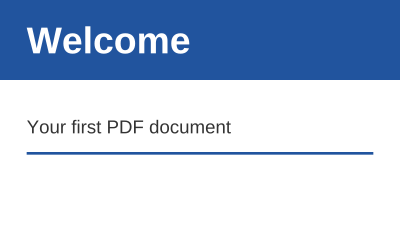
Create a document, add a page, draw on it with a content builder, and save it:
public static void CreateCard(string outputPath)
{
    var document = new PdfDocument();
    document.Information.Title = "Welcome";

    // A page of 300 by 180 points (1 point is 1/72 inch); the origin is its lower-left corner
    var page = document.Pages.Add(new PdfSize(300, 180));
    var bold = PdfFont.GetStandardFont(PdfStandardFont.HelveticaBold);
    var regular = PdfFont.GetStandardFont(PdfStandardFont.Helvetica);

    page.CreateContentBuilder()
        .SetFillRgb(0.13, 0.33, 0.62).Rectangle(0, 120, 300, 60).Fill() // a band at the top of the page
        .SetFillGray(1).DrawText("Welcome", bold, 28, 20, 140) // x and y are the start of the baseline
        .SetFillGray(0.2).DrawText("Your first PDF document", regular, 14, 20, 80)
        .SetStrokeRgb(0.13, 0.33, 0.62).SetLineWidth(2).MoveTo(20, 65).LineTo(280, 65).Stroke();

    document.Save(outputPath);
}
- Sizes and coordinates are in points, 1/72 inch. The origin is the lower-left corner of the page, and y grows upward.
CreateContentBuilderreturns a builder whose methods can be chained. A path is built first (Rectangle, MoveTo, LineTo), then painted (Fill, Stroke) with the current colors.- DrawText shows one line of text, starting at a point of its baseline. Helvetica is one of the 14 standard fonts, which every PDF reader has: the document does not need to embed them.
- Save writes the file. The output depends only on the document and the options: no date or random value is added.
Read a document
PdfDocument.Open reads a file, a stream or an array of bytes. The pages give their text back:
var document = PdfDocument.Open(file);
var pageCount = document.Pages.Count;
var text = document.Pages[0].ExtractText();
See Opening documents for passwords and damaged files, and Extracting text for what ExtractText returns.
Render a page
PdfRenderer draws a page to an image of Meziantou.Framework.Imaging, which can be saved to PNG, JPEG, WebP and other formats:
var page = document.Pages[0];

// 144 dpi: two pixels per point
using var image = PdfRenderer.RenderPage(page, new PdfRenderOptions { Dpi = 144 });
using var png = new MemoryStream();
image.Save(png, new Imaging.Formats.PngEncoder());
The images of this documentation are pages rendered this way. See Rendering.
Next steps
- Creating documents: pages, shapes, text, fonts and images.
- Modifying documents: add content to existing pages and save the changes.
- Encryption and Digital signatures.