 Meziantou.Framework
Text
editDrawText shows a line of text at a position, with a font and a size. The text is painted with the fill color, and the position is the start of its baseline.
Align text
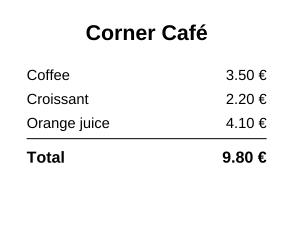
The builder places a text where it is told to: center or align it to the right by measuring it with GetTextWidth:
public static void DrawReceipt(string outputPath)
{
    var regular = PdfFont.GetStandardFont(PdfStandardFont.Helvetica);
    var bold = PdfFont.GetStandardFont(PdfStandardFont.HelveticaBold);
    (string Name, decimal Price)[] items = [("Coffee", 3.50m), ("Croissant", 2.20m), ("Orange juice", 4.10m)];

    var document = new PdfDocument();
    var builder = document.Pages.Add(new PdfSize(220, 170)).CreateContentBuilder();

    // Centered: the text starts half its width before the center of the page
    var title = "Corner Café";
    builder.DrawText(title, bold, 16, (220 - bold.GetTextWidth(title, 16)) / 2, 140);

    // One line per item: the name at the left margin, the price aligned on the right margin
    var y = 110.0;
    foreach (var (name, price) in items)
    {
        var amount = price.ToString("0.00 €", CultureInfo.InvariantCulture);
        builder.DrawText(name, regular, 11, 20, y)
            .DrawText(amount, regular, 11, 200 - regular.GetTextWidth(amount, 11), y);
        y -= 18;
    }

    builder.SetLineWidth(0.5).MoveTo(20, y + 10).LineTo(200, y + 10).Stroke();
    var total = items.Sum(item => item.Price).ToString("0.00 €", CultureInfo.InvariantCulture);
    builder.DrawText("Total", bold, 12, 20, y - 8)
        .DrawText(total, bold, 12, 200 - bold.GetTextWidth(total, 12), y - 8);

    document.Save(outputPath);
}
- GetTextWidth returns the width of a text at a font size, in points, without the character and word spacing. It throws
ArgumentExceptionwhen a character has no glyph in the font. - Ascent, Descent and CapHeight give the vertical metrics of the font, in thousandths of the font size: the height of the capital letters of a 16-point text is
font.CapHeight * 16 / 1000, to center a text vertically in a box.
Wrap a paragraph
DrawTextBox draws a text in a rectangle, broken into lines that fit its width:
// The text is broken into lines that fit the width of the box; what does not fit in its height is returned
builder.DrawTextBox(text, font, 10, new PdfRectangle(50, 400, 250, 550), new PdfTextBoxOptions { Alignment = PdfTextAlignment.Justify }, out var remaining);
if (remaining.Length > 0)
{
    builder.DrawTextBox(remaining, font, 10, new PdfRectangle(50, 100, 250, 380));
}- The lines break where the Unicode line breaking algorithm (UAX #14) allows it: after the spaces and the hyphens, and between the ideographs of Chinese and Japanese texts, which have no spaces. The rules keep together what must not be separated: a closing punctuation does not start a line, a no-break space (U+00A0) joins two words. A word wider than the rectangle is broken between its characters.
- A line feed, a paragraph separator (U+2029) or a line separator (U+2028) starts a new paragraph.
- PdfTextBoxOptions sets the alignment (left, centered, right or justified: the spaces of a justified line are stretched, except on the last line of a paragraph) and the line height, a multiple of the font size (1.2 by default).
- The first baseline is below the top of the rectangle by the ascent of the font. The lines that do not fit in the height of the rectangle are not drawn: the overload with
out remainingTextreturns their text, to continue in another rectangle or on the next page. - The text is laid out before anything is written: a character the font cannot show throws
ArgumentExceptionand leaves the content unchanged.
Hyphenate words
A soft hyphen (U+00AD) in a text marks where a word can be broken: it is not drawn, unless the line ends there, where a hyphen is drawn. To hyphenate the words automatically, set a hyphenator:
// The hyphenation patterns of a language, in the format of TeX: Hyphenator.Load reads them from files
var hyphenator = Hyphenator.Parse("hy3ph he2n hena4 hen5at 1na n2at 1tio 2io");
var options = new PdfTextBoxOptions
{
    Alignment = PdfTextAlignment.Justify,
    Hyphenator = new PdfPatternHyphenator(hyphenator),
};

// A word that does not fit at the end of a line is broken at a hyphenation point, and a hyphen is drawn
builder.DrawTextBox("A narrow column needs hyphenation", font, 12, new PdfRectangle(50, 400, 180, 550), options);- PdfPatternHyphenator applies the hyphenation patterns of a language, read by Hyphenator of
Meziantou.Framework.Unicode. No pattern is included: the hyph-utf8 project of the TeX community publishes patterns for many languages, each under its own license. - The word that does not fit at the end of a line is broken at the last hyphenation point where the line, ended by a hyphen, fits. The lines are not hyphenated otherwise.
- Implement IPdfHyphenator to use another source, such as a dictionary of words.
- The hyphen is the hyphen-minus (
-): a font without it is not hyphenated.
For full control of the lines (other break rules, a line height per line), measure the words with GetTextWidth and start a new line before the word that does not fit:
public static void DrawParagraph(string outputPath)
{
    var font = PdfFont.GetStandardFont(PdfStandardFont.TimesRoman);
    var text = "The content builder shows each text where it is told to. To fill a column, measure the words, and start a new line before the word that does not fit.";
    var fontSize = 12.0;
    var maxWidth = 260.0;

    var document = new PdfDocument();
    var builder = document.Pages.Add(new PdfSize(300, 80)).CreateContentBuilder()
        .BeginText()
        .SetFont(font, fontSize)
        .SetTextLeading(16)
        .MoveTextPosition(20, 55);

    var line = "";
    foreach (var word in text.Split(' '))
    {
        var candidate = line.Length == 0 ? word : line + " " + word;
        if (line.Length > 0 && font.GetTextWidth(candidate, fontSize) > maxWidth)
        {
            builder.ShowText(line).MoveToNextLine();
            line = word;
        }
        else
        {
            line = candidate;
        }
    }

    builder.ShowText(line).EndText();
    document.Save(outputPath);
}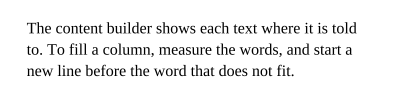
A text object (BeginText to EndText) shows several texts with the same font: SetTextLeading sets the distance between the lines, MoveTextPosition moves to the start of a line, and MoveToNextLine goes down by the leading.
The standard fonts
PdfFont.GetStandardFont returns one of the 14 standard fonts: Times, Helvetica and Courier in four styles each, Symbol and ZapfDingbats. PDF readers have them, so the document does not embed them and stays small.
They show the characters of WinAnsiEncoding, the Latin characters of Western European languages and a few symbols (the euro sign, the typographic quotes and dashes); Symbol and ZapfDingbats have their own characters. CanEncode tells whether a font can show a text. For other characters, or for PDF/A documents, which must embed their fonts, embed a font: see Fonts.
Spacing, scaling and rendering
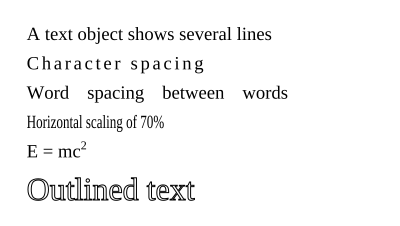
Inside a text object, the text state changes how the glyphs are placed and painted:
public static void DrawTextStyles(string outputPath)
{
    var font = PdfFont.GetStandardFont(PdfStandardFont.TimesRoman);
    var document = new PdfDocument();
    document.Pages.Add(new PdfSize(300, 170)).CreateContentBuilder()
        .BeginText()
        .SetFont(font, 14)
        .SetTextLeading(22) // the distance between two baselines
        .MoveTextPosition(20, 140) // the start of the first line
        .ShowText("A text object shows several lines")
        .SetCharacterSpacing(2).ShowTextOnNextLine("Character spacing").SetCharacterSpacing(0)
        .SetWordSpacing(10).ShowTextOnNextLine("Word spacing between words").SetWordSpacing(0)
        .SetHorizontalScaling(70).ShowTextOnNextLine("Horizontal scaling of 70%").SetHorizontalScaling(100)
        .MoveToNextLine().ShowText("E = mc").SetTextRise(6).SetFont(font, 9).ShowText("2").SetTextRise(0).SetFont(font, 14)
        .SetFont(font, 24).SetTextLeading(32).SetLineWidth(0.5).SetTextRenderingMode(PdfTextRenderingMode.Stroke).ShowTextOnNextLine("Outlined text")
        .EndText();

    document.Save(outputPath);
}
| Method | Effect |
|---|---|
| SetCharacterSpacing | Space added after each glyph |
| SetWordSpacing | Space added after each space character (standard fonts only: an embedded font has no single-byte space) |
| SetHorizontalScaling | Stretches or condenses the glyphs, in percent |
| SetTextRise | Moves the baseline up (superscript) or down (subscript) |
| SetTextRenderingMode | Fills, strokes or both; invisible text; text used as a clip |
| SetTextMatrix | Places and transforms the text with a PdfMatrix, for a turned or slanted text |
ShowText(segments) | Texts with adjustments between them, in thousandths of the font size, for kerning or justification |
The text state lasts until the end of the graphics state, not of the text object: reset what you changed, as the example does.