 Meziantou.Framework
Shapes and colors
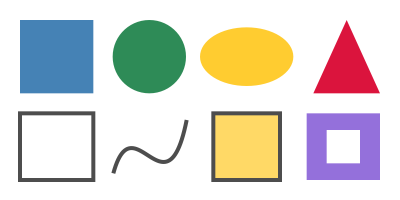
editA shape is drawn in two steps: the path is built (Rectangle, Circle, MoveTo, LineTo, CurveTo...), then painted (Fill, Stroke...) with the colors and the line style of the graphics state.
Fill and outline shapes
public static void DrawShapes(string outputPath)
{
    var document = new PdfDocument();
    document.Pages.Add(new PdfSize(300, 150)).CreateContentBuilder()
        // Filled shapes: set the fill color, build the path, then fill it
        .SetFillRgb(0.27, 0.51, 0.71).Rectangle(15, 80, 55, 55).Fill()
        .SetFillColor(PdfColor.FromRgb24(46, 139, 87)).Circle(112, 107.5, 27.5).Fill()
        .SetFillCmyk(0, 0.2, 0.9, 0).Ellipse(185, 107.5, 35, 22).Fill()
        .SetFillRgb(0.86, 0.08, 0.24).MoveTo(235, 80).LineTo(285, 80).LineTo(260, 135).ClosePath().Fill()

        // Outlines: set the stroke color and the line width, build the path, then stroke it
        .SetStrokeGray(0.3).SetLineWidth(3)
        .Rectangle(15, 15, 55, 50).Stroke()
        .MoveTo(85, 20).CurveTo(100, 75, 125, -15, 140, 60).Stroke() // a cubic Bézier curve

        // Both: fill, then stroke the same path
        .SetFillRgb(1, 0.85, 0.4).Rectangle(160, 15, 50, 50).FillAndStroke()

        // Two squares, one inside the other: with the even-odd rule, the inner one is a hole
        .SetFillRgb(0.58, 0.44, 0.86).Rectangle(230, 15, 55, 50).Rectangle(245, 27.5, 25, 25).Fill(PdfFillRule.EvenOdd);

    document.Save(outputPath);
}
| To build | Call |
|---|---|
| A rectangle | Rectangle(x, y, width, height) or Rectangle(PdfRectangle), from its lower-left corner |
| A circle, an ellipse | Circle(centerX, centerY, radius), Ellipse(centerX, centerY, radiusX, radiusY) |
| Lines | MoveTo starts a subpath, LineTo adds a straight line, ClosePath goes back to the start |
| Curves | CurveTo adds a cubic Bézier curve; CurveToFromCurrentPoint and CurveToEndPoint take one control point from the ends |
| To paint the path | Call |
|---|---|
| Fill it | Fill |
| Draw its outline | Stroke, or CloseAndStroke to close it first |
| Both | FillAndStroke, CloseFillAndStroke |
| Neither (after a clip) | EndPath |
- A path can have several subpaths: they are painted together. The fill rule decides what is inside: NonZero (the default) fills a shape inside another one, EvenOdd makes it a hole.
- The fill color is set with SetFillGray, SetFillRgb, SetFillCmyk or SetFillColor, the outline color with the
SetStroke...methods. The components go from 0 to 1. PdfColor holds a color: FromGray, FromRgb, FromRgb24 (0 to 255), FromCmyk, Black and White. - The fill color also paints text. Gradients and patterns are colors as well: see Gradients and patterns.
Style the lines
public static void DrawLineStyles(string outputPath)
{
    var document = new PdfDocument();
    var builder = document.Pages.Add(new PdfSize(300, 150)).CreateContentBuilder().SetStrokeRgb(0.2, 0.3, 0.5);

    // Caps: the ends of the lines, butt (the default), round and projecting square
    builder.SetLineWidth(10)
        .SetLineCap(PdfLineCap.Butt).MoveTo(25, 125).LineTo(105, 125).Stroke()
        .SetLineCap(PdfLineCap.Round).MoveTo(25, 100).LineTo(105, 100).Stroke()
        .SetLineCap(PdfLineCap.ProjectingSquare).MoveTo(25, 75).LineTo(105, 75).Stroke();

    // Joins: the corners, miter (the default), round and bevel
    builder.SetLineCap(PdfLineCap.Butt)
        .SetLineJoin(PdfLineJoin.Miter).MoveTo(135, 70).LineTo(155, 125).LineTo(175, 70).Stroke()
        .SetLineJoin(PdfLineJoin.Round).MoveTo(190, 70).LineTo(210, 125).LineTo(230, 70).Stroke()
        .SetLineJoin(PdfLineJoin.Bevel).MoveTo(245, 70).LineTo(265, 125).LineTo(285, 70).Stroke();

    // Dashes: 12 points drawn, 6 skipped; then dashes of length 0 with round caps, which are dots
    builder.SetLineWidth(3).SetDashPattern([12, 6]).MoveTo(25, 40).LineTo(285, 40).Stroke()
        .SetLineWidth(5).SetLineCap(PdfLineCap.Round).SetDashPattern([0, 10]).MoveTo(25, 20).LineTo(285, 20).Stroke()
        .SetDashPattern([]); // solid lines again

    document.Save(outputPath);
}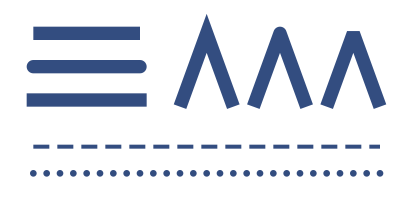
- SetLineWidth sets the width, centered on the path. A width of 0 is the thinnest line the device can draw.
- SetLineCap sets the ends of open lines and dashes; SetLineJoin the corners. A miter join longer than SetMiterLimit times the width is beveled.
- SetDashPattern takes the lengths of the dashes and the gaps, and a phase where the pattern starts; an empty array draws solid lines again.
Move, turn and clip
The transformation of the graphics state moves, turns and scales what is drawn after it, and a clip limits the region that can be painted. Both last until the graphics state is restored:
public static void DrawTransformations(string outputPath)
{
    var document = new PdfDocument();
    var builder = document.Pages.Add(new PdfSize(300, 150)).CreateContentBuilder();

    // The same square, turned around the center of the left half: move the origin there, then rotate the axes
    for (var i = 0; i < 6; i++)
    {
        builder.SaveGraphicsState()
            .Translate(75, 75)
            .Rotate(i * 15) // degrees, counterclockwise
            .SetStrokeRgb(0.1, 0.25 + (i * 0.12), 0.6).SetLineWidth(2)
            .Rectangle(-40, -40, 80, 80).Stroke()
            .RestoreGraphicsState(); // back to the coordinates of the page
    }

    // Clipping: stripes painted through a circle
    builder.SaveGraphicsState()
        .Circle(225, 75, 55).Clip().EndPath()
        .SetFillRgb(0.95, 0.6, 0.1);
    for (var x = 165; x < 285; x += 20)
    {
        builder.Rectangle(x, 0, 10, 150);
    }

    builder.Fill()
        .RestoreGraphicsState() // removes the clip
        .SetStrokeGray(0.3).SetLineWidth(1.5).Circle(225, 75, 55).Stroke();

    document.Save(outputPath);
}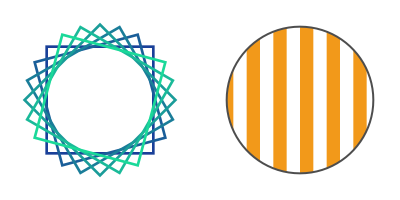
- Translate, Rotate and Scale change the coordinates of what follows; Transform applies any PdfMatrix (CreateTranslation, CreateRotation, CreateScale, Multiply). Each change applies to the coordinates the previous ones made: translate first, then rotate, to turn around a point.
- Clip intersects the clip with the current path, which must then be painted or ended with EndPath. The clip can only shrink: save the graphics state before, and restore it to remove the clip.
- SaveGraphicsState and RestoreGraphicsState must be balanced in a content stream: RestoreGraphicsState without a save throws
InvalidOperationException.