 Meziantou.Framework
Gradients and patterns
editGradients
A shading (PdfShading) is a smooth change of color. PaintShading paints it over the whole clipping region: clip to a shape first.
public static void DrawGradients(string outputPath)
{
    var document = new PdfDocument();
    var builder = document.Pages.Add(new PdfSize(300, 150)).CreateContentBuilder();

    // An axial gradient: the colors change along a line, from x = 15 to x = 135, with three stops
    var sunset = PdfShading.Axial(PdfDeviceColorSpace.Rgb, 15, 0, 135, 0, PdfFunction.Gradient(
        (0, PdfColor.FromRgb(0.98, 0.8, 0.2)),
        (0.5, PdfColor.FromRgb(0.95, 0.35, 0.3)),
        (1, PdfColor.FromRgb(0.35, 0.15, 0.5))));

    // A shading paints the whole clipping region: clip to the rectangle first
    builder.SaveGraphicsState()
        .Rectangle(15, 15, 120, 120).Clip().EndPath()
        .PaintShading(sunset)
        .RestoreGraphicsState();

    // A radial gradient: from a small circle of light to the edge of the sphere
    var sphere = PdfShading.Radial(PdfDeviceColorSpace.Rgb, 205, 95, 5, 225, 75, 60,
        PdfFunction.Gradient((0, PdfColor.FromRgb(1, 1, 1)), (1, PdfColor.FromRgb(0.1, 0.35, 0.75))));
    builder.SaveGraphicsState()
        .Circle(225, 75, 60).Clip().EndPath()
        .PaintShading(sphere)
        .RestoreGraphicsState();

    document.Save(outputPath);
}
| Shading | The color changes |
|---|---|
| PdfShading.Axial | Along a line, between two points |
| PdfShading.Radial | Between two circles |
| PdfShading.FunctionBased | With the position, by a function of two inputs |
| PdfShading.TriangleMesh, LatticeMesh | Between the colors of the vertices of triangles |
| PdfShading.CoonsPatchMesh, TensorPatchMesh | Inside patches bounded by Bézier curves (PdfPatch) |
- An axial or a radial shading stops at its ends;
extendStartandextendEndcontinue its first and last colors. - The colors come from a function (PdfFunction). PdfFunction.Gradient creates one from stops, a position from 0 to 1 and a color; all the colors must be in the same color space (gray, RGB or CMYK), the color space of the shading. The other functions are Exponential (between two colors), Stitching (functions side by side), Sampled (a table of values) and PostScript (a small program).
- Background paints the area outside the shading when the shading is used in a pattern, and AntiAlias asks the readers to smooth it.
Patterns
A pattern is a color that repeats a drawing or follows a gradient. It fills shapes and text, and outlines them, with SetFillPattern and SetStrokePattern:
public static void DrawPatterns(string outputPath)
{
    var document = new PdfDocument();
    var builder = document.Pages.Add(new PdfSize(300, 150)).CreateContentBuilder();

    // A colored tiling pattern: a cell of 20 by 20 points with its own colors, repeated every 20 points
    var checkerboard = document.CreateTilingPattern(new PdfRectangle(0, 0, 20, 20), 20, 20);
    checkerboard.CreateContentBuilder()
        .SetFillRgb(0.85, 0.9, 1).Rectangle(0, 0, 20, 20).Fill()
        .SetFillRgb(0.3, 0.45, 0.75).Rectangle(0, 0, 10, 10).Rectangle(10, 10, 10, 10).Fill();
    builder.SetFillPattern(checkerboard).Rectangle(15, 15, 80, 120).Fill();

    // An uncolored tiling pattern: a shape without colors, painted with the color given when it is used.
    // The matrix of the pattern turns its stripes by 45 degrees.
    var stripes = document.CreateTilingPattern(new PdfRectangle(0, 0, 8, 8), 8, 8, isColored: false, matrix: PdfMatrix.CreateRotation(45));
    stripes.CreateContentBuilder().Rectangle(0, 0, 8, 3).Fill();
    builder.SetFillPattern(stripes, PdfColor.FromRgb(0.8, 0.2, 0.2)).Rectangle(110, 80, 80, 55).Fill()
        .SetFillPattern(stripes, PdfColor.FromRgb(0.2, 0.6, 0.3)).Rectangle(110, 15, 80, 55).Fill();

    // A shading pattern: a gradient used as a color, here to fill text
    var gradient = new PdfShadingPattern(PdfShading.Axial(PdfDeviceColorSpace.Rgb, 0, 50, 0, 100,
        PdfFunction.Gradient((0, PdfColor.FromRgb(0.1, 0.3, 0.8)), (1, PdfColor.FromRgb(0.9, 0.2, 0.5)))));
    builder.SetFillPattern(gradient).DrawText("PDF", PdfFont.GetStandardFont(PdfStandardFont.HelveticaBold), 40, 205, 60);

    document.Save(outputPath);
}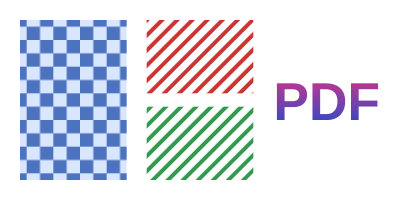
- CreateTilingPattern creates a tiling pattern: a cell drawn once with its own content builder, repeated every
xStepandySteppoints. A colored pattern sets its own colors; an uncolored one (isColored: false) is a shape, painted with the color given to SetFillPattern, so one pattern serves for every color. - PdfShadingPattern uses a shading as a color, so that a gradient can fill text or outline a shape.
- A pattern is positioned in the coordinates of the page, not in those of the current transformation: its matrix (
matrixof CreateTilingPattern, of PdfShadingPattern) moves, turns or scales it, as the stripes of the example. - A tiling pattern belongs to its document, like a form. Shadings, functions and shading patterns do not belong to a document: create them once, and use them in several documents.