 Meziantou.Framework
Fonts
editAn embedded font shows any text it has the glyphs of, in any script. Load the font file once with PdfFont.Load, and use it like a standard font:
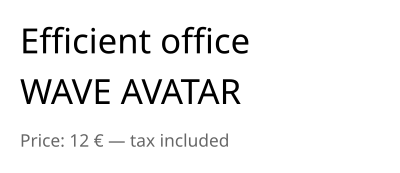
public static void DrawEmbeddedText(string fontPath, string outputPath)
{
    // A TrueType or OpenType font file: the document embeds the glyphs it shows
    var font = PdfFont.Load(fontPath);

    var document = new PdfDocument();
    document.Pages.Add(new PdfSize(300, 130)).CreateContentBuilder()
        .DrawText("Efficient office", font, 26, 15, 90) // the "ffi" and "ff" ligatures of the font
        .DrawText("WAVE AVATAR", font, 26, 15, 52) // kerning: the pairs "WA", "AV" and "TA" are tightened
        .SetFillRgb(0.4, 0.4, 0.4)
        .DrawText("Price: 12 € — tax included", font, 13, 15, 20);

    document.Save(outputPath);
}
What is embedded
- PdfFont.Load reads a
.ttf,.otf,.ttc,.woffor.woff2file, from a path or from bytes; thefaceIndexargument chooses a font of a collection (.ttc). PdfFont.FromFace takes a FontFace ofMeziantou.Framework.Fontsthat is already loaded. - Each document embeds the subset of the glyphs it shows, as a composite font. The subset is written when the document is saved, so it grows with the content until then.
- The document also gets a
ToUnicodemap from the glyphs to their characters: the text can be extracted, searched and copied in readers. A text whose glyphs cannot give it back (a ligature, a right-to-left run) is marked with its replacement text. - A PdfFont does not belong to a document and is thread-safe: load it once, and use it in every document.
Shaping
The text is shaped with the OpenType layout tables of the font: ligatures, kerning, marks, and the complex scripts such as Arabic or Devanagari. It is ordered by the Unicode Bidirectional Algorithm, so a right-to-left text is shown in the right order. Use a font that has the glyphs of the script.
A text already shaped and laid out by another engine is shown with ShowGlyphs, in a text object: the glyph identifiers of the font at their positions, which are not shaped again, and the text they show so that it can still be extracted. ShowGlyphs needs a font loaded from a file, not a standard font.
Choose between a standard and an embedded font
A standard font keeps the file small, but only shows the characters of WinAnsiEncoding. CanEncode tells whether a font has a glyph for every character of a text:
// A standard font shows the characters of WinAnsiEncoding (Latin-1, the euro sign, the typographic quotes...)
var helvetica = PdfFont.GetStandardFont(PdfStandardFont.Helvetica);
var font = helvetica.CanEncode(text) ? helvetica : PdfFont.Load(fontPath);
Showing a character a font has no glyph for throws ArgumentException. The PDF/A and PDF/UA documents must embed their fonts: the standard fonts cannot be used.
Fonts that cannot be embedded
PdfFont.Load throws:
- InvalidFontException when the file is not a valid font;
- UnsupportedPdfFeatureException when its outlines cannot be embedded (CFF2 and bitmap fonts) or when its license does not allow embedding;
ArgumentOutOfRangeExceptionwhenfaceIndexis not a font of the file.
The instances of variable fonts are not embedded.