 Meziantou.Framework
Creating documents
editA document is created empty, pages are added to it, and the content of each page is written by a content builder: paths and colors, text, images, gradients and transparency. Then the document is saved.
Create a document
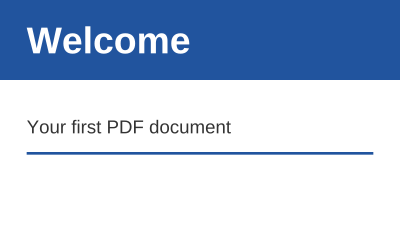
public static void CreateCard(string outputPath)
{
    var document = new PdfDocument();
    document.Information.Title = "Welcome";

    // A page of 300 by 180 points (1 point is 1/72 inch); the origin is its lower-left corner
    var page = document.Pages.Add(new PdfSize(300, 180));
    var bold = PdfFont.GetStandardFont(PdfStandardFont.HelveticaBold);
    var regular = PdfFont.GetStandardFont(PdfStandardFont.Helvetica);

    page.CreateContentBuilder()
        .SetFillRgb(0.13, 0.33, 0.62).Rectangle(0, 120, 300, 60).Fill() // a band at the top of the page
        .SetFillGray(1).DrawText("Welcome", bold, 28, 20, 140) // x and y are the start of the baseline
        .SetFillGray(0.2).DrawText("Your first PDF document", regular, 14, 20, 80)
        .SetStrokeRgb(0.13, 0.33, 0.62).SetLineWidth(2).MoveTo(20, 65).LineTo(280, 65).Stroke();

    document.Save(outputPath);
}
new PdfDocument() is an empty PDF 1.7 document without pages. The version is raised when the document uses a feature of a later version (AES-256 encryption needs PDF 2.0, for instance). A document supports one operation at a time: it is not thread-safe. Fonts, images and graphics states do not belong to a document: create them once, and use them in as many documents and threads as needed.
Pages and sizes
Pages.Add adds a page of a size, Pages.Insert inserts one, and Pages.RemoveAt removes one:
var document = new PdfDocument();
var letter = document.Pages.Add(PdfSize.Letter); // 8.5 x 11 inches: 612 x 792 points
var landscape = document.Pages.Add(PdfSize.A4.ToLandscape()); // 297 x 210 mm
var label = document.Pages.Add(PdfSize.FromMillimeters(100, 50));
var cover = document.Pages.Insert(0, PdfSize.A4); // the new first page

// The crop box is the region viewers show and print: here, the label without a margin of 18 points (1/4 inch)
label.CropBox = new PdfRectangle(18, 18, label.MediaBox.Width - 18, label.MediaBox.Height - 18);

// A page drawn in portrait, shown turned 90 degrees clockwise
letter.Rotation = 90;

document.Pages.RemoveAt(document.Pages.IndexOf(cover));- PdfSize has the common sizes (A3, A4, A5, Letter, Legal), FromMillimeters, and ToLandscape, which puts the greater dimension in the width.
- The media box (MediaBox) is the size of the page. The crop box (CropBox) is the region viewers show and print; it is the media box unless it is set.
- Rotation turns the page clockwise when it is shown, by 0, 90, 180 or 270 degrees. The content keeps its coordinates.
Coordinates
Positions and sizes are in points, 1/72 inch: an A4 page is 595 by 842 points, a Letter page 612 by 792. The origin is the lower-left corner of the page, x grows to the right and y upward, so the top of a page is at its height. Text is positioned by the start of its baseline.
The transformation of the graphics state changes these coordinates for what follows: Translate, Rotate (degrees, counterclockwise), Scale and Transform (any PdfMatrix). See Shapes and colors.
The content builder
PdfPage.CreateContentBuilder returns a builder that appends a content stream to the page. Its methods write the operators of PDF, and return the builder so that the calls can be chained. The fonts, images, forms and patterns it uses are added to the resources of the page.
- The graphics state holds the current colors, line style, transformation, clip, font and transparency. SaveGraphicsState saves it, and RestoreGraphicsState goes back to it: wrap the changes that apply to one part of the page between them. GraphicsStateDepth is the number of saves not restored yet.
- The builder checks the structure. The text operators are only allowed between BeginText and EndText, a text is shown only once a font is set, and RestoreGraphicsState and EndMarkedContent need a matching call: a mistake throws
InvalidOperationExceptionwhen it is made, instead of writing a file that readers reject. - The content of a page can be extended. When the page already has content, a new builder wraps it between a save and a restore of the graphics state first, so that the new content starts from the default state. See Modifying documents.
- Operators without a method can be written with AppendRawContent, which the builder does not check, and marked content with BeginMarkedContent, MarkPoint and EndMarkedContent.
Save the document
Save writes the document to a file or a stream, SaveAsync to a stream, and ToByteArray to an array. The save writes the objects that can be reached from the catalog, so the objects of a removed page are not written. The options choose how the file is written:
// The default: compressed streams, object streams and a cross-reference stream (PDF 1.5 and later)
var compact = document.ToByteArray();

// A file for older readers: a cross-reference table and a PDF 1.4 header
var compatible = document.ToByteArray(new PdfSaveOptions { UseObjectStreams = false, Version = PdfVersion.Pdf14 });

// Content streams left as text, to read them in an editor
var readable = document.ToByteArray(new PdfSaveOptions { CompressStreams = false });

// Linearized for fast web view: a viewer shows the first page before the file is downloaded
var web = document.ToByteArray(new PdfSaveOptions { Linearize = true });| Option | Default | Effect |
|---|---|---|
| CompressStreams | true | Compresses the streams that have no filter with FlateDecode |
| UseObjectStreams | true | Writes the objects in object streams with a cross-reference stream (PDF 1.5); false writes a cross-reference table |
| Linearize | false | Writes a linearized file for fast web view: the first page comes first, with hint tables, so that a viewer shows each page before the file is downloaded. It uses cross-reference tables, writes the inherited attributes of the page tree on the pages, and cannot be encrypted or written incrementally |
| Version | null | The version of the header; null for the version of the document, raised to what the options need |
Save writes the file to the stream or the file as it is serialized, through a buffer of bounded size, so that a large document is not held in memory as one array; when the save fails, the stream may contain the beginning of the file (Save(path) deletes the incomplete file). SaveAsync serializes the document on the calling thread into blocks of memory, then writes them asynchronously: its cancellation token is observed between the objects and between the blocks. The data a document read with OpenSeekable has not loaded is not copied into these blocks: it is read from the stream of the document when the blocks are written.
The output depends only on the document and the options: the library writes no date, no random value and not its own version (Information.Producer is empty unless you set it), so a test can compare the files it writes.
In this section
- Shapes and colors: paths, fills and outlines, colors, line styles, transformations and clips.
- Text: the standard fonts, positioning, aligning, wrapping and hyphenating text, and the text state.
- Fonts: embed TrueType and OpenType fonts, for any language.
- Images: draw JPEG, PNG and other images.
- Gradients and patterns: shadings, tiling patterns and shading patterns.
- Reusable content: forms, painted as many times as needed.
- Transparency: opacity, blend modes, soft masks and transparency groups.
- Tables: columns, borders, cells broken into lines, and tables that continue on the next pages.