 Meziantou.Framework
Treemaps
editA TreemapChart draws a hierarchy as nested rectangles: each leaf has an area proportional to its value, and each section surrounds its children, with its name and its total in a header (Mermaid treemap):
var diagram = new TreemapChart { Title = "Sales by product" };
var electronics = diagram.AddNode("Electronics");
electronics.AddChild("Phones", 50);
electronics.AddChild("Computers", 30);
electronics.AddChild("Accessories", 20);
var clothing = diagram.AddNode("Clothing");
clothing.AddChild("Men's", 40);
clothing.AddChild("Women's", 40);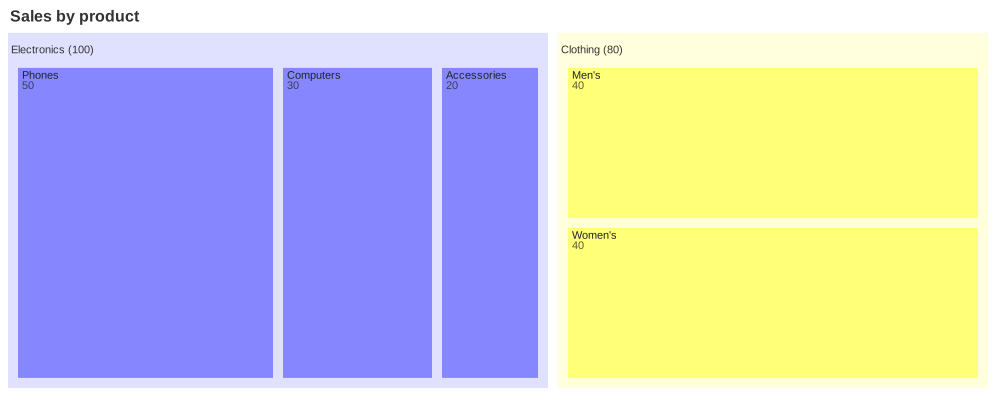
Sections and leaves
AddNode adds a top-level node, and AddChild a node under a section. As in Mermaid, a TreemapNode with a Value is a leaf, and a node without one is a section, whose value is the total of its children. The values are positive numbers; a leaf or a section whose value is 0 has no area, so it is not drawn.
The chart is drawn with the TreemapMark<T> of Meziantou.Framework.Charts, whose squarified layout is the one of d3-hierarchy that Mermaid uses: the nodes of each section are sorted by decreasing value, then placed in rows whose rectangles are as square as possible. A node that is twice in the tree is drawn once.
| Property | Description | Default |
|---|---|---|
| NodeWidth | A tenth of the width of the treemap, in pixels | 100 |
| NodeHeight | A tenth of the height of the treemap, in pixels | 40 |
| InnerPadding | The space between the nodes of a section, in pixels | 10 |
| DiagramPadding | The space around the treemap, in pixels | 8 |
The treemap is laid out in 1,000 by 400 pixels by default. As in Mermaid, every section, the hidden root included, leaves a 35-pixel header above its children, where its name is drawn, and 10 pixels on its other sides; the image is cut to the top-level nodes, with DiagramPadding around them, under the title.
Colors and labels
The colors are the palette of the Theme, as Mermaid gives them: each section name takes the next color, from the top-level sections down, and a leaf takes the color of its section. A top-level leaf, which Mermaid leaves transparent, takes the color of its own name. A section is drawn in a light shade of its color behind its children, with its name in its header; a leaf is drawn in its color, with its name and its value when they fit.
ValueFormat formats the values with a format specifier of d3-format, as Mermaid does: , (the default) adds thousands separators, .1f writes one decimal, .0% a percentage, and $0,0 or $.2f add a dollar sign. A section writes its total after its name, as Clothing (80), and a leaf writes its value under its name. ShowValues hides the values. The tooltip of a node is its path and its formatted value.
ClassDefinitions holds styles by class name, and the CssClass of a node applies one. The fill and the opacity of a style color the node; its border, its text color and its font are kept, so MermaidWriter writes them back, but they are not drawn.
Customize the drawing
ToPlot returns the Plot that draws the chart: a single TreemapMark<T> whose nodes carry the TreemapNode they draw, an ordinal color scale that gives each node its color, and no legend. Change the mark, for instance its tiling, then draw the plot:
var chart = new TreemapChart { Title = "Sales by product" };
var electronics = chart.AddNode("Electronics");
electronics.AddChild("Phones", 50);
electronics.AddChild("Computers", 30);
chart.AddNode("Clothing").AddChild("Shoes", 40);

var plot = chart.ToPlot();
var mark = (TreemapMark<TreemapNode?>)plot.Marks[0];
mark.Tiling = TreemapTiling.SliceDice;
var svg = plot.ToSvg();
Mermaid syntax
var diagram = (TreemapChart)MermaidDocument.Parse("""
    treemap
      title Sales by product
      "Electronics"
          "Phones": 50
          "Computers": 30
          "Accessories": 20
      "Clothing"
          "Men's": 40
          "Women's": 40
    """).Content;
treemap and treemap-beta are read the same. A line is a quoted name (between double or single quotes, without escapes): a section, or a leaf when : value (or , value) follows it. The indentation makes the tree as in Mermaid: a node is a child of the last section above it that is less indented, so a node more indented than a leaf is a child of the section of the leaf. A value is made of digits and points, the commas are ignored (1,000.5), and it stops at a second point or an underscore, as JavaScript reads it. :::class after a node sets its class, and classDef name fill:#f96,stroke:#333; defines one (the name has at least two characters, as in Mermaid). The parser reads the title and the accessibility statements, and diagramPadding, padding, nodeWidth, nodeHeight, showValues and valueFormat in the treemap section of the configuration.
Mermaid reads several nodes on a line and rejects a line that ends with spaces; here, a line holds one node, and the spaces at the end of a line are ignored. A value that is not a number is an error, where Mermaid draws nothing.