 Meziantou.Framework
Show an image while it downloads
editSome files store an image at increasing levels of detail: a coarse version comes first, then finer ones. A viewer can show the coarse version as soon as its bytes arrive, as a browser does with a slow download. The readers of the library give these intermediate renderings with ReadFrameRefinementInto.
Read the renderings of a frame
Open a reader on the stream, create an image of the size of the canvas, and call ReadFrameRefinementInto until it returns the final rendering. Each call writes a complete image of the frame's size into your image, and returns a FrameRefinement that describes it:
public static int ShowWhileReading(Stream input, Action<Image<Rgba32>, FrameRefinement> show)
{
    using var reader = Image.OpenReader<Rgba32>(input);
    using var image = new Image<Rgba32>(reader.Info.Width, reader.Info.Height);
    var renderings = 0;

    // Each call writes a full image: coarse at first (Downsampling 8, then 4, 2), then the frame itself (IsFinal).
    // A file that is not progressive, or another format, gives its frame at once. An input that ends early gives the
    // renderings it has, then throws: truncation is never a clean end.
    while (reader.ReadFrameRefinementInto(image) is { } refinement)
    {
        show(image, refinement);
        renderings++;
        if (refinement.IsFinal)
            break;
    }

    return renderings;
}
The first three renderings of a progressive JPEG file, then the frame itself:
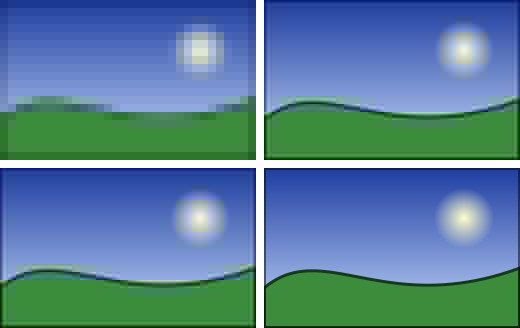
| FrameRefinement property | Meaning |
|---|---|
| IsFinal | true when the image holds the frame itself: the same pixels as ReadFrameInto. The next call starts the next frame of an animation. |
| Downsampling | How coarse the rendering is in each direction: 8 when it has one value per block of 8x8 pixels, then 4 and 2, and 1 for full detail. The image always has the size of the frame. |
| CompletedPasses | The number of passes or scans of the frame that the rendering holds. |
ReadFrameRefinementIntoAsync does the same with asynchronous I/O and a CancellationToken. ReadFrame and ReadFrameInto can be called at any time to skip the remaining renderings and read the frame itself. See Streaming readers and writers for the readers.
What each format gives
| Input | Renderings before the frame |
|---|---|
| Progressive JPEG | One after each scan, once every color component has its first scan |
| Interlaced PNG (Adam7) | The passes completed by each piece of data that arrives; each missing pixel takes the value of a pixel of its block |
| Progressive JPEG XL | The image at one eighth of its detail, then one rendering for each pass |
| Any other file | None: the first call returns the frame, with IsFinal set |
- An interlaced PNG file gives renderings as its data arrives. When the whole file is already available, from a local file or bytes in memory, the first call can return the frame itself.
- A small JPEG XL frame stored in a single section gives the frame at once.
- The number of renderings and their pixels can change from one version of the library to the next: only the final rendering is guaranteed. Do not compare intermediate renderings in tests.
- The renderings count toward the MaxTotalPixels limit, like frames. See Resource limits.
To write files that can be shown this way, see the Process option of JPEG, the Interlaced option of PNG and the Progressive option of JPEG XL.
Partial downloads
An input that ends before the frame is complete is malformed, never a clean end. When the format allows it, the read that reaches the end of the input returns a last intermediate rendering of what was decoded, as a browser shows a partial download, and the next read throws an InvalidImageContentException:
- the coefficients decoded so far of a progressive JPEG frame;
- the passes decoded so far of an interlaced PNG image;
- the rows decoded so far of a GIF image, of a PNG image that is not interlaced, of a JPEG frame coded in one scan and of a still lossy WebP image (the other rows are zero).
Other inputs throw at once. The renderings returned before the error stay valid: keep showing the last one, and report the error. See Handling errors.