 Meziantou.Framework
Layers, masks and filters
editMost effects take a callback: what the callback draws is drawn on a layer, the effect applies to the layer as a whole, then the layer is drawn on the canvas. Effects nest in any order, with transformations too.
Clip a drawing to a shape
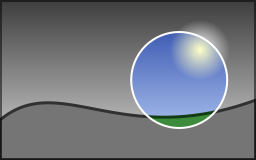
canvas.Clip(path, callback) (or a rectangle) runs a callback whose drawings only change the inside of the path. The clip lasts as long as the callback, and a clip started inside another one keeps what both let through.
public static void DrawSpotlight(string inputPath, string outputPath)
{
    using var image = Image.Load(inputPath);
    var spot = new PointD(image.Width * 0.7, image.Height / 2.0);

    // The image and a circle: with the even-odd rule, the circle is a hole, so the clip is everything around it
    var around = new VectorPathBuilder()
        .AddRectangle(new RectangleD(0, 0, image.Width, image.Height))
        .AddCircle(spot, 48)
        .Build();

    image.Draw(canvas =>
    {
        canvas.Clip(around, outside => outside.FilterBackdrop(ColorMatrix.CreateGrayscale()), FillRule.EvenOdd);
        canvas.StrokeCircle(new Pen(Colors.White, 2), spot, 48);
    });

    image.Save(outputPath);
}
- The edge of a clip is antialiased like the edge of a shape.
- A clip takes a fill rule: with FillRule.EvenOdd, a circle inside a rectangle is a hole, so the clip is everything around the circle.
- A rectangle on whole pixels is exact and free. Any other clip keeps one value per pixel of its bounds while it lasts.
Fade a group of shapes: layers
canvas.Layer(opacity, callback) draws the callback on a transparent image of the size of the canvas, then draws that image on the canvas as a whole. Shapes that overlap, drawn one after the other with a translucent paint, show through each other; in a layer they are drawn as they are, then faded together:
public static void DrawBadge(string outputPath)
{
    using var image = new Image<Rgba32>(220, 120, Colors.WhiteSmoke);
    var card = new RectangleD(30, 24, 160, 64);
    var face = new LinearGradientBrush(new PointD(0, 24), new PointD(0, 88), [new GradientStop(0, Rgba32.ParseHex("#4F8EF7")), new GradientStop(1, Rgba32.ParseHex("#2456C8"))]) { ColorSpace = GradientColorSpace.Oklab };
    var shine = new SolidBrush(new Rgba32(255, 255, 255, 90)) { BlendMode = BlendMode.SoftLight };
    var mark = new SolidBrush(Colors.White);

    image.Draw(canvas =>
    {
        // The card and its shadow: black at a third of its opacity, 6 pixels down, blurred
        canvas.Shadow(new Rgba32(0, 0, 0, 85), new PointD(0, 6), 5, shadowed =>
            shadowed.FillRoundedRectangle(face, card, new CornerRadii(18, 18, 4, 18)));

        // A light that lightens the top of the card without hiding it, only where the card is
        canvas.Clip(new VectorPathBuilder().AddRoundedRectangle(card, new CornerRadii(18, 18, 4, 18)).Build(), clipped =>
            clipped.FillEllipse(shine, new PointD(110, 20), 120, 34));

        // Two disks that overlap, faded together: they do not show through each other
        canvas.Layer(0.6, layer =>
        {
            layer.FillCircle(mark, new PointD(96, 56), 16);
            layer.FillCircle(mark, new PointD(118, 56), 16);
        });
    });

    image.Save(outputPath);
}
- A layer has the coordinates of the canvas. Layers and clips nest, and a clip that is active when a layer starts applies to the layer as a whole.
canvas.Layer(bounds, opacity, callback)holds the pixels of a rectangle only: what the callback draws outside it is lost, and the layer costs the pixels of the rectangle, however large the canvas. Otherwise, start a layer inside a Clip when it covers a small part of a large canvas.- A layer also takes a compositing operator and a blend mode (see below). With an operator other than source-over, the opacity is a coverage of what the operator makes; pass LayerOpacity.Group for the group opacity of CSS, which fades the layer, then combines it.
Shadows, blurs and masks
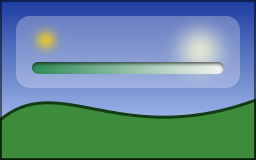
public static void DrawGlassPanel(string photoPath, string outputPath)
{
    using var image = Image.Load(photoPath);
    var bounds = new RectangleD(16, 16, image.Width - 32, 72);
    var panel = new VectorPathBuilder().AddRoundedRectangle(bounds, 14).Build();
    var track = new RectangleD(bounds.X + 16, bounds.Bottom - 26, bounds.Width - 32, 12);
    var fade = new LinearGradientBrush(new PointD(track.X, 0), new PointD(track.Right, 0), [new GradientStop(0, Colors.White), new GradientStop(1, Colors.Black)]);

    image.Draw(canvas =>
    {
        // Frosted glass: what is behind the panel is blurred, then lightened, inside the panel only
        canvas.Clip(panel, glass =>
        {
            glass.BlurBackdrop(6);
            glass.Fill(new Rgba32(255, 255, 255, 70));
        });

        // A light on the panel, out of focus
        canvas.Blur(5, glow => glow.FillCircle(Colors.Gold, new PointD(bounds.X + 30, bounds.Y + 24), 8));

        // The track of a gauge, pressed into the panel: the shadow of its edge falls inside it, from the top
        canvas.InnerShadow(new Rgba32(0, 0, 0, 150), new PointD(0, 2), 1.5, well =>
        {
            well.FillRoundedRectangle(Colors.WhiteSmoke, track, 6);

            // Its level fades out to the right: it is kept by the luminance of a gradient from white to black
            well.Mask(
                mask => mask.Fill(fade),
                level => level.FillRoundedRectangle(Colors.SeaGreen, track, 6),
                MaskMode.Luminance);
        });
    });

    image.Save(outputPath);
}
| Method | Draws |
|---|---|
Shadow(color, offset, blur, callback) | The drawings with their shadow under them: a drop shadow, or a glow without offset |
InnerShadow(color, offset, blur, callback) | The drawings with a shadow inside them, for a shape that looks cut out or pressed in |
Blur(blur, callback) | The drawings out of focus |
BlurBackdrop(blur) | What is already drawn, blurred where the clip lets drawings through: frosted glass |
Mask(mask, content, mode) | The content, kept in proportion to what the mask draws |
- A shadow is the shape of everything the callback drew, as a whole, blurred by a Gaussian blur of the given standard deviation, moved by the offset and painted with the color: the alpha of the color makes it translucent.
- A blur blurs colors and alpha together: a transparent pixel does not darken its neighbors. Shadows and blurs take a drawing that reaches an edge of the canvas to continue beyond it, so they do not fade along that edge.
- MaskMode.Alpha (the default) keeps the content where the mask is opaque, whatever its colors: a shape, a text, a gradient to a transparent color. MaskMode.Luminance, as the masks of SVG, keeps it where the mask is light: white keeps, black removes, and a gradient from white to black fades.
- The cost grows with the pixels the clip shows and with the blur: draw the shadow of a small shape inside Clip, with room for the shadow.
Change colors with a color filter
canvas.Filter(matrix, callback) gives new colors to what the callback draws, as a whole: a photo drawn in gray levels, an icon in the color of a theme, a disabled button. canvas.FilterBackdrop(matrix) changes what is already drawn, where the clip lets drawings through, as the spotlight above does with ColorMatrix.CreateGrayscale(). The matrices (gray levels, sepia, a tint, brightness, contrast, saturation, a negative…) are those of Color adjustments and effects.
Apply CSS filters and backdrop filters
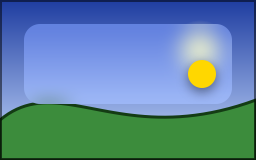
A Filter is what the filter and backdrop-filter properties of CSS apply:
public static void DrawFrostedCard(string photoPath, string outputPath)
{
    using var image = Image.Load(photoPath);
    var card = new RectangleD(24, 24, image.Width - 48, 80);
    var shape = new VectorPathBuilder().AddRoundedRectangle(card, 16).Build();

    // backdrop-filter: blur(16px) saturate(1.4), and filter: drop-shadow(0 4px 12px rgb(0 0 0 / 47%))
    var glass = new FilterChain(new BlurFilter(8), new ColorMatrixFilter(ColorMatrix.CreateSaturation(1.4)));
    var lift = new DropShadowFilter(new Rgba32(0, 0, 0, 120), new PointD(0, 4), 6);

    image.Draw(canvas =>
    {
        // The card starts with what is behind it, blurred, inside its rounded corners, then is lightened
        canvas.Clip(shape, clipped => clipped.BackdropLayer(glass, card, 1, panel => panel.Fill(new Rgba32(255, 255, 255, 60))));

        // The badge and its shadow, as a whole
        canvas.Filter(lift, badge => badge.FillCircle(Colors.Gold, new PointD(card.Right - 30, card.Bottom - 30), 14));
    });

    image.Save(outputPath);
}
| Filter | Does |
|---|---|
| BlurFilter | A Gaussian blur, with one standard deviation or one per axis, and an EdgeMode for what it reads beyond the canvas |
| ColorMatrixFilter | A color matrix: the filter functions of CSS that change colors |
| DropShadowFilter | A shadow of the alpha, moved, blurred and colored, under the drawing (or alone, with ShadowOnly) |
| FilterChain | Several filters, applied one after the other |
canvas.Filter(filter, callback)filters what the callback draws, including what it draws beyond the canvas within the reach of the filter: a shape out of view casts its shadow on the canvas.canvas.BackdropLayer(filter, bounds, opacity, callback)starts a layer with what is already drawn behind a rectangle, filtered; the callback draws on it, then it is drawn with its opacity. The clip around it gives it its shape.- The lengths of a filter are lengths of the drawing: a transformation that enlarges the drawing enlarges its blurs and its offsets.
filter.TryGetBounds(bounds, out result)gives the rectangle a filter paints in when what it filters stays in a rectangle: the size of an image that keeps the whole shadow.
Apply SVG filter graphs
A FilterGraph is the filter element of SVG: primitives computed in order, each one reading the drawing (FilterInput.SourceGraphic), its alpha (FilterInput.SourceAlpha), the result of the primitive before it (the default) or of any earlier one (FilterInput.FromResult(index)):
public static void DrawGlowingRing(string outputPath)
{
    using var image = new Image<Rgba32>(160, 160, new Rgba32(16, 20, 40));

    // <feMorphology in="SourceAlpha" operator="dilate" radius="3"/> <feGaussianBlur stdDeviation="6"/>
    // <feFlood flood-color="#33ccff"/> <feComposite operator="in" in2="(the blur)"/>
    // <feMerge> <feMergeNode in="(the glow)"/> <feMergeNode in="SourceGraphic"/> </feMerge>
    var glow = new FilterGraph(
        new MorphologyPrimitive(FilterMorphologyOperator.Dilate, 3, 3) { Input = FilterInput.SourceAlpha },
        new GaussianBlurPrimitive(6),
        new FloodPrimitive(new Rgba32(51, 204, 255)),
        new CompositePrimitive(FilterCompositeOperator.In, FilterInput.FromResult(1)),
        new MergePrimitive(FilterInput.FromResult(3), FilterInput.SourceGraphic));

    image.Draw(canvas => canvas.Filter(glow, ring => ring.StrokeCircle(new Pen(new Rgba32(255, 255, 255), 6), new PointD(80, 80), 40)));
    image.Save(outputPath);
}
| Primitive | SVG element |
|---|---|
| FloodPrimitive, ImagePrimitive | feFlood, feImage (what a callback draws) |
| OffsetPrimitive, TilePrimitive, MergePrimitive | feOffset, feTile, feMerge |
| ColorMatrixPrimitive, ComponentTransferPrimitive | feColorMatrix, feComponentTransfer |
| CompositePrimitive, BlendPrimitive | feComposite, feBlend |
| GaussianBlurPrimitive, DropShadowPrimitive, MorphologyPrimitive | feGaussianBlur, feDropShadow, feMorphology |
| ConvolveMatrixPrimitive, DisplacementMapPrimitive, TurbulencePrimitive | feConvolveMatrix, feDisplacementMap, feTurbulence |
| DiffuseLightingPrimitive, SpecularLightingPrimitive | feDiffuseLighting, feSpecularLighting, with a DistantLight, a PointLight or a SpotLight |
Each primitive computes in its Subregion, within the Region of the filter (the canvas by default). Primitives compute in linear light by default, as color-interpolation-filters of SVG, or in sRGB with ColorSpace.
Blend modes
The BlendMode of a brush mixes the color of its paint with the color of the pixels under it. Each disk is the same magenta, painted with Normal, Multiply, Screen, Overlay, Difference and Color:
public static void DrawBlendModes(string outputPath)
{
    BlendMode[] modes = [BlendMode.Normal, BlendMode.Multiply, BlendMode.Screen, BlendMode.Overlay, BlendMode.Difference, BlendMode.Color];
    var background = new LinearGradientBrush(new PointD(0, 0), new PointD(0, 70), [new GradientStop(0, Colors.Gold), new GradientStop(1, Colors.Teal)]);

    using var image = new Image<Rgba32>(300, 70);
    image.Draw(canvas =>
    {
        canvas.Fill(background);
        for (var i = 0; i < modes.Length; i++)
        {
            // The same color each time: only the blend mode of the brush changes
            var paint = new SolidBrush(Colors.MediumVioletRed) { BlendMode = modes[i] };
            canvas.FillCircle(paint, new PointD(25 + (i * 50), 35), 20);
        }
    });

    image.Save(outputPath);
}
| BlendMode | Effect |
|---|---|
| Multiply | Darkens: a shadow, a texture, a tint over a photo |
| Screen | Lightens: a glow |
| Overlay, HardLight, SoftLight | Darken or lighten, by the lightness of the pixel or of the paint |
| Darken, Lighten | Keep the darker or the lighter color |
| ColorDodge, ColorBurn | Brighten or darken the pixel to reflect the paint |
| Difference, Exclusion | Invert |
| Hue, Saturation, Color, Luminosity | Take some of the three from the paint and the rest from the pixel: Color tints a gray image |
These are the blend modes of CSS and of image editors, with the formulas of the W3C. A paint keeps its own color on a transparent pixel, since there is nothing to mix it with. canvas.Layer takes a blend mode too, to mix a whole drawing at once.
Erase and combine with compositing operators
A brush is painted over the pixels unless its CompositeMode says otherwise. DestinationOut makes an eraser:
public static void DrawTicket(string outputPath)
{
    // A paint that removes the pixels where it is opaque, whatever its color
    var eraser = new SolidBrush(Colors.Black) { CompositeMode = CompositeMode.DestinationOut };
    var perforation = new Pen(eraser, 4) { DashPattern = [0, 8], LineCap = LineCap.Round };

    // The image starts transparent
    using var image = new Image<Rgba32>(240, 110);
    image.Draw(canvas =>
    {
        canvas.FillRoundedRectangle(Colors.Goldenrod, new RectangleD(10, 10, 220, 90), 8);

        // Two notches and a line of holes: the pixels become transparent again
        canvas.FillCircle(eraser, new PointD(170, 10), 10);
        canvas.FillCircle(eraser, new PointD(170, 100), 10);
        canvas.StrokeLine(perforation, new PointD(170, 26), new PointD(170, 86));
    });

    image.Save(outputPath);
}
| CompositeMode | Result |
|---|---|
| SourceOver (the default) | The paint over the pixels |
| Source | The paint replaces the pixels, alpha included: a transparent color erases |
| DestinationOver | The paint behind the pixels |
| DestinationIn | The pixels kept where the paint is opaque: a mask |
| DestinationOut | The pixels erased where the paint is opaque: an eraser, with any shape and any gradient |
| SourceIn, SourceOut, SourceAtop, DestinationAtop, Xor | The operators of Porter and Duff that combine both |
| Clear | The pixels erased, whatever the paint |
| Plus | The paint added to the pixels, light to light, up to white (plus-lighter of CSS) |
An operator changes only what a shape covers: a pixel the shape does not touch never changes. On a frame without alpha, the pixels stay opaque and get the color the result would have over black, so an eraser darkens them. A layer drawn with DestinationIn makes a mask of any drawing, a text included, and with DestinationOut an eraser of it. canvas.Clear(color) replaces every pixel by a color (Colors.Transparent erases the canvas).
Transparency groups
canvas.Group(options, content, mask) composites its drawings as a whole, as the transparency groups of PDF do. GroupOptions sets the opacity, the blend mode, the mask mode and the bounds of the group:
- An isolated group (IsIsolated, the default) starts transparent, as a layer. A non-isolated group starts with the pixels under it, which its blend modes mix with.
- In a knockout group (IsKnockout), each element drawn with
KnockoutElement(opacity, content, mask)replaces the elements before it where it covers them: two overlapping translucent squares show the second one only where they overlap.