 Meziantou.Framework
Drawing
editThe library draws vector graphics on images: shapes and paths filled with colors, gradients, images or patterns, outlines drawn with pens, transformations, clips, layers, shadows, masks and filters. Edges are antialiased with the exact area of each pixel a shape covers, and the result is the same on every platform. The drawing types are in the Meziantou.Framework.Imaging.Drawing namespace; text has its own section, Text.
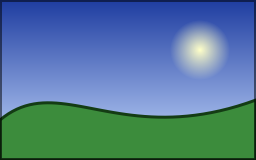
Draw on an image
Create an image (or load one), then draw on it in a callback:
public static void DrawLandscape(string outputPath)
{
    using var image = new Image<Rgba32>(256, 160);

    // Brushes, pens and paths are immutable: create them once and reuse them
    var sky = new LinearGradientBrush(new PointD(0, 0), new PointD(0, 160), [new GradientStop(0, new Rgba32(30, 60, 160)), new GradientStop(1, new Rgba32(200, 220, 255))]);
    var sun = new RadialGradientBrush(new PointD(200, 50), 30, [new GradientStop(0, new Rgba32(255, 255, 200)), new GradientStop(1, new Rgba32(255, 180, 0, 0))]);
    var hill = new VectorPathBuilder()
        .MoveTo(0, 160).LineTo(0, 120)
        .CubicBezierTo(60, 70, 120, 150, 256, 100)
        .LineTo(256, 160).Close()
        .Build();
    var outline = new Pen(new Rgba32(20, 60, 20), 3) { LineJoin = LineJoin.Round };
    var frame = new Pen(new Rgba32(0, 0, 0, 128), 2);

    image.Frames[0].Draw(canvas =>
    {
        canvas.Fill(sky); // the whole canvas
        canvas.FillCircle(sun, new PointD(200, 50), 30); // fades to transparent at its edge
        canvas.Fill(new Rgba32(60, 140, 60), hill); // a color converts to a solid brush
        canvas.Stroke(outline, hill);
        canvas.StrokeRectangle(frame, new RectangleD(1, 1, 254, 158)); // centered on its path: from 0 to 2
    });

    image.Save(outputPath);
}
- ImageFrame.Draw hands a DrawingCanvas to a callback, for one frame. Image.Draw does the same for the whole image, and paints every frame and the poster frame identically: see Drawing on animations.
- The callback runs once, while the pixels are leased. The canvas is only valid inside it, and other pixel accesses or geometry changes on the same image throw
InvalidOperationExceptionuntil it returns. - Each call paints over what is already there, in order. A color (Rgba32, Rgba64) converts to a solid brush.
- The canvas works on every pixel format. Brush colors are converted to the pixel format of the frame, and a frame without alpha stays opaque.
Coordinates
Positions are double values in pixels: PointD and RectangleD (the integer Point and Rectangle convert to them implicitly). The origin is the top-left corner and Y grows downward. Integer coordinates are the boundaries between pixels: the pixel (x, y) covers the square from (x, y) to (x + 1, y + 1). So:
- A rectangle on integer coordinates is filled exactly, with no partly painted pixel.
- A line of one pixel is crisp when it runs through the middle of a row or a column: a horizontal line at
y + 0.5. - A pen is centered on the outline it draws: a rectangle stroked with a pen of width 2 at
x = 1covers the pixels from 0 to 2.
Shapes are clipped to the canvas. A coordinate must be finite (ArgumentException) and no larger than 16,777,216 in magnitude (ArgumentOutOfRangeException). Angles are in degrees, and a positive angle turns clockwise on the image. PointD has the usual arithmetic (+, -, *, /, DistanceTo) and RectangleD the usual helpers (Center, Contains, Intersect, Union, Offset, Inflate).
Brushes, pens and paths
What is drawn is described by three kinds of objects, all immutable and safe to share between threads:
| Type | Describes | Page |
|---|---|---|
| Brush | How a shape is painted: a color, a gradient, an image, a pattern | Brushes and pens |
| Pen | How an outline is drawn: a brush, a width, joins, caps, dashes | Brushes and pens |
| VectorPath | Any shape: lines, curves, arcs, several contours | Shapes and paths |
Create them once and reuse them: once the working storage of the canvas has grown to the largest shape, drawing a shape allocates nothing. The overloads that take a state and a static callback avoid the allocation of a closure as well.
Untrusted input and cancellation
Drawing is sequential. The time a shape takes grows with the number of its edges and of the points where they cross, and a very short dash pattern on a large canvas makes millions of dashes. When shapes come from untrusted input, pass a CancellationToken to Draw: it is checked by every shape, every 64 rows, every few thousand crossings and every few hundred dashes. A canceled drawing leaves the shapes already drawn, and the image stays valid.
In this section
- Shapes and paths: rectangles, ellipses, polygons, curves and paths; SVG path data; combine, grow, measure and cut paths.
- Brushes and pens: colors, gradients, images, patterns, and the width, joins, caps, dashes and markers of an outline.
- Transformations: move, turn and scale a drawing; draw in perspective and in 3D.
- Layers, masks and filters: clips, layers, shadows, blurs, masks, color filters, CSS and SVG filters, blend modes and compositing operators.
- Rendering quality: hard edges, linear light, precision, and colors of a color profile.
- Drawing on animations: draw on every frame, or a different drawing on each frame.