 Meziantou.Framework
Getting started
editInstall the package
Add the Meziantou.Framework.Diagrams package to a project:
dotnet package add Meziantou.Framework.DiagramsThe types are in the Meziantou.Framework.Diagrams namespace.
Draw a flowchart
Create a FlowchartDiagram, add nodes and edges, and write the SVG:
var flowchart = new FlowchartDiagram { Title = "Order processing" };
var start = flowchart.AddNode("start", "Order received", FlowchartNodeShape.Stadium);
var check = flowchart.AddNode("check", "Is the payment valid?", FlowchartNodeShape.Diamond);
var ship = flowchart.AddNode("ship", "Ship the order");
var cancel = flowchart.AddNode("cancel", "Cancel the order");

flowchart.AddEdge(start, check);
flowchart.AddEdge(check, ship, "yes");
flowchart.AddEdge(check, cancel, "no");

var svg = flowchart.ToSvg();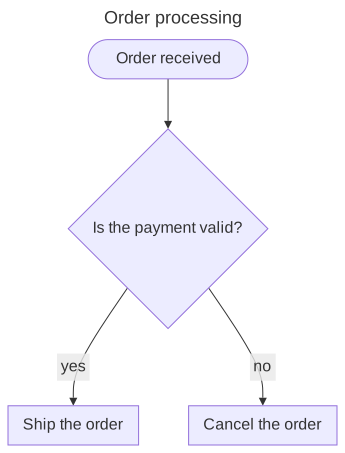
The layout places the nodes in ranks, in the Direction of the flow, and routes the edges between them. WriteSvg writes the SVG to a stream or a writer, and CreateScene returns the layout as drawing primitives (see vector graphics).
From Mermaid text
To draw a diagram written in Mermaid, add the Meziantou.Framework.Mermaid package and parse the text:
dotnet package add Meziantou.Framework.Mermaidvar text = """
---
title: Order processing
config:
theme: forest
---
flowchart LR
start([Order received]) --> check{Payment valid?}
check -->|yes| ship[Ship the order]
check -->|no| cancel[Cancel the order]
""";
var document = MermaidDocument.Parse(text);
var flowchart = (FlowchartDiagram)document.Content;
var svg = flowchart.ToSvg();See Mermaid for the supported syntax.