 Meziantou.Framework
Wardley maps
editA WardleyDiagram draws a Wardley map: the components of a value chain, placed by their visibility to the user, from the bottom to the top, and by their evolution, from genesis on the left to commodity on the right, with their dependencies and their movements (Mermaid wardley-beta). The coordinates are between 0 and 1:
var map = new WardleyDiagram { Title = "Tea Shop Value Chain" };
map.AddAnchor("Business", visibility: 0.95, evolution: 0.63);
map.AddComponent("Cup of Tea", 0.79, 0.61);
map.AddComponent("Tea", 0.63, 0.81);
map.AddComponent("Hot Water", 0.52, 0.80);
map.AddComponent("Kettle", 0.43, 0.35).Inertia = true;
map.AddComponent("Power", 0.10, 0.70).Sourcing = WardleySourcing.Outsource;

map.AddLink("Business", "Cup of Tea");
map.AddLink("Cup of Tea", "Tea");
map.AddLink("Cup of Tea", "Hot Water");
map.AddLink("Hot Water", "Kettle");
map.AddLink("Kettle", "Power").Flow = WardleyFlow.Forward;

map.AddEvolve("Kettle", 0.62);
map.AddEvolve("Power", 0.89);
map.AddNote("Standardising power allows Kettles to evolve faster", 0.30, 0.49);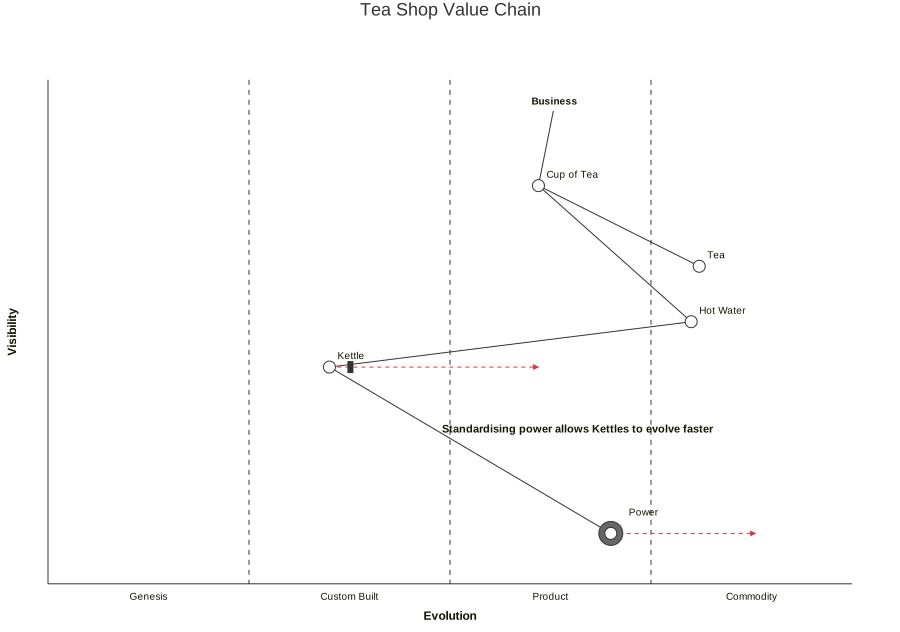
Components
An anchor is a user or a customer whose needs the value chain serves: its name is drawn in bold. A component is a circle with its name above and to its right, or at its LabelOffset, in pixels. Its Sourcing adds a larger circle around it: very light gray for built in house, light gray for bought, dark gray for outsourced, and three small circles for a market. Inertia draws a thick bar on its right.
The elements are found by name, as in Mermaid: an anchor and a component of the same name are a single node, drawn at the position of the component, and the last component of a name gives its position.
Links and movements
A link joins two names. It can be dashed, have a flow drawn as arrowheads, and a Label drawn along the line. A link to a name that is not on the map is not drawn. A movement is a dashed red arrow from a component to the evolution it moves to; the last movement of a component replaces the previous ones.
Pipelines
A pipeline holds the variants of a component at different stages of evolution, at the visibility of the component: they are drawn in a box, joined by a dotted line from the least to the most evolved, and the parent component becomes a square above the middle of the box. A link can use the name of a component of a pipeline.
Stages, notes and forces
The Stages divide the evolution axis with dashed lines: Genesis, Custom Built, Product and Commodity when the list is empty. A stage can have a second name, drawn after a slash, and a Boundary: when every stage has one, the stages end at their boundaries; otherwise they share the axis equally.
A note is a bold text. An annotation is a number in a circle; when the AnnotationsPosition is set, a box lists the texts of the annotations by number, inside the map. The Accelerators and the Deaccelerators are the forces on the evolution, drawn as large arrows pointing right or left, with their name.
Appearance
The map is drawn on a canvas of Width by Height pixels, 900 by 600 by default, with the axes at MapPadding pixels from its edges. Anything outside the canvas is cut. ShowGrid divides the map in quarters, NodeRadius sets the size of the components, and AxisFontSize and LabelFontSize the size of the texts. The diagram has no Padding, and its Title is drawn above the canvas. The lines and the texts follow the theme; the movements are red.
Mermaid syntax
var map = (WardleyDiagram)MermaidDocument.Parse("""
    wardley-beta
    title Tea Shop Value Chain

    anchor Business [0.95, 0.63]
    component Cup of Tea [0.79, 0.61]
    component Tea [0.63, 0.81]
    component Hot Water [0.52, 0.80]
    component Kettle [0.43, 0.35] (inertia)
    component Power [0.10, 0.70] (outsource)

    Business -> Cup of Tea
    Cup of Tea -> Tea
    Cup of Tea -> Hot Water
    Hot Water -> Kettle
    Kettle +> Power

    evolve Kettle 0.62
    evolve Power 0.89

    note "Standardising power allows Kettles to evolve faster" [0.30, 0.49]
    """).Content;
The coordinates are written [visibility, evolution], the vertical position first. A value up to 1 is a fraction of the axis, and a value between 1 and 100 a percentage; the coordinates of the components need a decimal point (0.5, 50.0). The statements are:
| Statement | Example |
|---|---|
| Canvas size | size [1100, 800] |
| Stages | evolution Genesis@0.25 / Concept -> Custom -> Product -> Commodity |
| Anchor | anchor Customer [0.95, 0.9] |
| Component | component API [0.6, 0.7] label [-50, 10] (buy) (inertia) |
| Link | A -> B, A -.-> B (dashed), A +> B, A +< B, A +<> B (flows), A +'text'> B, A -> B; label |
| Movement | evolve API 0.85 |
| Pipeline | pipeline Database {, a component Name [0.5] per line, then } |
| Note | note "text" [0.4, 0.5] |
| Annotations | annotations [0.1, 0.9], then annotation 1,[0.6, 0.65] "text" |
| Forces | accelerator "Cloud" [0.2, 0.85], deaccelerator "Legacy" [0.4, 0.35] |
A name is written as is, with spaces and hyphens, or between quotes. As in Mermaid, the keywords are read before the names, so a name that starts with one of them, such as builder (build) or notes (note), needs quotes. In a quoted text and in a label, #35; and the other entity codes are characters. A pipeline needs a component or an anchor of its name, and Mermaid checks the target of a movement only when its component is on the map. The parser reads width, height, padding, nodeRadius, nodeLabelOffset, axisFontSize, labelFontSize and showGrid in the wardley-beta section of the configuration; size replaces width and height.
The circles of the sourcing are gray as the renderer of Mermaid draws them; the style sheet of Mermaid 12.3.0 overrides them with the color of the components, which makes them alike. The writer writes the elements grouped by kind, in the order Mermaid reads them, and the characters a text cannot hold as entity codes.