 Meziantou.Framework
Venn diagrams
editA VennDiagram draws sets as circles, and the overlaps of the sets as the regions where the circles cross (Mermaid venn-beta). Add the sets with AddSet, then their overlaps with AddOverlap:
var diagram = new VennDiagram { Title = "What makes a good feature" };
diagram.AddSet("Desirable");
diagram.AddSet("Feasible");
diagram.AddSet("Viable");
diagram.AddOverlap(["Desirable", "Feasible"], "Buildable");
diagram.AddOverlap(["Feasible", "Viable"], "Sustainable");
diagram.AddOverlap(["Desirable", "Viable"], "Marketable");
diagram.AddOverlap(["Desirable", "Feasible", "Viable"], "Ship it");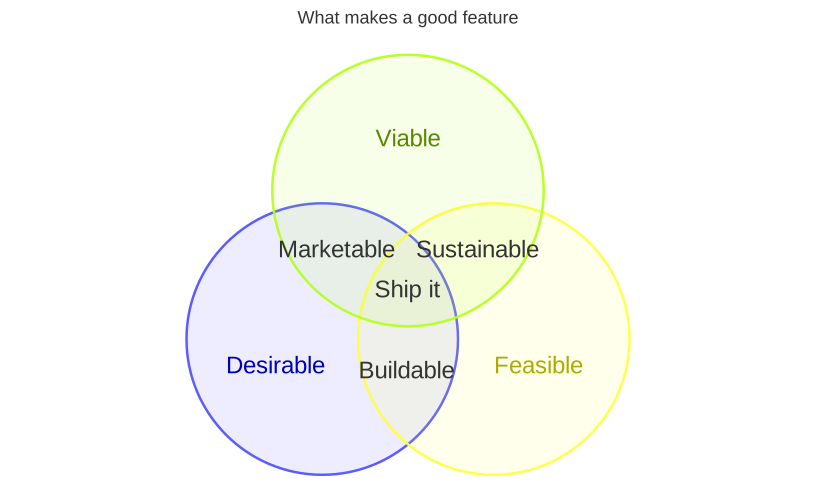
Areas and sizes
Each VennArea is a set, or the overlap of several sets, with a Label and a Size. A set without a label shows its identifier; an overlap without a label shows nothing. The size is the area of the circle, or of the overlap, relative to the other sizes: without one, a set has a size of 10 and an overlap of two sets 2.5, as in Mermaid. A set of size 0 is not drawn, nor its overlaps.
The circles are laid out with the algorithm of venn.js, the library Mermaid uses: the circles are moved until their overlaps have the requested areas, as closely as circles allow. An overlap of three sets or more adds the overlaps of its pairs of sets, with a quarter of the size of the smaller set, so the circles cross where the overlap is drawn. The sets that do not overlap are packed side by side. The layout is deterministic: the same diagram gives the same drawing on every platform.
The diagram is 800 by 450 pixels, as in Mermaid; set Width and Height to change it. The texts and the outlines grow with the width.
Texts and styles
AddText places a text inside an area: the texts of an area are laid out in a grid around its label, and wrap to the width of their cell. A VennStyle sets the fill, the opacity of the fill, the outline and the color of the label of an area, or the color of a text, by its identifier:
var diagram = new VennDiagram();
diagram.AddSet("A", "Frontend", size: 20);
diagram.AddSet("B", "Backend", size: 12);
diagram.AddOverlap(["A", "B"], "Shared", size: 3);
diagram.AddText(["A"], "A1", "React");
diagram.AddText(["A"], "A2", "Design Systems");
diagram.AddText(["B"], "B1", "API");
diagram.AddText(["A", "B"], "AB1", "OpenAPI");
diagram.AddStyle(["A"], new VennStyle { Fill = "#ff6b6b" });
diagram.AddStyle(["A", "B"], new VennStyle { Fill = "#ffe08a", TextColor = "#333333" });
diagram.AddStyle(["A1"], new VennStyle { TextColor = "red" });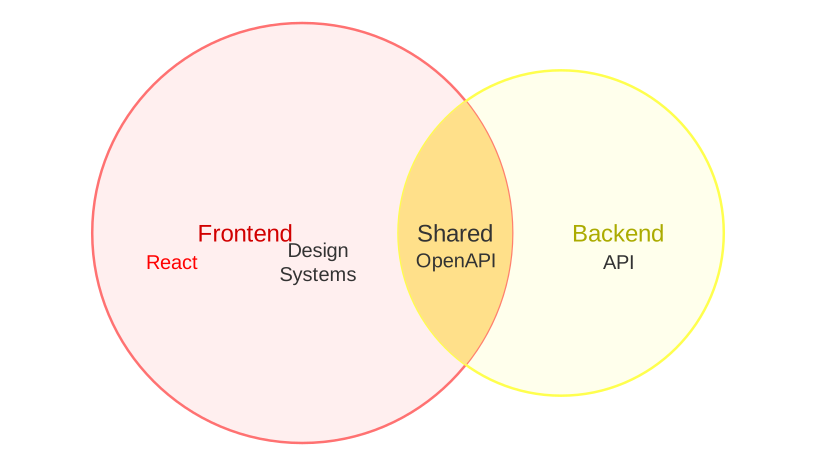
A circle is filled with its color at an opacity of 0.1, and outlined with it; its label is the color, darker (lighter in a dark theme). An overlap is transparent, unless a style fills it. The colors of the sets come from the theme, in the order of the sets, and SetColors replaces them (Mermaid venn1 to venn8).
Mermaid syntax
var diagram = (VennDiagram)MermaidDocument.Parse("""
    venn-beta
      title Team skills
      set A["Frontend"]:20
        text A1["React"]
        text A2["Design Systems"]
      set B["Backend"]:12
        text B1["API"]
      union A,B["Shared"]:3
        text AB1["OpenAPI"]
      style A fill:#ff6b6b
      style A,B color:#333
      style A1 color:red
    """).Content;
The keyword venn-beta starts the diagram, and the keywords are read in any case:
set iddeclares a set, andunion a,ban overlap of sets declared before it. An identifier is a word or a quoted string. Both take an optional label,["label"]or[label], and an optional size,:20.text id ["label"]on an indented line after asetor aunionplaces a text in that area;text a,b idnames the sets of the area, at the start of a line.style a,b fill:#ff6b6b, color:redstyles an area, or a text by its identifier, withfill,fill-opacity,stroke,stroke-widthandcolor; the parser warns about the other properties.title textsets the title, which cannot contain#nor;, as the front mattertitle.
The statements need no line break between them. %% starts a comment, and the entity codes (#quot;) are decoded in the strings, the labels and the title. The parser reads width and height in the venn section of the configuration, and the theme variables venn1 to venn8 and vennSetTextColor.
The differences with Mermaid:
- The title is drawn above the circles, as for the other diagrams: Mermaid draws it inside the 450 pixels.
- The texts are placed in the circles as they are drawn: Mermaid lays them out a second time, with a padding of 8 pixels instead of 15, so they can be a few pixels off the circles.
- A negative or infinite size, more than 32 sets, or more texts than
MaxNodesis an error. - The hand-drawn look and
useDebugLayoutare not supported.
The Mermaid syntax has no accessibility statements: the writer throws when the diagram has an AccessibleTitle or a Description, and when an overlap names a set that no earlier set declares.