 Meziantou.Framework
User journeys
editA UserJourneyDiagram draws the steps users take to reach a goal, and how they feel at each step (Mermaid journey):
var diagram = new UserJourneyDiagram { Title = "My working day" };
var work = diagram.AddSection("Go to work");
work.AddTask("Make tea", 5, "Me");
work.AddTask("Go upstairs", 3, "Me");
work.AddTask("Do work", 1, "Me", "Cat");
var home = diagram.AddSection("Go home");
home.AddTask("Go downstairs", 5, "Me");
home.AddTask("Sit down", 5, "Me");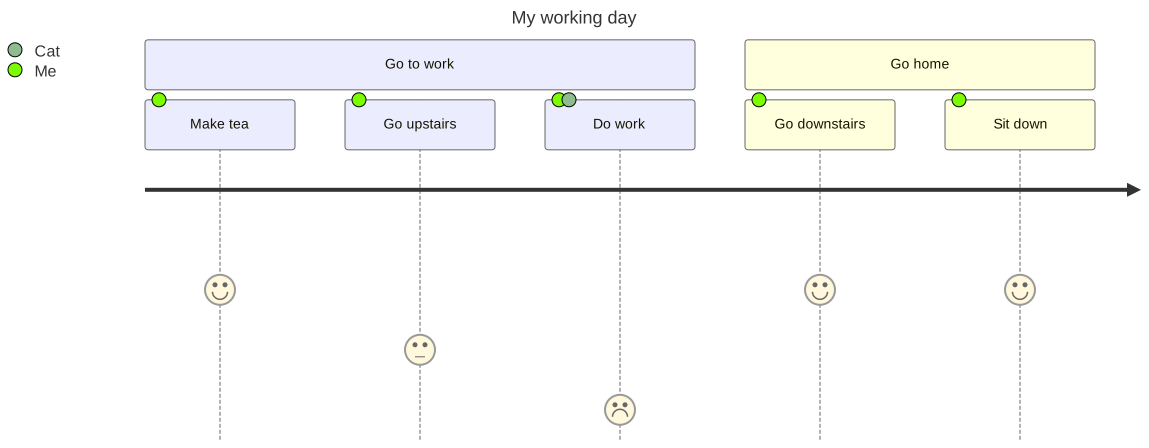
Sections and tasks
A UserJourneySection is a part of the goal, drawn above its tasks, in the colors of the theme: each section takes the next one. A UserJourneyTask has a Score from 1 to 5: the higher the score, the higher its face; the face smiles above 3, and is sad below 3. The actors of a task are colored dots on it, and the legend on the left lists the actors in ordinal order, with their color.
Mermaid syntax
var diagram = (UserJourneyDiagram)MermaidDocument.Parse("""
    journey
        title My working day
        section Go to work
          Make tea: 5: Me
          Go upstairs: 3: Me
          Do work: 1: Me, Cat
        section Go home
          Go downstairs: 5: Me
          Sit down: 5: Me
    """).Content;
A task is name: score: actor, actor, a section is section name. The keywords ignore the case, # and %% start comments, and a semicolon ends a statement. As in Mermaid, the tasks before the first section are in a section without name.