 Meziantou.Framework
Tree views
editA TreeViewDiagram draws a hierarchy of files and directories as indented rows linked by lines, like the output of the tree command (Mermaid treeView-beta). The nodes are the children of a root directory named /:
var diagram = new TreeViewDiagram { ShowIcons = true };
var src = diagram.AddNode("src", isDirectory: true);
var app = src.AddChild("App.tsx");
app.CssClass = "highlight";
app.Description = "main component";
src.AddChild("index.ts").Description = "entry point";
var tests = diagram.AddNode("tests", isDirectory: true);
tests.AddChild("app.test.ts");
diagram.AddNode(".env").Description = "environment variables";
diagram.AddNode("package.json");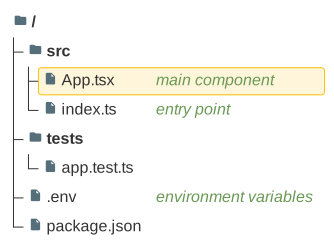
Nodes
A node has a Name, drawn as is, spaces included, and children. A node is a file or, when IsDirectory is set, a directory, whose name is bold. A node can have:
- a Description, drawn in italic in a column after the widest name;
- a CssClass, set on the group of the row in the SVG. The class
highlightdraws the row on an amber background; - an Icon:
fileandfolderare drawn,nonehides the icon, and the icons of the icon packs of Mermaid, such aslogos:react, are drawn as a question mark, as Mermaid does when the pack is not registered.
A node that appears twice in the tree is drawn once, at its first place.
Icons
When ShowIcons is set, the nodes without an icon get one: the directories get the folder icon, and the files get the icon of their name in FileNameIcons, else the icon of their extension in ExtensionIcons (such as .ts, the dot is optional and the case is ignored), else the file icon. An icon name without a pack takes DefaultIconPack, when it is set.
Layout and colors
A level is indented by RowIndent plus PaddingX, and a row is the height of its text plus twice PaddingY. The lines are LineThickness wide. The names and the lines take the colors of the theme, and the icons, the descriptions and the highlighted rows take the colors of Mermaid; the properties FontSize, LabelColor, LineColor, IconColor, DescriptionColor, HighlightBackground and HighlightBorderColor replace them.
Mermaid syntax
var diagram = (TreeViewDiagram)MermaidDocument.Parse("""
    ---
    config:
      treeView:
        showIcons: true
    ---
    treeView-beta
        src/
            App.tsx :::highlight icon(logos:react) ## main component
            index.ts ## entry point
        "my notes.txt"
        package.json
    """).Content;
Each line is a node, nested by its indentation: a node is a child of the last node less indented than it. A name is bare, up to its annotations, or quoted with " or ', and a name that ends with / is a directory. The annotations follow the name: :::class, icon(name) (icon() hides the icon) and ## description, which takes the rest of the line. The tree can also be drawn with box-drawing characters, as the tree command prints it:
treeView-beta
├── src/
│   ├── index.ts
│   └── utils.ts
└── package.json
The depth then comes from the column of the branch (├──, └──, or the heavy ┣━━ and ┗━━), and the lines that only hold │ are ignored. The title, accTitle and accDescr statements come before the nodes. The parser reads rowIndent, paddingX, paddingY, lineThickness, showIcons, defaultIconPack, filenameIcons and extensionIcons in the treeView section of the configuration, and the theme variables labelFontSize, labelColor, lineColor, iconColor, descriptionColor, highlightBg and highlightStroke in themeVariables.treeView.
Unlike Mermaid, %% starts a comment anywhere in a line, a line holds a single node, a line such as titles or ├── title is a node and not a title, and the tabs of the names drawn with box-drawing characters are kept.