 Meziantou.Framework
Timelines
editA TimelineDiagram shows periods of time in order, each with its events (Mermaid timeline). Sections group the periods:
var diagram = new TimelineDiagram { Title = "History of .NET" };
var framework = diagram.AddSection(".NET Framework");
framework.AddPeriod("2002", "Version 1.0");
framework.AddPeriod("2005", "Generics", "64-bit support");
framework.AddPeriod("2007", "LINQ");

var core = diagram.AddSection(".NET Core and .NET");
core.AddPeriod("2016", ".NET Core 1.0");
core.AddPeriod("2020", ".NET 5\nOne .NET");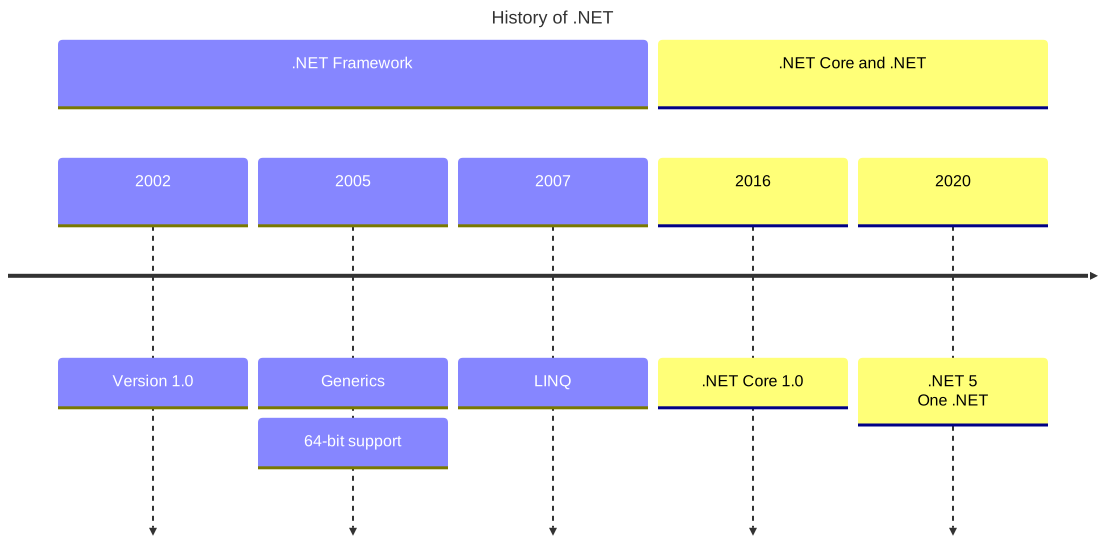
Periods and sections
A TimelinePeriod has a Label, such as a year, and Events, drawn in boxes below the period. The texts wrap, and a line feed starts a new line.
A TimelineSection groups periods under a title, in a color of the palette of the theme. The periods of Periods come before the sections; without sections, each period takes the next color of the palette, unless DisableMulticolor is set.
Direction draws the periods from left to right, with their events below them, or from top to bottom, with their events on the right of the axis.
Mermaid syntax
var diagram = (TimelineDiagram)MermaidDocument.Parse("""
    timeline
        title History of Social Media Platform
        2002 : LinkedIn
        2004 : Facebook
             : Google
        2005 : YouTube : Twitch
        2006
    """).Content;
A line is a period, followed by its events, each introduced by a colon and a space; a line that starts with a colon adds events to the previous period. The parser also reads title, section, the direction after the keyword (timeline LR, timeline TD) and the disableMulticolor setting. As in Mermaid, # starts a comment in a period, and a period cannot contain a colon, while the events and the section titles can contain # and the entity codes (#35;).