 Meziantou.Framework
Sequence diagrams
editA SequenceDiagram draws participants side by side, with their lifelines, and the messages they exchange from the top to the bottom (Mermaid sequenceDiagram):
var diagram = new SequenceDiagram();
var customer = diagram.AddParticipant("customer", "Customer", SequenceParticipantKind.Actor);
var shop = diagram.AddParticipant("shop", "Web shop");
var bank = diagram.AddParticipant("bank", "Bank", SequenceParticipantKind.Database);

diagram.Steps.Add(new SequenceAutonumber());
diagram.AddMessage(customer, shop, "Place order").ActivatesReceiver = true;
var payment = diagram.AddBlock(SequenceBlockKind.Alternative, "card accepted");
payment.Sections[0].Steps.Add(new SequenceMessage(shop, bank) { Text = "Charge card", EndArrowHead = SequenceArrowHead.Arrow });
payment.Sections[0].Steps.Add(new SequenceMessage(bank, shop) { Text = "Approved", LineStyle = SequenceLineStyle.Dotted, EndArrowHead = SequenceArrowHead.Arrow });
var declined = new SequenceBlockSection("card declined");
declined.Steps.Add(new SequenceMessage(shop, customer) { Text = "Ask for another card", EndArrowHead = SequenceArrowHead.OpenArrow });
payment.Sections.Add(declined);
var confirmation = diagram.AddMessage(shop, customer, "Order confirmed", SequenceLineStyle.Dotted);
confirmation.DeactivatesSender = true;
diagram.AddNote("One order, one payment", SequenceNotePosition.Over, customer, bank);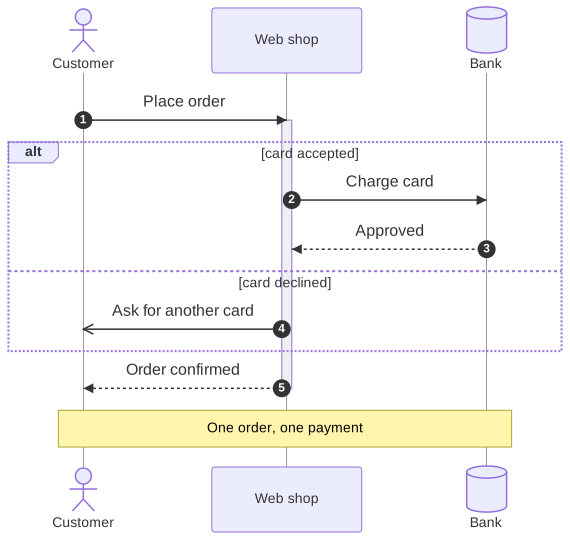
Participants
A SequenceParticipant is drawn at the top of its lifeline, and at the bottom too unless MirrorParticipants is false. Its Kind is a box, a stick figure, or a symbol of UML: boundary, control, entity, database, collections or queue. The participants are as far apart as their messages and notes need. A SequenceBox draws a colored background with a title behind a group of participants.
Messages
A SequenceMessage goes from the lifeline of a participant to another one, or to itself. Its line is solid or dotted, and each end has a decoration:
| Mermaid | Line | Decoration |
|---|---|---|
->, --> | solid, dotted | none |
->>, -->> | solid, dotted | an arrowhead |
<<->>, <<-->> | solid, dotted | arrowheads at both ends |
-x, --x | solid, dotted | a cross |
-), --) | solid, dotted | an open arrowhead (asynchronous) |
-\|\, -\|/ | solid (-- for dotted) | the top or the bottom half of an arrowhead |
-\\, -// | solid (-- for dotted) | the top or the bottom stroke of an open arrowhead |
/\|-, \\-... | solid (-- for dotted) | the same halves at the sender |
A message can activate its receiver or deactivate its sender (Mermaid + and -), start or end at a circle on a lifeline (()), create its receiver, which then appears at the message, or destroy a participant, whose lifeline ends at a cross.
Other steps
- A SequenceActivation starts or ends a bar on a lifeline; the activations of a participant nest.
- A SequenceNote is on the left or the right of a participant, or over one or two participants.
- A SequenceBlock frames steps: a loop, alternatives, an option, parallel branches, a critical region, a break, or a colored background (
rect). Its Sections are separated by dashed lines. - A SequenceAutonumber numbers the next messages, from a start and by an increment, or stops the numbering.
Mermaid syntax
var diagram = (SequenceDiagram)MermaidDocument.Parse("""
    sequenceDiagram
        actor Customer
        participant Shop as Web shop
        participant Bank@{ "type": "database" }
        Customer->>+Shop: Place order
        alt card accepted
            Shop->>Bank: Charge card
            Bank-->>Shop: Approved
        else card declined
            Shop-)Customer: Ask for another card
        end
        Shop-->>-Customer: Order confirmed
        Note over Customer,Bank: One order, one payment
    """).Content;
The parser reads the participants and the actors (participant A as Alice, actor B, participant C@{ "type": "database" }), the boxes, create and destroy, every arrow of Mermaid 12, the activations, the notes, the blocks (loop, alt/else, opt, par/and, par_over, critical/option, break, rect), autonumber, title and the accessibility statements. The keywords ignore the case, a semicolon separates statements, # starts a comment, and the entity codes such as #59; write the characters that the syntax reserves. The actor menus (link, links) are ignored, with a warning.