 Meziantou.Framework
Packet diagrams
editA PacketDiagram draws the fields of a network packet or of a binary structure, in rows of a fixed number of bits (Mermaid packet):
var diagram = new PacketDiagram { Title = "UDP packet" };
diagram.AddField(16, "Source port");
diagram.AddField(16, "Destination port");
diagram.AddField(16, "Length");
diagram.AddField(16, "Checksum");
diagram.AddField(64, "Data (variable length)");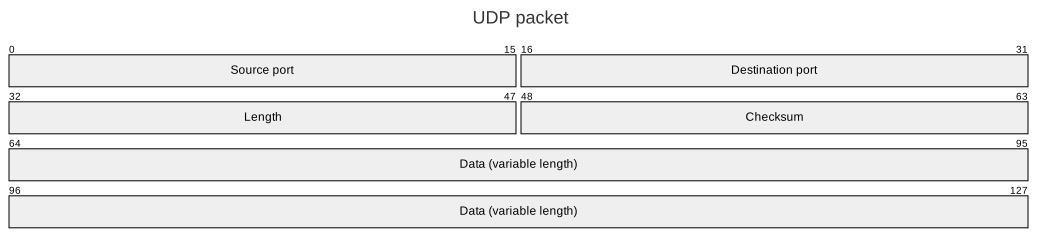
Fields and rows
A PacketField covers the bits from its Start to its End, both included. AddField adds a field after the previous one. A field that does not fit in its row continues on the next one.
BitsPerRow is the number of bits per row (32 by default), BitWidth the width of a bit and RowHeight the height of a row. ShowBits writes the number of the first and the last bit of each field above it, and DescendingBitOrder numbers the bits of a row from right to left.
Mermaid syntax
var diagram = (PacketDiagram)MermaidDocument.Parse("""
    packet
      title UDP packet
      0-15: "Source port"
      16-31: "Destination port"
      +16: "Length"
      +16: "Checksum"
      64-127: "Data (variable length)"
    """).Content;
packet and packet-beta are read the same. A field is start: "label" for one bit, start-end: "label", or +bits: "label" after the previous field; the fields must follow each other without gap, as in Mermaid. The parser reads the title and the accessibility statements, and bitsPerRow, bitWidth, rowHeight, showBits and bitOrder in the packet section of the configuration.