 Meziantou.Framework
Mindmaps
editA MindmapDiagram draws a tree of nodes around a root (Mermaid mindmap):
var diagram = new MindmapDiagram();
var root = diagram.SetRoot("Diagrams", MindmapNodeShape.Circle);
var graphs = root.AddChild("Graphs", MindmapNodeShape.Hexagon);
graphs.AddChild("Flowcharts");
graphs.AddChild("Class diagrams");
graphs.AddChild("State diagrams");
var timelines = root.AddChild("Timelines", MindmapNodeShape.RoundedSquare);
timelines.AddChild("Gantt charts");
timelines.AddChild("Sequence diagrams");
var charts = root.AddChild(DiagramText.Markdown("**Charts**"), MindmapNodeShape.Square);
charts.AddChild("Pie", MindmapNodeShape.Cloud);
charts.AddChild("Sankey", MindmapNodeShape.Bang);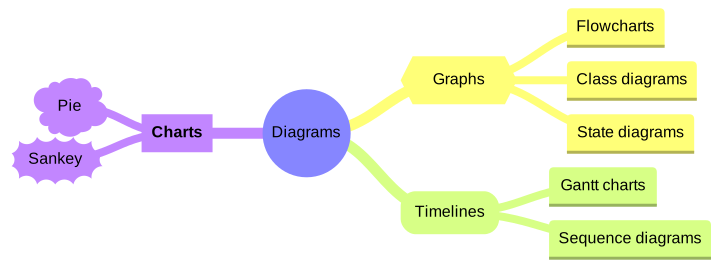
Nodes
SetRoot sets the central node, and AddChild adds a node under another one. A node has a text, which can be markdown and wraps to MaxNodeWidth, and a shape:
| Shape | Drawing | Mermaid |
|---|---|---|
Default | A rectangle with rounded top corners and a line below it | text, id(-text-) |
Square | A rectangle | id[text] |
RoundedSquare | A rectangle with rounded corners | id(text) |
Circle | A circle | id((text)) |
Bang | An explosion | id))text(( |
Cloud | A cloud | id)text( |
Hexagon | A hexagon | id{{text}} |
NodePadding is the space around the text; the rounded squares and the hexagons take more, as in Mermaid. A node also has an optional Id, CSS classes that are added to its SVG element, and an Icon, the classes of an icon font such as fa fa-book: the icon is kept, to write it back as Mermaid, but it is not drawn.
Layout and colors
The root is at the center. Its children are split in two halves: the first half goes to the right, the second half to the left, and the descendants of a node go further on the same side, stacked so that subtrees never overlap. The layout is deterministic: the same diagram always gives the same drawing. Mermaid places the nodes with a force-directed layout instead, so the positions differ, but the shapes, the colors and the edges are the same.
Each branch of the root takes a color of the palette of the theme, and its descendants take the same color. With ColorBy set to Depth, the nodes take the color of their depth instead. The edges get thinner as they go away from the root.
Mermaid syntax
var diagram = (MindmapDiagram)MermaidDocument.Parse("""
    mindmap
      root((mindmap))
        Origins
          Long history
          Popularisation
        Research
          On effectiveness<br/>and features
        Tools
          Pen and paper
          Mermaid
    """).Content;
The indentation makes the tree: a node is a child of the last node above it that is less indented. The first node is the root, and a second node as indented as the root is an error. The text of a node is plain (id[text]), quoted (id["text"]) or markdown (id["`**text**`"]). A line ::icon(fa fa-book) sets the icon of the node above it, with a warning since icons are not drawn, and a line :::class1 class2 adds classes to it. The parser reads colorBy (branch or depth), padding and maxNodeWidth in the mindmap section of the configuration.
The grammar of the mind maps has no accessibility statements: accTitle: ... is read as a node, and the writer rejects a diagram with an AccessibleTitle or a Description.