 Meziantou.Framework
Kanban diagrams
editA KanbanDiagram draws a board of columns that hold cards (Mermaid kanban):
var diagram = new KanbanDiagram { TicketLinkFormat = "https://tracker.example.com/browse/#TICKET#" };
var todo = diagram.AddColumn("todo", "To do");
todo.AddCard("docs", "Write the documentation");
var parser = todo.AddCard("parser", "Write the parser");
parser.Priority = KanbanPriority.High;
parser.Ticket = "DIA-12";

var doing = diagram.AddColumn("doing", "In progress");
var renderer = doing.AddCard("renderer", DiagramText.Markdown("Draw the **cards**"));
renderer.Assigned = "Alice";
renderer.Priority = KanbanPriority.VeryHigh;

var done = diagram.AddColumn("done", "Done");
done.AddCard("model", "Design the model").Priority = KanbanPriority.Low;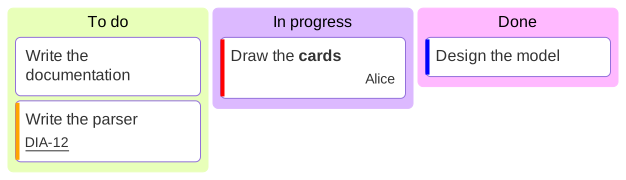
Columns and cards
A column and a card have an identifier and an optional text, which can be markdown; without text, the identifier is written. The text of a card wraps to the width of the column, ColumnWidth. The columns take the colors of the palette of the theme.
A card can show:
- a ticket, at the bottom left. When TicketLinkFormat is set, the ticket is a link to this address, where
#TICKET#is replaced by the ticket. The link is written only when the completed address is an http, https, mailto or relative address, so a ticket cannot turn it into ajavascript:address; - the person it is assigned to, at the bottom right;
- a priority, as a stripe on its left side: red for very high, orange for high, blue for low, light blue for very low, and none for medium.
Mermaid syntax
var diagram = (KanbanDiagram)MermaidDocument.Parse("""
    ---
    config:
      kanban:
        ticketBaseUrl: 'https://tracker.example.com/browse/#TICKET#'
    ---
    kanban
      todo[To do]
        docs[Write the documentation]
        parser[Write the parser]@{ ticket: DIA-12, priority: 'High' }
      doing[In progress]
        renderer[Draw the cards]@{ assigned: 'Alice', priority: 'Very High' }
      [Done]
        [Design the model]
    """).Content;
The indentation makes the board: the items as indented as the first one are the columns, the items indented more are the cards of the column above them. An item is id, id[text] or [text] (the text is then the identifier too), with a plain, quoted (["text"]) or markdown (["`**text**`"]) text; the other shapes of the mind maps ((text), ((text)), {{text}}...) are read as rectangles. The metadata @{ ticket: ..., assigned: ..., priority: ... } follows the item, and a line :::class1 class2 adds classes to the item above it. The parser reads ticketBaseUrl and sectionWidth in the kanban section of the configuration. It ignores the icons (::icon(...)), with a warning.