 Meziantou.Framework
Git graphs
editA GitGraphDiagram draws the history of a Git repository (Mermaid gitGraph). It is a list of operations, replayed in order as Git would: a commit goes on the current branch, a branch starts at the current commit, a merge joins a branch into the current one.
var diagram = new GitGraphDiagram();
diagram.Commit("init");
diagram.Branch("develop");
diagram.Commit("feature");
diagram.Commit("fix", GitGraphCommitType.Reverse);
diagram.Checkout("main");
diagram.Commit("hotfix", GitGraphCommitType.Highlight);
diagram.Merge("develop", "release").Tags.Add("v1.0.0");
diagram.Branch("support");
diagram.CherryPick("feature");
diagram.Commit();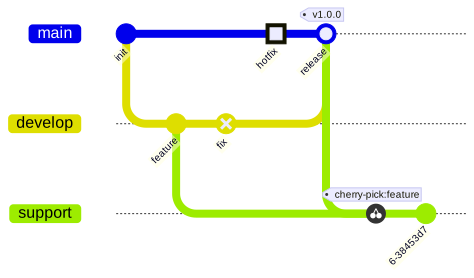
Operations
- Commit adds a GitGraphCommit, with an optional identifier, message, tags and type: a normal commit is a filled circle, a reverse commit a crossed circle, a highlighted commit a square. A commit without identifier gets a generated one, the same at each drawing.
- Branch creates a branch and checks it out. Its optional order sorts the lanes; the main branch takes MainBranchOrder.
- Checkout changes the current branch.
- Merge adds a merge commit, drawn as a ring, with an optional identifier, type and tags.
- CherryPick copies a commit to the current branch. It is tagged
cherry-pick:<id>unless ShowDefaultTag isfalseor it has its own tags; cherry-picking a merge commit needs the parent to take.
An operation that Git refuses, such as a checkout of a branch that does not exist, is skipped by the drawing. The Mermaid parser reports it as an error, as Mermaid does.
Layout and colors
Orientation puts the time from left to right (the default), from top to bottom, or from bottom to top. ParallelCommits aligns the commits by their distance to the first one instead of giving each commit its own column. ShowBranches, ShowCommitLabels and RotateCommitLabels hide the names of the branches, hide the identifiers of the commits, or write them horizontally.
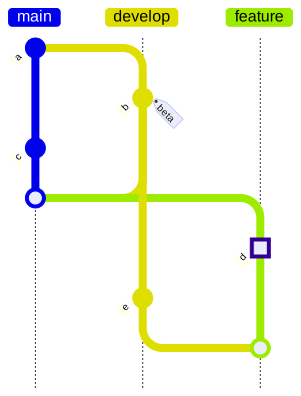
The branches take 8 colors in turn. They are the colors of Mermaid for its themes, and the palette of a custom theme otherwise. BranchColors, BranchLabelColors, HighlightColors and the colors of the labels and the tags replace them, as the git0...git7, gitBranchLabel0... and gitInv0... theme variables of Mermaid.
Mermaid syntax
var diagram = (GitGraphDiagram)MermaidDocument.Parse("""
    gitGraph
      commit id: "init"
      branch develop
      commit id: "feature" tag: "beta"
      commit type: REVERSE
      checkout main
      commit type: HIGHLIGHT msg: "hotfix"
      merge develop id: "release" tag: "v1.0.0"
      branch support order: 2
      cherry-pick id: "feature"
    """).Content;
The parser reads the orientation (gitGraph TB:), commit with id:, msg:, tag: and type:, branch with order:, checkout and switch, merge with id:, tag: and type:, cherry-pick with id:, parent: and tag:, the title and the accessibility statements. It reads the gitGraph section of the configuration (mainBranchName, mainBranchOrder, showBranches, showCommitLabel, rotateCommitLabel, parallelCommits) and the theme variables of the colors. The writer writes the colors as an %%{init}%% directive.