 Meziantou.Framework
Gantt diagrams
editA GanttDiagram draws tasks as bars on a time axis, grouped in sections (Mermaid gantt). A task starts at a date or after other tasks, and ends at a date, after a duration, or when other tasks start:
var diagram = new GanttDiagram
{
    Title = "Release plan",
    AxisFormat = "%b %d",
    TickInterval = new GanttTickInterval(1, GanttTimeUnit.Week),
};
diagram.Excludes.Add("weekends");

var design = diagram.AddSection("Design");
var specification = design.AddTask("Specification");
specification.Id = "spec";
specification.Start = new DateTime(2024, 3, 4);
specification.Duration = new GanttDuration(5, GanttTimeUnit.Day);
specification.IsDone = true;
var review = design.AddTask("Review");
review.Id = "review";
review.After.Add("spec");
review.Duration = new GanttDuration(2, GanttTimeUnit.Day);
review.IsActive = true;

var development = diagram.AddSection("Development");
var api = development.AddTask("API");
api.Id = "api";
api.After.Add("review");
api.Duration = new GanttDuration(2, GanttTimeUnit.Week);
api.IsCritical = true;
var client = development.AddTask("Client");
client.Start = new DateTime(2024, 3, 18);
client.End = new DateTime(2024, 3, 29);

var release = development.AddTask("Release");
release.Id = "release";
release.After.Add("api");
release.Duration = new GanttDuration(0, GanttTimeUnit.Day);
release.IsMilestone = true;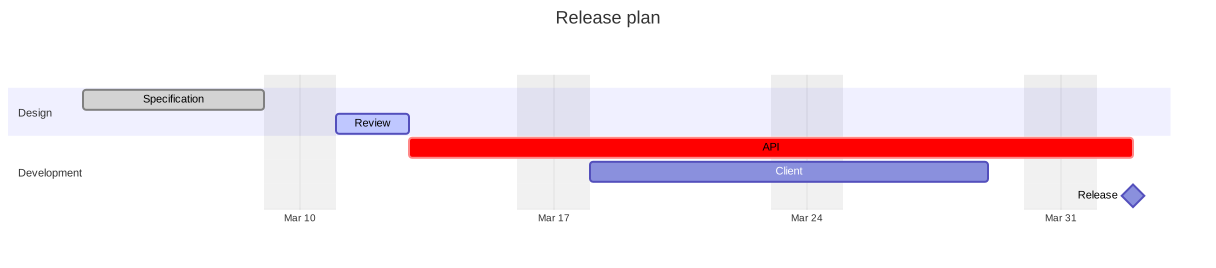
Tasks
A GanttTask has a name, an optional Id that other tasks reference, a start and an end:
- The start is Start, or the end of the latest task of After. Without either, the task starts when the previous task ends.
- The end is End, the start of the earliest task of Until, or the start plus Duration. A GanttDuration counts milliseconds to years; as in Mermaid, the days and the weeks are rounded to whole days, and the months and the years are truncated to whole units.
IsDone, IsActive and IsCritical change the colors of the bar. IsMilestone draws a diamond at the middle of the task, and IsVertical a vertical line across the chart at its start. Link makes the name a hyperlink.
The tasks of Tasks come before the sections. A reference to an unknown task, or a cycle of references, places the task at the start of the chart.
Dates
The dates are DateTime values without time zone, and the chart never reads the clock: the output depends on the diagram only.
- DateFormat is the format of the dates of the Mermaid text, with the tokens of dayjs:
YYYY,YY,M,MM,MMM,MMMM,D,DD,Do,d,dd,ddd,dddd,H,HH,h,hh,k,kk,m,mm,s,ss,SSS,A,a,Q,X(Unix seconds),x(Unix milliseconds), and literal text between brackets. The names of the months and of the days are English. A date that does not match the format is read as an ISO date (2014-01-06,2014-01-06T10:30:00), and FormatDate writes the dates the format cannot represent as ISO dates. - AxisFormat is the format of the labels of the axis, with the tokens of d3 (
%Y-%m-%dby default,%b %d,%H:%M...), in English. - TickInterval sets the interval between the ticks, such as one week; WeekStart is the first day of the weeks of these ticks. Without it, the axis has about ten ticks.
- Today draws a vertical line at a date, styled by TodayMarkerStyle. Mermaid draws it at the current date; here, nothing is drawn unless the date is set.
Excluded days
Excludes lists the days that do not count: weekends, names of days (friday), or dates in the date format or as YYYY-MM-DD. Includes lists exceptions. As in Mermaid, a task whose end is not a YYYY-MM-DD date ends later by one day per excluded day it spans, and the excluded days are shaded. WeekendStart sets whether the weekend is Friday and Saturday, or Saturday and Sunday.
InclusiveEndDates makes the end dates include their day: a task from 2024-01-01 to 2024-01-02 then lasts two days.
Layout
Compact puts the tasks of a section that do not overlap on the same row. TopAxis adds an axis above the tasks. Width, BarHeight, BarGap and LeftPadding set the size of the chart. The name of a task is in its bar when it fits, otherwise next to it.
Mermaid syntax
var diagram = (GanttDiagram)MermaidDocument.Parse("""
    gantt
        title A Gantt Diagram
        dateFormat YYYY-MM-DD
        excludes weekends
        section Section
            A task       :done, a1, 2014-01-01, 30d
            Another task :after a1, 20d
        section Another
            Task in sec  :crit, 2014-01-12, 12d
            Release      :milestone, 2014-02-20, 0d
    """).Content;
A task is name : data, where the data is a list separated by commas: the tags (done, active, crit, milestone, vert), then the end, or the start and the end, or the identifier, the start and the end. The start is a date or after id1 id2; the end is a date, a duration (3d, 2w, 12h, 1.5M) or until id1 id2. The parser also reads title, section, dateFormat, axisFormat, tickInterval, weekday, weekend, excludes, includes, inclusiveEndDates, topAxis, todayMarker (off or a style), click id href "url", and the displayMode: compact setting of the front matter. The keywords ignore the case. click id call function() is ignored with a warning, as the diagrams run no script; so is an end that is neither a date nor a duration, which makes the task last no time.