 Meziantou.Framework
Flowcharts
editA FlowchartDiagram is made of nodes linked by edges, laid out in ranks in the direction of the flow (Mermaid flowchart).
var flowchart = new FlowchartDiagram { Title = "Order processing" };
var start = flowchart.AddNode("start", "Order received", FlowchartNodeShape.Stadium);
var check = flowchart.AddNode("check", "Is the payment valid?", FlowchartNodeShape.Diamond);
var ship = flowchart.AddNode("ship", "Ship the order");
var cancel = flowchart.AddNode("cancel", "Cancel the order");

flowchart.AddEdge(start, check);
flowchart.AddEdge(check, ship, "yes");
flowchart.AddEdge(check, cancel, "no");

var svg = flowchart.ToSvg();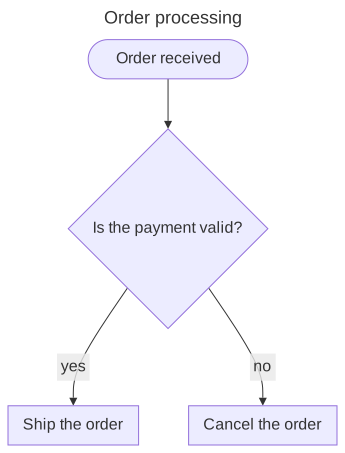
Nodes
A FlowchartNode has an identifier, a Label (its identifier when there is none) and a Shape: the 53 shapes of Mermaid, from Rectangle to the shapes of the flowcharts of processes (documents, databases, decisions, manual inputs...).
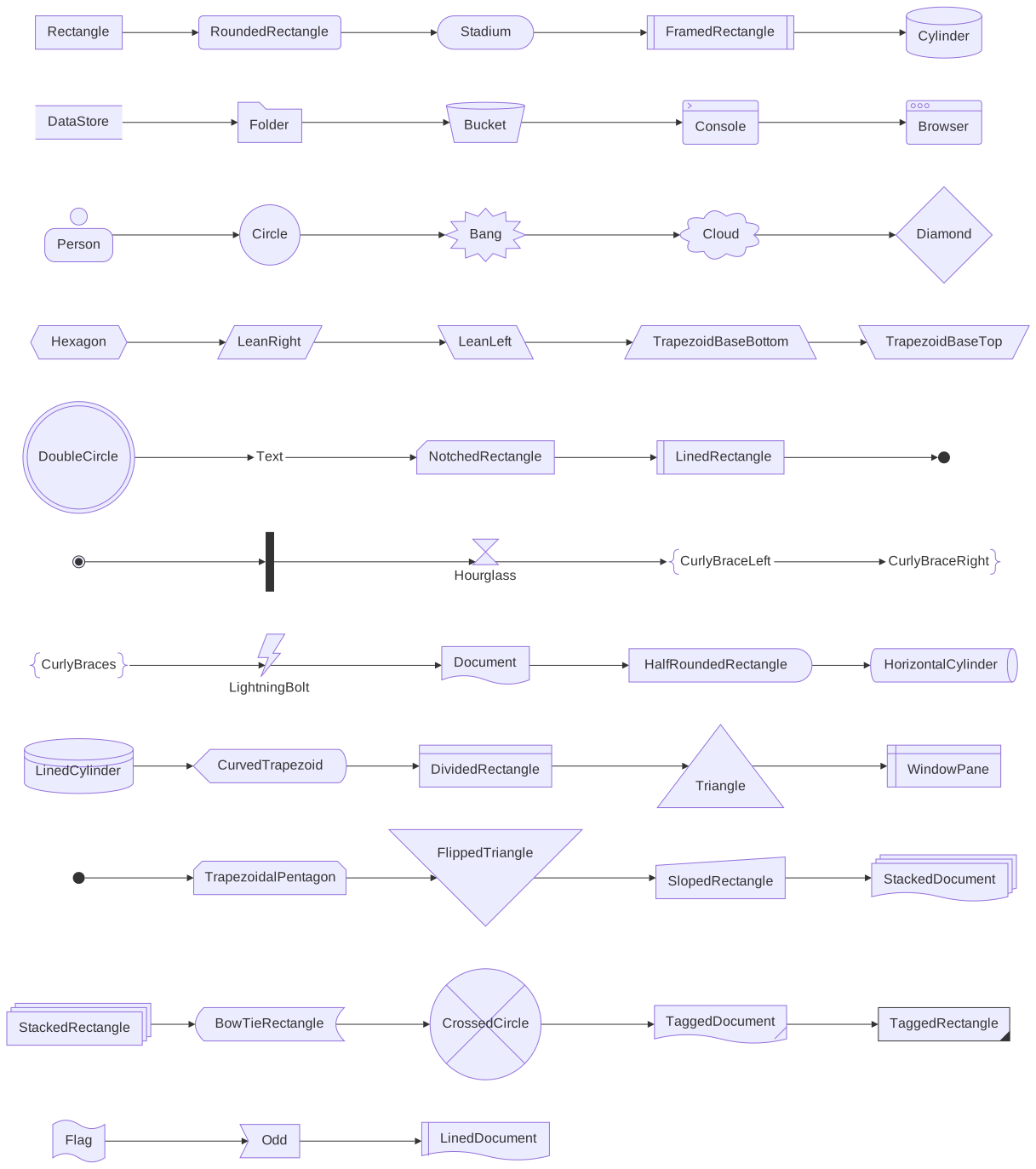
A label is a DiagramText: plain text, where a line feed starts a new line, or markdown with bold and italic parts (DiagramText.Markdown). The labels wrap at WrappingWidth, 200 pixels by default.
Edges
A FlowchartEdge goes from a node or a subgraph to another. Its LineStyle is solid, dotted, thick or invisible; its ends have an arrow, a circle, a cross or nothing; and its Length makes it span more ranks:
var flowchart = new FlowchartDiagram { Direction = DiagramDirection.LeftToRight };
flowchart.AddEdge("a", "b", "solid");
flowchart.AddEdge("b", "c", "dotted").LineStyle = FlowchartLineStyle.Dotted;
flowchart.AddEdge("c", "d", "thick").LineStyle = FlowchartLineStyle.Thick;

var both = flowchart.AddEdge("d", "e", "both ends");
both.StartArrowHead = FlowchartArrowHead.Circle;
both.EndArrowHead = FlowchartArrowHead.Circle;

flowchart.AddEdge("e", "f").EndArrowHead = FlowchartArrowHead.Cross;
flowchart.AddEdge("f", "g", "longer").Length = 2;
Curve sets how the edges go through the points of the layout: a smooth B-spline by default, or straight segments, steps, and the other curves of Mermaid.
Subgraphs
A FlowchartSubgraph groups nodes in a frame with a title. Edges can link a subgraph itself:
var flowchart = new FlowchartDiagram { Direction = DiagramDirection.LeftToRight };
var backend = flowchart.AddSubgraph("backend", "Backend");
var api = new FlowchartNode("api", "API");
var database = new FlowchartNode("db", "Orders", FlowchartNodeShape.Cylinder);
backend.Nodes.Add(api);
backend.Nodes.Add(database);

var client = flowchart.AddNode("client", "Web app");
flowchart.AddEdge(client, api, "HTTPS");
flowchart.AddEdge(api, database);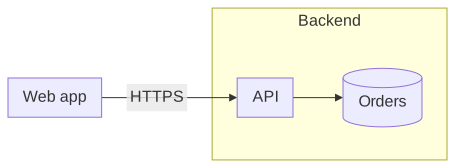
A subgraph can have its own Direction. As in Mermaid, it applies only when no edge links a node of the subgraph to a node outside of it: the subgraph is then laid out on its own.
Styles and classes
A DiagramStyle changes the fill, the outline, the text and the opacity of a node, a subgraph or an edge. Define named styles in ClassDefinitions and add their names to the CssClasses of the elements; the class default applies to every node. The style of an element takes precedence over the styles of its classes:
var flowchart = new FlowchartDiagram();
flowchart.ClassDefinitions["important"] = new DiagramStyle { Fill = (SceneColor)"#fde68a", Stroke = (SceneColor)"#b45309", StrokeWidth = 2 };

var start = flowchart.AddNode("start", "Start");
var alert = flowchart.AddNode("alert", "Page the on-call engineer");
alert.CssClasses.Add("important");
var done = flowchart.AddNode("done", "Done");
done.Style = new DiagramStyle { Fill = (SceneColor)"#bbf7d0", TextColor = (SceneColor)"#14532d", Bold = true };

flowchart.AddEdge(start, alert).Style = new DiagramStyle { Stroke = (SceneColor)"#dc2626", StrokeWidth = 2 };
flowchart.AddEdge(alert, done);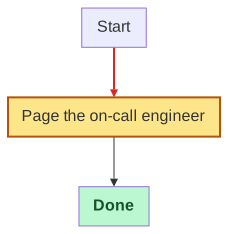
The classes are also CSS classes of the SVG, and every node has a data-id attribute with its identifier, for the styles and the scripts of a web page. A node or a subgraph links to an address with Link, and shows a Tooltip when hovered.
Mermaid syntax
The parser reads the whole syntax of the flowcharts of Mermaid: the shapes (A[text], A{text}, A@{ shape: cyl }...), the edges (-->, ---, -.->, ==>, ~~~, <-->, --o, --x, with more dashes for longer edges, and a text -- text --> or -->|text|), chains (A & B --> C), subgraphs and their direction, classDef, class, :::class, style, linkStyle (with interpolate), click with href, and the identifiers and the data of the edges (e1@-->, e1@{ curve: linear }). The labels decode the entity codes (#quot;), <br> and the markdown strings.