 Meziantou.Framework
Event modeling
editAn EventModelingDiagram draws an event model: a timeline of frames, each an entity in its swimlane, and the relations between them (Mermaid eventmodeling):
var diagram = new EventModelingDiagram();
var items = new EventModelingDataBlock("Item", new EventModelingData("description: string\nprice: number"));
diagram.DataBlocks.Add(items);
diagram.AddFrame("01", EventModelingEntityKind.Ui, "CartUI");
diagram.AddFrame("02", EventModelingEntityKind.Command, "AddItem").DataBlock = items;
var added = diagram.AddFrame("03", EventModelingEntityKind.Event, "ItemAdded");
added.DataBlock = items;

// A reset frame infers no relation from the frame before it
var external = diagram.AddFrame("04", EventModelingEntityKind.Event, "Inventory.InventoryChanged");
external.IsReset = true;
diagram.AddFrame("05", EventModelingEntityKind.Processor, "InventoryProcessor");
diagram.AddFrame("06", EventModelingEntityKind.Command, "ChangeInventory");

// A read model built from several events
var cart = diagram.AddFrame("07", EventModelingEntityKind.ReadModel, "CartItems");
cart.IsReset = true;
cart.Sources.Add(added);
cart.Sources.Add(external);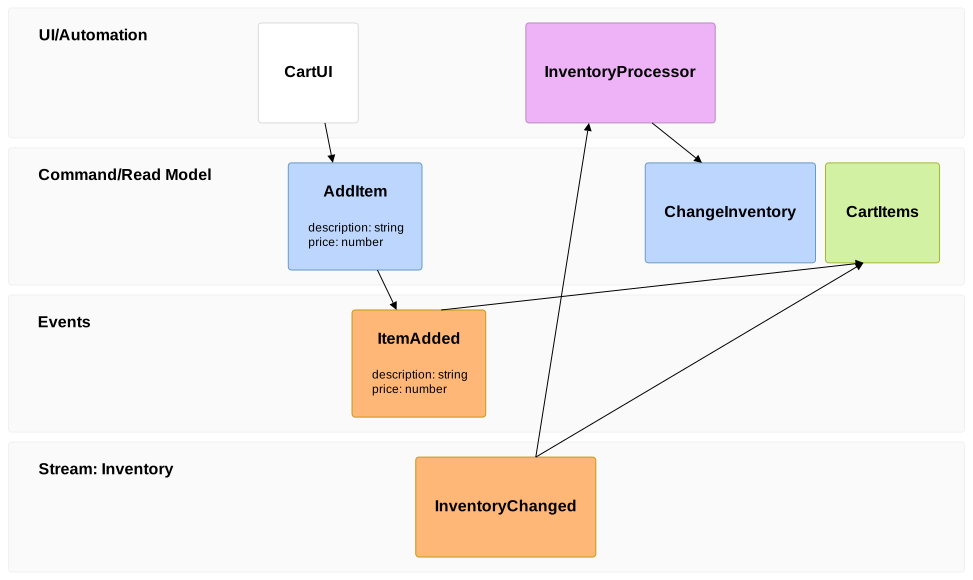
Frames and swimlanes
An EventModelingFrame has a number, unique in the diagram, a Kind and an entity. The kind sets the swimlane and the color of the box: the screens and the processors are in the UI/Automation swimlane, the commands and the read models in the Command/Read Model swimlane, and the events in the Events swimlane. An entity of two parts, Namespace.Name, is in a swimlane of its namespace and kind.
The boxes follow the order of the frames, left to right; a box overlaps the previous box of another swimlane, as in Mermaid. A box shows the name of its entity and its data: the inline Data, or the DataBlock it references.
Relations
A frame receives input from its Sources. Without sources, the relation is inferred from the last frame of another swimlane before it, unless the frame is a reset frame. The relations are arrows from the source to the frame.
The entities, the notes and the given/when/then scenarios are kept for Mermaid, which does not draw them either.
Mermaid syntax
var diagram = (EventModelingDiagram)MermaidDocument.Parse("""
    eventmodeling
    tf 01 ui CartUI
    tf 02 cmd AddItem { description: string }
    tf 03 evt ItemAdded [[ItemAdded]]
    rf 04 evt External.InventoryChanged
    tf 05 rmo CartItems ->> 03 ->> 04
    data ItemAdded {
      description: string
      price: number
    }
    """).Content;
The parser reads the compact and the relaxed notations: the frames (tf or timeframe, rf or resetframe), the kinds (ui, pcr or processor, cmd or command, rmo or readmodel, evt or event), the sources (->> 01), the data references ([[name]]), the inline data ({ ... } or a quoted text, on one line), the data blocks (data name { ... }, with } at the start of a line), the formats (`json`...), entity, note and gwt. The white space separates the tokens only, and // and /* */ are comments. A relation that does not follow the rules of event modeling, such as an event that receives input from a screen, is reported as a warning. As in Mermaid, the title is in the front matter only.
Unlike Mermaid 12.3.0, which gives each frame of a namespace its own swimlane, the frames of a namespace and kind share one swimlane.