 Meziantou.Framework
Entity relationship diagrams
editAn ErDiagram draws entities linked by relationships (Mermaid erDiagram):
var diagram = new ErDiagram();
var customer = diagram.AddEntity("CUSTOMER");
customer.AddAttribute("string", "email", ErAttributeKeys.PrimaryKey);
customer.AddAttribute("string", "name");

var order = diagram.AddEntity("ORDER");
order.AddAttribute("int", "id", ErAttributeKeys.PrimaryKey);
order.AddAttribute("string", "customerEmail", ErAttributeKeys.ForeignKey);
order.AddAttribute("date", "placedAt", comment: "UTC");

var lineItem = diagram.AddEntity("LINE-ITEM");
lineItem.AddAttribute("int", "quantity");

diagram.AddRelationship(customer, order, ErCardinality.ExactlyOne, ErCardinality.ZeroOrMore, "places");
diagram.AddRelationship(order, lineItem, ErCardinality.ExactlyOne, ErCardinality.OneOrMore, "contains");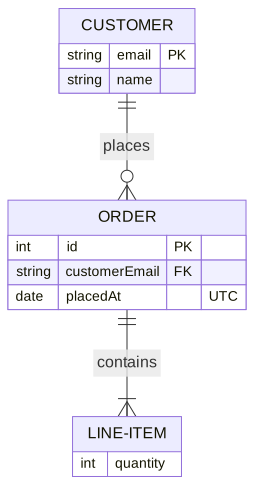
Entities and attributes
An ErEntity is a box with its name, or its Label (a Mermaid alias), above the table of its Attributes. An ErAttribute is a row with its type, its name, its Keys (PK, FK, UK) and its comment. A type ending with ? is optional, and the generic types are written List~int~, as in Mermaid, and shown List<int>.
Relationships
The ends of an ErRelationship show how many instances of each entity take part, in crow's foot notation. FromCardinality is drawn at the first entity, and ToCardinality at the second one:
| Cardinality | Left | Right | Aliases |
|---|---|---|---|
| ExactlyOne | \|\| | \|\| | one, only one, 1 |
| ZeroOrOne | \|o | o\| | zero or one, one or zero |
| OneOrMore | }\| | \|{ | one or more, one or many, many(1), 1+ |
| ZeroOrMore | }o | o{ | zero or more, zero or many, many(0), many, 0+ |
A relationship is identifying by default: a solid line, written -- (or to). A non-identifying relationship (IsIdentifying set to false) is dashed, written .. (or optionally to). The label reads from the first entity: CUSTOMER ||--o{ ORDER : places.
Subgraphs
An ErSubgraph groups entities in a frame, can nest, and can have its own Direction. A relationship can link a subgraph:
var diagram = new ErDiagram { Direction = DiagramDirection.LeftToRight };
var sales = diagram.AddSubgraph("sales", "Sales");
var customer = diagram.AddEntity("CUSTOMER");
var order = diagram.AddEntity("ORDER");
sales.Entities.Add(customer);
sales.Entities.Add(order);

var warehouse = diagram.AddEntity("WAREHOUSE", "Warehouse");
diagram.AddRelationship(customer, order, ErCardinality.ExactlyOne, ErCardinality.ZeroOrMore, "places");

// A relationship can link a subgraph; a non-identifying one is dashed
var relationship = diagram.AddRelationship(sales, warehouse, ErCardinality.OneOrMore, ErCardinality.ZeroOrOne, "ships from");
relationship.IsIdentifying = false;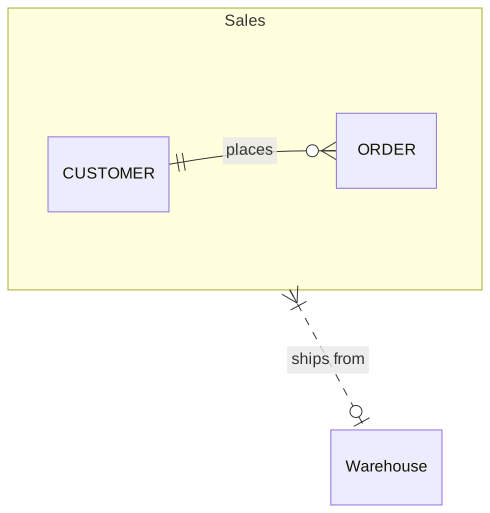
Mermaid syntax
var diagram = (ErDiagram)MermaidDocument.Parse("""
    erDiagram
        CUSTOMER ||--o{ ORDER : places
        ORDER ||--|{ LINE-ITEM : contains
        CUSTOMER }|..|{ DELIVERY-ADDRESS : uses
        CUSTOMER {
            string email PK
            string name "Full name"
        }
    """).Content;
The parser reads the entities (NAME, "name with spaces", NAME[alias]), their attribute blocks, the relationships with the symbols and the aliases of the cardinalities, direction, the subgraphs (subgraph id [title] ... end), classDef, class, :::class and style. As in Mermaid, an entity belongs to the first subgraph that closes and mentions it, and a relationship names a subgraph when the subgraph is closed before it.