 Meziantou.Framework
Cynefin diagrams
editA CynefinDiagram draws the five domains of the Cynefin sense-making framework, items placed in them, and transitions between them (Mermaid cynefin-beta):
var diagram = new CynefinDiagram { Title = "Incident response" };
diagram.AddItem(CynefinDomain.Complex, "Investigate root cause");
diagram.AddItem(CynefinDomain.Complex, "Run chaos experiment");
diagram.AddItem(CynefinDomain.Complicated, "Analyze performance data");
diagram.AddItem(CynefinDomain.Clear, "Restart service");
diagram.AddItem(CynefinDomain.Chaotic, "Page on-call immediately");
diagram.AddItem(CynefinDomain.Confusion, "Unknown failure mode");
diagram.AddTransition(CynefinDomain.Complex, CynefinDomain.Complicated, "Pattern identified");
diagram.AddTransition(CynefinDomain.Clear, CynefinDomain.Chaotic, "Complacency");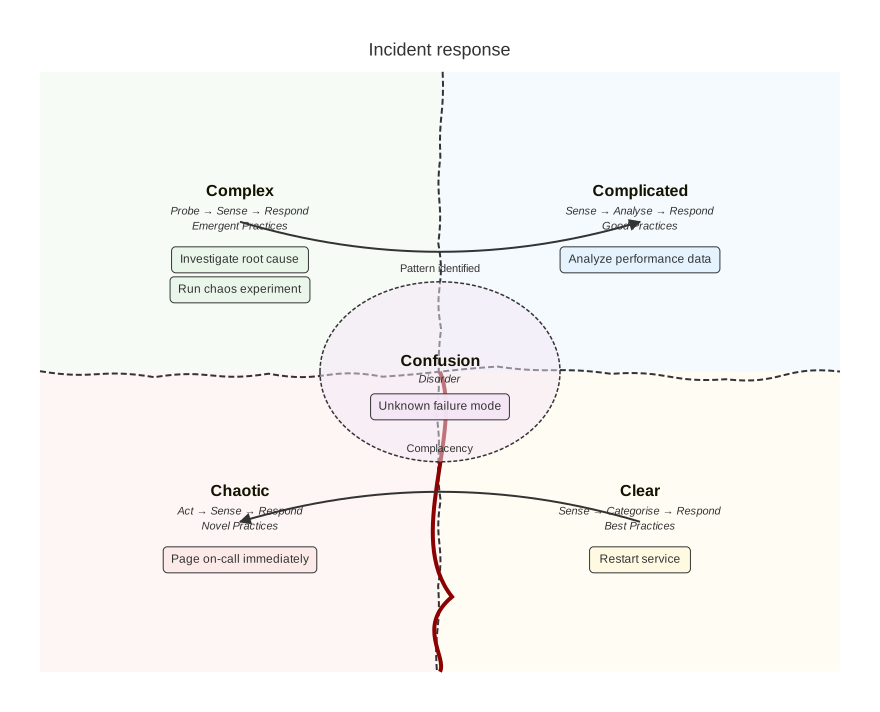
Domains, items and transitions
The domains are always at the same place: complex at the top left, complicated at the top right, chaotic at the bottom left, clear at the bottom right, and confusion in an ellipse in the center. Wavy boundaries separate the quadrants, and a cliff goes from the center down between the clear and the chaotic domains. Below its name, each domain shows its decision model and its practices, unless ShowDomainDescriptions is false.
The items are badges below the names of their domains, in their order. The confusion domain shows three items, and a badge with the number of the others. A transition is a curved arrow from the center of a domain to the center of another one, with an optional text; a transition to the same domain is not drawn.
Width and Height are the size of the domains, 800 by 600 pixels, and the Padding is 40 pixels, as in Mermaid. BoundaryAmplitude sets how much the boundaries wave (0 draws straight lines), and Seed chooses their waves with the random generator of Mermaid: the same seed draws the same waves as Mermaid. Mermaid derives the default seed, 0, from the identifier of the SVG element, so its waves change from page to page; here, the default seed is fixed.
The backgrounds of the domains and the color of the cliff are those of the themes of Mermaid, and the lines and the texts take the colors of the theme. Colors replaces the colors, the widths of the lines and the font sizes, as the cynefin theme variables of Mermaid do.
Mermaid syntax
var diagram = (CynefinDiagram)MermaidDocument.Parse("""
    cynefin-beta
      title Strategy categorization
      complex
        "Market research"
      complicated
        "Competitive analysis"
      clear
        "Standard pricing"
      chaotic
        "Crisis management"
      complex --> complicated : "Pattern identified"
      clear --> chaotic : "Complacency"
    """).Content;
The keyword is cynefin-beta or cynefin-beta:. A domain name (complex, complicated, clear, chaotic or confusion) followed by quoted texts is a domain block: the texts are its items, on its line or on the next ones. As in Mermaid, a second block of a domain replaces the items of the first one. from --> to : "text" is a transition, alone on its line. The texts are between double or single quotes, with backslash escapes such as \n and \".
The parser reads the title and the accessibility statements, the cynefin section of the configuration (width, height, padding, showDomainDescriptions, boundaryAmplitude and seed), and the cynefin theme variables. Mermaid reads a width or a font size of 0 as its default, so the writer does not write them.