 Meziantou.Framework
C4 diagrams
editA C4Diagram draws a software architecture with the C4 model: system context, container, component, dynamic and deployment diagrams (Mermaid C4Context, C4Container, C4Component, C4Dynamic and C4Deployment):
var diagram = new C4Diagram { Kind = C4DiagramKind.Container, Title = "Internet banking" };
var customer = diagram.AddElement("customer", C4ElementKind.Person, "Customer", "A customer of the bank");
var bank = diagram.AddBoundary("bank", "Internet Banking", C4BoundaryKind.System);
var webApp = new C4Element("web", C4ElementKind.Container, "Web Application") { Technology = "ASP.NET Core", Description = "Serves the pages" };
var database = new C4Element("db", C4ElementKind.Container, "Database") { Shape = C4ElementShape.Database, Technology = "SQL Server" };
bank.Elements.Add(webApp);
bank.Elements.Add(database);
var mail = diagram.AddElement("mail", C4ElementKind.System, "E-mail system");
mail.IsExternal = true;

diagram.AddRelationship(customer, webApp, "Uses", "HTTPS");
diagram.AddRelationship(webApp, database, "Reads and writes", "SQL");
diagram.AddRelationship(webApp, mail, "Sends e-mails").Kind = C4RelationshipKind.Bidirectional;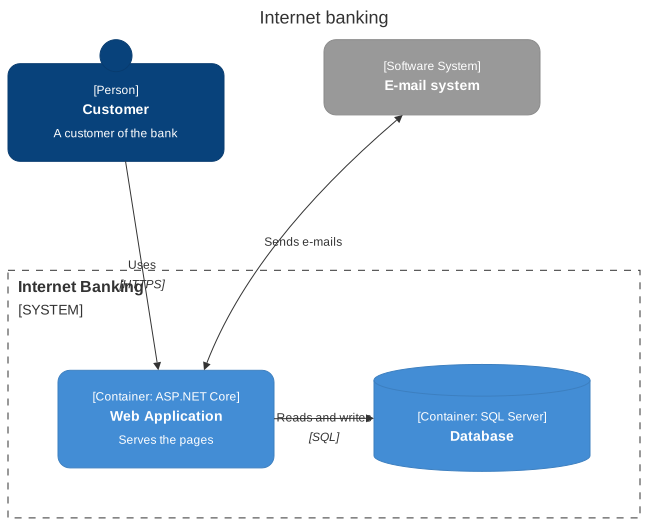
Layout
As in Mermaid, the C4 diagrams have no automatic layout: the elements of a boundary are placed in rows, in the order they are declared, ShapesPerRow per row (4 by default), and its boundaries follow, BoundariesPerRow per row (2 by default). Reorder the declarations to move the elements. The relationships are lines between the borders of the items; LabelOffsetX and LabelOffsetY move their text.
Elements and boundaries
A C4Element has a Kind (person, software system, container, component), shown between brackets with its technology, a name and a description, in the colors of C4. An external element is gray. A system, a container or a component can be a database or a queue (Shape).
A C4Boundary frames elements and other boundaries: a dashed frame for a boundary of an enterprise, a system or a container, a solid frame for a deployment node. Style changes the colors of an item, and of a relationship.
Mermaid syntax
var diagram = (C4Diagram)MermaidDocument.Parse("""
    C4Container
        title Internet banking
        Person(customer, "Customer", "A customer of the bank")
        System_Boundary(bank, "Internet Banking") {
            Container(web, "Web Application", "ASP.NET Core", "Serves the pages")
            ContainerDb(db, "Database", "SQL Server")
        }
        System_Ext(mail, "E-mail system")
        Rel(customer, web, "Uses", "HTTPS")
        Rel(web, db, "Reads and writes")
        BiRel(web, mail, "Sends e-mails")
    """).Content;
The parser reads the statements of C4-PlantUML that Mermaid supports: the elements (Person, System, SystemDb, SystemQueue, Container..., Component... and their _Ext variants), the boundaries (Boundary, Enterprise_Boundary, System_Boundary, Container_Boundary, Deployment_Node, Node, Node_L, Node_R), the relationships (Rel, BiRel, Rel_U, Rel_D, Rel_L, Rel_R, Rel_Back, RelIndex), UpdateElementStyle, UpdateRelStyle, UpdateLayoutConfig and title. The attributes are positional or named ($descr="..."). As in Mermaid, a second relationship between the same items replaces the first one. The sprites are ignored, with a warning.