 Meziantou.Framework
Block diagrams
editA BlockDiagram places blocks on a grid, in the order they are declared, left to right then top to bottom (Mermaid block). Unlike a flowchart, the author decides where each block goes:
var diagram = new BlockDiagram { Columns = 3 };
diagram.AddBlock("frontend", "Frontend");
diagram.Items.Add(new BlockDiagramArrow("toBackend", "API", BlockArrowDirections.Right));
var backend = diagram.AddBlock("backend", "Backend");
diagram.Items.Add(new BlockDiagramSpace { Span = 2 });
diagram.Items.Add(new BlockDiagramArrow("down", " ", BlockArrowDirections.Down));

// A composite block spans 3 columns, with its own grid
var storage = new BlockDiagramComposite("storage", "Storage") { Span = 3, Columns = 2 };
var database = new BlockDiagramBlock("database", "Database") { Shape = FlowchartNodeShape.Cylinder };
var cache = new BlockDiagramBlock("cache", "Cache") { Shape = FlowchartNodeShape.RoundedRectangle };
storage.Items.Add(database);
storage.Items.Add(cache);
diagram.Items.Add(storage);

diagram.AddEdge(backend, database, "SQL");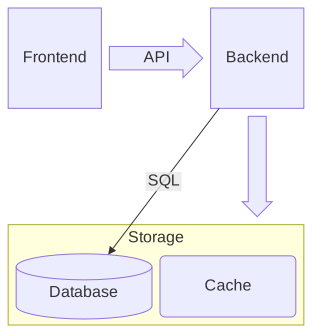
The grid
Columns sets the number of columns; without it, every item is on one row. An item takes Span columns. As in Mermaid, the items of a group have the same height, and the width of the widest one per column they span.
Items
- A BlockDiagramBlock has the shape of a node of a flowchart: rectangle, rounded rectangle, stadium, subroutine, cylinder, circle, double circle, diamond, hexagon, parallelograms, trapezoids...
- A BlockDiagramComposite frames items placed on its own grid.
- A BlockDiagramArrow is a wide arrow with a text, pointing in one or more directions.
- A BlockDiagramSpace leaves columns empty.
A BlockDiagramEdge is a straight line between two blocks, with the line styles and the arrowheads of the flowcharts.
Mermaid syntax
var diagram = (BlockDiagram)MermaidDocument.Parse("""
    block
      columns 3
      frontend["Frontend"] api<["API"]>(right) backend["Backend"]
      space:2 down<[" "]>(down)
      block:storage:3
        columns 2
        database[("Database")] cache("Cache")
      end
      backend --> database
    """).Content;
The statements are separated by white space, so a line can hold several blocks. The parser reads columns, the blocks with their shape and their quoted or markdown text (id["text"]), their span (id:2), space and space:n, the composite blocks (block:id ... end, or block ... end without identifier), the block arrows (id<["text"]>(right, down)), the edges and their texts (a -- "text" --> b), classDef, class and style. A block takes its place where it is first named.