 Meziantou.Framework
QR codes
editChoose the kind of QR code
| Kind | Method | Size in modules | Standard |
|---|---|---|---|
| Standard QR code | QRCode.Create | 21×21 to 177×177 (versions 1 to 40) | ISO/IEC 18004 |
| Micro QR code | QRCode.CreateMicroQR | 11×11 to 17×17 (versions M1 to M4) | ISO/IEC 18004 |
| Rectangular Micro QR code (rMQR) | QRCode.CreateRMQR | Rectangular, wider than high | ISO/IEC 23941 |
// Standard QR code
var standardQr = QRCode.Create("HELLO WORLD", ErrorCorrectionLevel.H);

// Micro QR code (smaller, single finder pattern)
var microQr = QRCode.CreateMicroQR("12345", ErrorCorrectionLevel.L);

// Rectangular Micro QR code (narrow rectangular shape)
var rmqr = QRCode.CreateRMQR("https://www.meziantou.net", ErrorCorrectionLevel.M);

// Format info: type, width and height in modules
Assert.Equal((QRCodeType.Standard, 25, 25), (standardQr.Type, standardQr.Width, standardQr.Height));
Assert.Equal((QRCodeType.MicroQR, 11, 11), (microQr.Type, microQr.Width, microQr.Height));
Assert.Equal((QRCodeType.RMQR, 43, 13), (rmqr.Type, rmqr.Width, rmqr.Height));
A standard QR code is what every phone reads. Use a Micro QR code or an rMQR code only when the space is too small and you know the scanners support them: a Micro QR code has a single finder pattern and holds a few characters, an rMQR code fits in a narrow strip, such as the edge of a label.
var microQr = QRCode.CreateMicroQR("12345");
var rmqr = QRCode.CreateRMQR("HELLO WORLD");

Assert.Equal((1, 11, 11), (microQr.Version, microQr.Width, microQr.Height));
Assert.Equal((27, 13), (rmqr.Width, rmqr.Height));

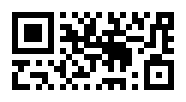
var microPng = microQr.ToPng(new QRCodePngOptions { ModuleSize = 6, QuietZoneModules = 2 });
var rmqrPng = rmqr.ToPng(new QRCodePngOptions { ModuleSize = 6, QuietZoneModules = 2 });
Choose the error correction level
The error correction level says how much of the code can be damaged or hidden and still be read. A higher level stores more redundancy, so the same data takes a larger code:
| Level | Recovers about |
|---|---|
| ErrorCorrectionLevel.L | 7% |
| ErrorCorrectionLevel.M | 15% (the default of Create and CreateRMQR) |
| ErrorCorrectionLevel.Q | 25% |
| ErrorCorrectionLevel.H | 30% |
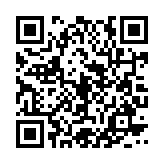
var low = QRCode.Create("https://www.meziantou.net", ErrorCorrectionLevel.L);
var high = QRCode.Create("https://www.meziantou.net", ErrorCorrectionLevel.H);

// More redundancy takes more modules: the version is the smallest one that holds the data
Assert.Equal((2, 25), (low.Version, low.Width));
Assert.Equal((4, 33), (high.Version, high.Width));

var lowPng = low.ToPng(new QRCodePngOptions { ModuleSize = 4 });
var highPng = high.ToPng(new QRCodePngOptions { ModuleSize = 4 });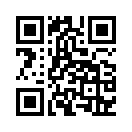
- Use H when a logo covers the middle of the code (see the logo of the SVG renderer), or when the printed code can get dirty or scratched.
- Not every kind supports every level. Micro QR versions M2 and M3 support L and M, M4 supports L, M and Q, and M1 only detects errors (its ErrorCorrectionLevel is reported as L). CreateMicroQR uses L by default. rMQR codes support M and H only. A level the kind does not support, or a value that is not a member of ErrorCorrectionLevel, throws an
ArgumentOutOfRangeException. - QRCode.ErrorCorrectionLevel gives the level the code was built with, and Version its version.
Choose the size of the code
By default, a code has the smallest size that holds the data. To print codes of a fixed size, or to make sure a code fits a known space, constrain the number of modules:
- QRCodeOptions.MinimumVersion and QRCodeOptions.MaximumVersion bound the version of a standard QR code (1 to 40); set both to the same value for an exact version.
- MicroQRCodeOptions.MinimumVersion and MicroQRCodeOptions.MaximumVersion do the same for Micro QR codes (1 to 4, M1 to M4).
- RMQRCodeOptions.Height and RMQRCodeOptions.Width set the exact height (7 to 17 modules) or width (27 to 139 modules) of an rMQR code, and RMQRCodeOptions.MaximumHeight and RMQRCodeOptions.MaximumWidth bound them. Among the allowed sizes, the code has the one with the fewest modules.
// Every label gets a version 4 code (33 × 33 modules), whatever the length of its data
var exact = new QRCodeOptions { MinimumVersion = 4, MaximumVersion = 4 };
var shortLabel = QRCode.Create("A1", ErrorCorrectionLevel.Q, exact);
var longLabel = QRCode.Create("https://example.com/items/1234", ErrorCorrectionLevel.Q, exact);
Assert.Equal((33, 33), (shortLabel.Size, longLabel.Size));

// A code that must fit in the space of a version 2 code: larger data throws instead of giving a larger code
var bounded = new QRCodeOptions { MaximumVersion = 2 };
Assert.Throws<InvalidOperationException>(() => QRCode.Create(new string('x', 100), ErrorCorrectionLevel.M, bounded));

// The Micro QR version, and the rMQR height and width, in modules
var microQr = QRCode.CreateMicroQR("12345", ErrorCorrectionLevel.L, new MicroQRCodeOptions { MinimumVersion = 3, MaximumVersion = 3 });
var rmqr = QRCode.CreateRMQR("12345", ErrorCorrectionLevel.M, new RMQRCodeOptions { MaximumHeight = 7 });
Assert.Equal((15, 15), (microQr.Width, microQr.Height));
Assert.Equal((43, 7), (rmqr.Width, rmqr.Height));

// The size of the image is set by the renderer: 33 modules of 10 pixels, plus a quiet zone of 4 modules on each side
var png = shortLabel.ToPng(new QRCodePngOptions { ModuleSize = 10 });- Data that does not fit in the largest allowed size throws an
InvalidOperationException: the code is never larger than requested. Data smaller than the capacity of the size is padded. - Constraints that no size satisfies throw an
ArgumentException: a minimum version greater than the maximum one, an rMQR height and width that do not make a size (such as 7 × 27), or Micro QR versions that do not support the error correction level (M1 has no error correction, only M4 supports Q). - These options set the number of modules. The size of the image is set by the renderer: its module size gives the pixels (or SVG units) of a module, and the quiet zone adds a margin. Scaling the image does not change the version, so it does not change how much data the code holds.
How the data is encoded
A QR code stores text in modes that take more or fewer bits per character:
- Digits only take the fewest bits.
- Uppercase letters, digits, the space and
$%*+-./:(the alphanumeric mode) take fewer bits than other characters. - A text whose characters are all double-byte Shift JIS characters, such as Japanese kanji and kana, is encoded in the kanji mode. Only the characters of JIS X 0208 that every reader decodes to the same character qualify: the few codes that the Shift JIS tables of readers disagree on (
¢,£,¬,―,\,〜,‖,−and their fullwidth forms) and the vendor extensions, such as①, are encoded as UTF-8. - Any other text is encoded as UTF-8 in the byte mode. Create also takes bytes, encoded as they are.
Create encodes a text in the most compact mode that can hold all its characters, or splits it into segments of different modes when that gives a smaller code, such as a long number after a few lowercase letters. Each segment has a header of a few bits, so short runs stay in the mode of their neighbors. Without an ECI designator (see below), readers guess the encoding of each byte-mode segment, so a text with non-ASCII characters other than kanji and kana is not split: it stays in one byte-mode segment. Micro QR codes and rMQR codes always encode the whole text in one mode.
// Uppercase letters, digits and " $%*+-./:" take fewer bits than other characters
Assert.Equal(2, QRCode.Create("HTTPS://WWW.MEZIANTOU.NET/BLOG/").Version);
Assert.Equal(3, QRCode.Create("https://www.meziantou.net/blog/").Version);

// Digits alone take even fewer
Assert.Equal(1, QRCode.Create("0123456789012345678901234567890123").Version);

// Any other text is encoded as UTF-8, and binary data as it is
Assert.Equal(1, QRCode.Create("Caf\u00E9").Version);
Assert.Equal(1, QRCode.Create([0x00, 0x01, 0xFE, 0xFF]).Version);

// A text that mixes kinds of characters is split into segments of different modes when it gives a smaller code:
// the lowercase letters in byte mode, the order number in numeric mode
Assert.Equal(1, QRCode.Create("order 1234567890123456").Version);
Assert.Equal(2, QRCode.Create(Encoding.UTF8.GetBytes("order 1234567890123456")).Version);
The scheme and the host name of a URL are not case-sensitive, so an uppercase URL can give a smaller code, provided the path of the site accepts uppercase too.
Data too long for the largest version throws an InvalidOperationException; empty data throws an ArgumentException.
Declare the encoding with ECI
By default, the byte mode holds UTF-8 with nothing that says so, and readers guess the encoding. Most guess UTF-8 right, but a few bytes can look like another encoding: a reader can show ¢ as 瞽. An ECI (Extended Channel Interpretation) designator declares the encoding. Set QRCodeOptions.EciAssignmentNumber to QRCodeOptions.Utf8EciAssignmentNumber (26) to declare a text as UTF-8, or to any assignment number for bytes you encoded yourself:
// Declare the text as UTF-8 (ECI assignment number 26), so that readers do not guess its encoding
var options = new QRCodeOptions { EciAssignmentNumber = QRCodeOptions.Utf8EciAssignmentNumber };
var qrCode = QRCode.Create("Caf\u00E9 cr\u00E8me", ErrorCorrectionLevel.M, options);

// Binary data can declare any encoding, such as ISO-8859-1 (ECI assignment number 3)
var latin1 = QRCode.Create([0x63, 0x61, 0x66, 0xE9], ErrorCorrectionLevel.M, new QRCodeOptions { EciAssignmentNumber = 3 });- ECI is opt-in, so the codes created without options do not change. Most current readers support it; very old ones can show the designator as text or fail to read the code.
- The designator takes 12 to 28 bits, which can give a larger code. A text with an ECI designator is never encoded in the kanji mode, and it is split into segments whatever its characters.
- A text accepts only the assignment number 26, since it is encoded as UTF-8: another one throws an
ArgumentException. Encode the text yourself and pass the bytes to declare another encoding. - Micro QR codes cannot hold an ECI designator, and CreateRMQR does not write one.
Read the modules
A QRCode is a grid of modules: Width columns and Height rows (Size is the side of a square code), and the indexer tells whether a module is dark. Use it to render the code your own way:
var qrCode = QRCode.Create("HELLO");

// The modules, row by row: true for a dark module
var text = new StringBuilder();
for (var row = 0; row < qrCode.Height; row++)
{
    for (var column = 0; column < qrCode.Width; column++)
    {
        text.Append(qrCode[row, column] ? '#' : '.');
    }

    text.Append('\n');
}

Assert.StartsWith("#######.", text.ToString()); // the top-left finder pattern, then its separator
The grid does not include the quiet zone: leave a light margin around the modules when you draw them.