 Meziantou.Framework
Data Matrix, PDF417 and Aztec
editChoose the symbology
Barcode2D holds the two-dimensional symbols that are not QR codes. Each symbology has its own method:
| Symbology | Method | Size in modules | Standard |
|---|---|---|---|
| Data Matrix (ECC 200) | CreateDataMatrix | 10×10 to 144×144, or rectangular from 8×18 to 16×48 | ISO/IEC 16022 |
| GS1 Data Matrix | CreateGs1DataMatrix | Same as Data Matrix | GS1 General Specifications |
| PDF417 | CreatePdf417 | 3 to 90 rows of 1 to 30 columns | ISO/IEC 15438 |
| Aztec | CreateAztec | 15×15 to 27×27 (compact), 19×19 to 151×151 (full-range) | ISO/IEC 24778 |
The symbology is usually imposed by what reads it: Data Matrix marks small parts and healthcare products, GS1 Data Matrix carries GS1 element strings on products, PDF417 is on identity cards and boarding passes, Aztec on transport tickets. For a code that phones read, prefer a QR code.
A text of ASCII characters only is encoded as it is. Another text is encoded as UTF-8, after an ECI designator that tells readers so. Each method also has an overload that takes bytes, encoded as they are.
Data Matrix
CreateDataMatrix encodes the data in the smallest square symbol that holds it. The encoder switches between the encodation schemes of the standard (ASCII, C40, Text, X12, EDIFACT and Base 256) to keep the symbol small:
// The smallest square symbol that holds the data
var dataMatrix = Barcode2D.CreateDataMatrix("https://www.meziantou.net");
Assert.Equal((Barcode2DType.DataMatrix, 22, 22), (dataMatrix.Type, dataMatrix.Width, dataMatrix.Height));

// A rectangular symbol, for a narrow space
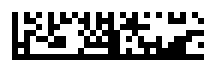
var rectangle = Barcode2D.CreateDataMatrix("ABC-12345", new DataMatrixOptions { Shape = DataMatrixShape.Rectangle });
Assert.Equal((32, 8), (rectangle.Width, rectangle.Height));

// A symbol of an exact size: the data is padded
var fixedSize = Barcode2D.CreateDataMatrix("42", new DataMatrixOptions { Height = 24, Width = 24 });
Assert.Equal((24, 24), (fixedSize.Width, fixedSize.Height));

// Binary data
var binary = Barcode2D.CreateDataMatrix([0x00, 0xFF, 0x10, 0x80]);
Assert.Equal((14, 14), (binary.Width, binary.Height));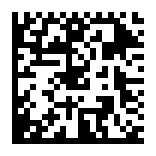
DataMatrixOptions sets the size:
- Shape: Square (the default), Rectangle for a narrow space, or Any for the one with the fewest modules.
- Height and Width: an exact size. The shape is ignored when one of them is set, and data shorter than the capacity is padded.
Data that does not fit in the largest allowed size throws an InvalidOperationException. The largest symbol holds 3,116 digits, 2,335 uppercase letters or 1,556 bytes.
GS1 Data Matrix
CreateGs1DataMatrix takes Gs1Element values, like GS1-128. The symbol starts with the FNC1 that identifies GS1 data, and a FNC1 separates an element of variable length from the next one:
// GTIN, expiration date, batch and serial number: a FNC1 separates the batch, of variable length, from the serial number
var gs1 = Barcode2D.CreateGs1DataMatrix(
    new Gs1Element("01", "09521234543213"),
    new Gs1Element("17", "250101"),
    new Gs1Element("10", "ABC123"),
    new Gs1Element("21", "XYZ"));
Assert.Equal((Barcode2DType.DataMatrix, 22, 22), (gs1.Type, gs1.Width, gs1.Height));
A reader returns the data with the separators as the group separator character (U+001D), and the symbology identifier ]d2. Put the elements of variable length last to save separators.
PDF417
A PDF417 symbol is a stack of rows. Pdf417Options sets the number of data columns, the error correction level, and the height of the rows:
var options = new Pdf417Options
{
    Columns = 4,       // 4 data columns: 17 × (4 + 4) + 1 = 137 modules wide
    SecurityLevel = 3, // 16 error correction codewords
    RowHeight = 3,     // each row of the symbol is 3 modules high
};
var pdf417 = Barcode2D.CreatePdf417("Hello, PDF417!", options);

Assert.Equal(Barcode2DType.Pdf417, pdf417.Type);
Assert.Equal(137, pdf417.Width);
Assert.Equal(21, pdf417.Height); // 7 rows of 3 modules
string svg = pdf417.ToSvg();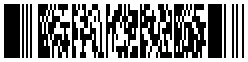
- Columns: 1 to 30. By default, the number of columns gives a symbol about three times wider than high. The number of rows is the smallest that holds the data.
- SecurityLevel: the error correction level, from 0 (2 codewords) to 8 (512 codewords). By default, the level ISO/IEC 15438 recommends for the length of the data, from 2 to 5.
- RowHeight: the height of each row, in modules. It is 3 by default, the minimum the standard recommends. The modules of Barcode2D are square, so each row of the symbol is this number of rows of the matrix: Height is the number of rows times the row height.
The encoder switches between the text, byte and numeric compaction modes. A symbol holds at most 2,710 digits, 1,850 uppercase letters or 1,108 bytes, with error correction level 0.
Aztec
An Aztec symbol has a bullseye at its center, so it needs no quiet zone. AztecOptions sets the error correction and the size:
var barcode = Barcode2D.CreateAztec("Hello, World!", new AztecOptions
{
    ErrorCorrectionPercent = 50, // 50% of the symbol and 3 codewords are error correction
    Compact = true, // 1 to 4 layers: 15 × 15 to 27 × 27 modules
});

Assert.Equal(Barcode2DType.Aztec, barcode.Type);
Assert.Equal(19, barcode.Width);
Assert.Equal(19, barcode.Height);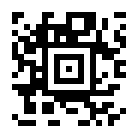
- ErrorCorrectionPercent: the minimum share of the codewords of the symbol used for error correction, from 5 to 95. It is 23 by default, as the standard recommends, and the symbol gets 3 more error correction codewords.
- Compact:
truefor a compact symbol (1 to 4 layers),falsefor a full-range one (1 to 32 layers), ornull(the default) for the smallest of both. - Layers: an exact number of layers. The error correction codewords fill the space the data leaves.
With the default error correction, the largest symbol holds 3,832 digits, 3,067 uppercase letters or 1,754 bytes.
Render
Barcode2D has its own renderers, with square modules: ToSvg gives an SVG document, ToPng and WriteToPng a PNG file:
var barcode = Barcode2D.CreateDataMatrix("https://www.meziantou.net");

// SVG: a viewBox of (22 + 2 × 2) × 4 units, a rectangle of the light color and a path of the dark modules
var svg = barcode.ToSvg(new Barcode2DSvgOptions { ModuleSize = 4, QuietZoneModules = 2 });
Assert.StartsWith("<svg xmlns=\"http://www.w3.org/2000/svg\" viewBox=\"0 0 104 104\">", svg);

// PNG: the bytes of a file, to save with File.WriteAllBytes("datamatrix.png", png)
var png = barcode.ToPng(new Barcode2DPngOptions
{
    ModuleSize = 6,
    QuietZoneModules = 2,
    DarkColor = Color.FromRgb(0x1f, 0x29, 0x37),
    LightColor = Color.White,
});
Assert.Equal([0x89, 0x50, 0x4E, 0x47, 0x0D, 0x0A, 0x1A, 0x0A], png[..8]);- ModuleSize is 4 by default.
- QuietZoneModules is 2 by default: the minimum of PDF417, and more than Data Matrix (1) and Aztec (0) need.
Meziantou.Framework.Imaging.Barcodes renders them as images and draws them on a canvas, like QR codes: see Images.